Loading
Form preview
  • US Legal Forms
  • Other Templates
  • More Forms
  • More Uncategorized Forms
  • Travelers Insurance Employee Training Verification Form 2016

Get Travelers Insurance Employee Training Verification Form 2016-2026

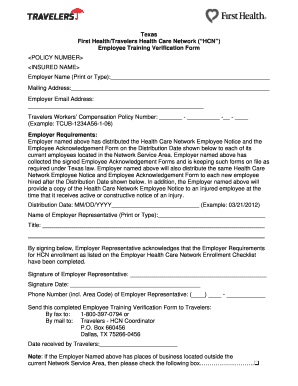
Texas First Health/Travelers Health Care Network ("HCN") Employee Training Verification Form Employer Name (Print or Type): Mailing Address: Employer Email Address: Travelers Workers' Compensation.

How it works

  1. Open form

    Open form follow the instructions

  2. Easily sign form

    Easily sign the form with your finger

  3. Share form

    Send filled & signed form or save

How to fill out the Travelers Insurance Employee Training Verification Form online

This guide provides a comprehensive overview of how to complete the Travelers Insurance Employee Training Verification Form online. By following the step-by-step instructions, users can effortlessly navigate each section of the form to ensure accurate submission.

Follow the steps to complete the form accurately.

  1. Click ‘Get Form’ button to access the form and open it in your preferred editor.
  2. Begin by filling in the policy number in the designated field. This information helps identify the specific insurance policy relevant to the employee training verification.
  3. Enter the insured name, followed by the employer name. Ensure that the names are clearly printed or typed for accuracy.
  4. Provide the mailing address of the employer. This should include the street address, city, state, and ZIP code.
  5. Input the employer email address. This allows for effective communication regarding the form submission.
  6. Fill out the Travelers Workers’ Compensation Policy Number, following the provided format (e.g., TCUB-1234A56-1-06).
  7. Record the distribution date in MM/DD/YYYY format. This date is critical as it indicates when the employee notice and acknowledgment forms were distributed.
  8. Complete the name and title of the employer representative responsible for the form. This may be a manager or human resources representative.
  9. Obtain the signature of the employer representative to validate that the relevant employer requirements have been met.
  10. Enter the signature date and the phone number of the employer representative, including the area code.
  11. Once all fields are completed, review the form for accuracy. After ensuring that all information is correct, you can save changes, download, print, or share the form.

Begin filling out your Travelers Insurance Employee Training Verification Form online today.

Get form

Experience a faster way to fill out and sign forms on the web. Access the most extensive library of templates available.
Get form

Related content

Training Options
Federally Mandated Training, is defined on the Standard Form (SF) 182 (Authorization...
Learn more
EMPLOYEE TRAVEL AUTHORIZATION FORM
❖ Serves as documentation to insurance companies for worker's compensation eligibility...
Learn more
FORM 10-K The Travelers Companies, Inc....
Feb 11, 2021 — ... employee benefit plans, errors and omissions insurance for employees...
Learn more

Related links form

CHEST Conflicts Of Interest Disclosure Form - Chestnet Facility Request Form - Lees Summit High School - Lshs Lsr7 Book Review Rubric Tiny Titan Cheer Clinic - Lees Summit School District - Docs Lsr7

Questions & Answers

Get answers to your most pressing questions about US Legal Forms API.

Contact support

The claim number for Travelers Insurance typically follows a series of digits that may include letters. It is often formatted as a combination of numbers and sometimes letters, specific to the type of claim. Always include your claim number when referencing your file, and consider utilizing the Travelers Insurance Employee Training Verification Form to streamline any related requests.

Travelers Insurance operates as a part of The Travelers Companies, Inc., which provides a wide range of insurance services. They are independent and maintain their own underwriting and claim processes. If you need training verification, the Travelers Insurance Employee Training Verification Form can ease your efforts in obtaining necessary confirmations.

The corporate name for Travelers Insurance is The Travelers Companies, Inc. This parent company oversees all operations and policies issued under the Travelers brand. If you are engaging in employee verification processes, the Travelers Insurance Employee Training Verification Form can be helpful to ensure you have all the right documentation.

To contact the CEO of Travelers Insurance, you can start by visiting the official Travelers website for corporate contact information. Look for the investor relations section, which often contains details on how to reach executive management. For inquiries related to employee training or verification forms, leveraging the Travelers Insurance Employee Training Verification Form can facilitate communication.

The full name of the Travelers Insurance Company is The Travelers Indemnity Company. It operates under this name for various insurance offerings, including personal and commercial lines. Remember, if you are dealing with employment verification, the Travelers Insurance Employee Training Verification Form may assist you in gathering necessary records.

No, Travelers did not become MetLife. They are distinct companies with separate operations. However, both companies offer insurance products and services. If you need assistance with verification services for employment, consider using the Travelers Insurance Employee Training Verification Form for streamlined processes.

To email Travelers Insurance Company Limited claims, gather all necessary documentation related to your claim. Visit the official Travelers website to find the appropriate email address for claims inquiries. When you compose your email, include your claim number and a brief description of your issue. Using the Travelers Insurance Employee Training Verification Form can help speed up the verification process.

To obtain loss runs from Travelers Insurance, reach out directly to their customer service or utilize their online portal. You'll need to provide your policy details and specify that you are requesting loss runs, which detail your claims history. Additionally, the Travelers Insurance Employee Training Verification Form can assist you in keeping track of the process and requirements.

Making a commercial claim with Travelers Insurance involves notifying them of your loss as soon as possible. You can file a claim online or via phone, ensuring to provide all necessary documentation related to the incident. Using the Travelers Insurance Employee Training Verification Form can help establish your expertise in managing these claims.

The claim number for Travelers Insurance typically consists of a series of numbers and may include letters. This unique identifier helps streamline communication and claims processing. Be sure to have your claim number accessible when submitting the Travelers Insurance Employee Training Verification Form, as it will facilitate a quicker review.

Get This Form Now!

Use professional pre-built templates to fill in and sign documents online faster. Get access to thousands of forms.
Get form
If you believe that this page should be taken down, please follow our DMCA take down processhere.
Get Travelers Insurance Employee Training Verification Form
Get form

Form categories

Real Estate
  • Home Sale
  • Deeds
  • Leases
  • Landlord Tenant
  • First Refusal Agreement
  • Lis Pendens
  • View all Real Estate
Business & Commercial
  • Small Business
  • Contracts
  • Construction
  • Employment
  • Limited Liability Company
  • Partnerships
  • View all Business & Commercial
Estate Planning
  • Personal Planning
  • Last Will and Testament
  • Living Trust
  • Power of Attorney
  • Living Will (Healthcare Directive)
  • Probate
  • Trusts
  • Small Estate
  • View all Estate Planning

Other Legal Areas

  • Civil Actions
  • Civil Procedure
  • Animals
  • Affidavits
  • Bill of Sale
  • Oil Gas and Minerals
  • Name Change
  • Other
Family Law
  • Divorce
  • Annulment
  • Adoption
  • Marriage
  • Child Justice
  • View all Family Law
  • Forms Catalog
  • Other Templates

Company

  • About Us
  • Pricing
  • Legal Hub
  • Affiliate Program

Knowledge Base

  • Help Portal
  • Legal Resources
  • Blog
  • Industries
  • Legal Guides
  • Sitemap

Services

  • Notarize
  • Form Selector

Support

  • Contact Us
  • Delete My Account

Products

  • USLegal
  • FormsPass
  • pdfFiller
  • signNow
  • altaFlow
  • DocHub
  • Instapage
Social Media
Call us now toll free:
+1 833 426 79 33
As seen in:
© 2026 US Legal Forms. All rights reserved.
  • Your Privacy Choices
  • Terms of Service
  • Privacy Notice
  • Content Takedown Policy
  • Bug Bounty Program