Loading

Open form follow the instructions

Easily sign the form with your finger

Send filled & signed form or save
How to fill out the Children's Hospital Discharge Papers online
Completing the Children's Hospital Discharge Papers online is a crucial step in ensuring your child's smooth transition from the hospital. This guide provides clear, step-by-step instructions to help you fill out the form accurately and efficiently.
Follow the steps to complete the discharge papers online.
- Click ‘Get Form’ button to obtain the discharge papers and open them in the online editor.
- Enter the child's personal information, including their full name, date of birth, age, and gender. Use the designated fields for this information.
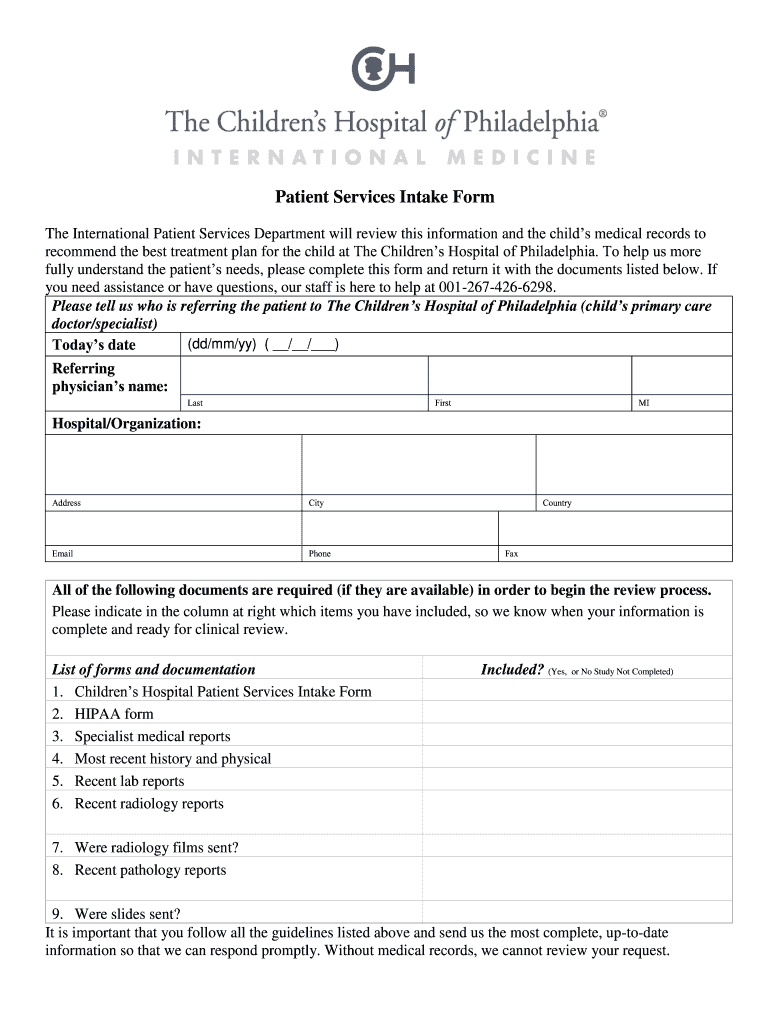
- Provide the referring physician's details, including their name, hospital or organization, address, contact number, and email.
- Indicate the necessary documents you have included for the review process, marking 'Yes' or 'No' for each required document listed.
- Fill in the parent or guardian information for both male and female, including names, dates of birth, and contact details.
- Detail any specific medical questions or concerns regarding the child's condition that you wish the specialists to address.
- Complete the payment information section by selecting a payment method and providing insurance details if applicable.
- Review all entered information for accuracy, and make any necessary corrections before finalizing.
- Once satisfied with the information provided, save changes, download a copy, print the form, or share it as needed.
Start filling out the Children's Hospital Discharge Papers online today for a smooth discharge process.
Experience a faster way to fill out and sign forms on the web. Access the most extensive library of templates available.
Related content
I/we understand that this authorizes only the release of this child from the hospital...
Parents will be involved in the decision and planning for discharge including home care...
FOR HOSPITAL USE ONLY. Final 12/16. Mother's Worksheet for Child's Birth Certificate. The...
Get answers to your most pressing questions about US Legal Forms API.
What do discharge papers show?
The Report of Separation contains information normally needed to verify military service for benefits, retirement, employment and membership in veterans' organizations.
Are you allowed to discharge your child from hospital?
Your child should not be discharged from hospital unless: They are medically fit for discharge as determined by the clinical team. An assessment has taken place to determine the level of support they may need to discharge them safely and to establish if your child qualifies for NHS continuing care.
What details are included in a discharge summary note?
Thus, the Discharge Summary has pretty clear mandatory elements: what was the patient's history, why were they hospitalized, what were the significant events during their stay including procedures and treatments, in what condition did the patient leave the hospital, and what sort of follow-ups are required after ...
What should be included in a discharge report?
To continue to paraphrase the APTA's description: All discharge summaries should include patient response to treatment at the time of discharge and any follow-up plan, including recommendations and instructions regarding the home program if there is one, equipment provided, and so on.
What are 4 things that are required for a patient's successful discharge?
Discharge to a Facility ensure continuity of care. clarify the current state of the patientʼs health and capabilities. review medications. help you select the facility to which the person you care for is to be released.
What do discharge papers include?
A written transition plan or discharge summary is completed and includes diagnosis, active issues, medications, services needed, warning signs, and emergency contact information. The plan is written in the patient's language.
How do I get my discharge papers from hospital?
You should be able to get a copy from the ward manager or the hospital's Patient Advice and Liaison Service (PALS)....Do not forget to: provide a forwarding address for any post. collect your hospital discharge letter for your GP or arrange to have it sent directly to them. ensure you have the medication you need.
Do you always get a discharge letter from hospital?
Yes,you should receive a copy. If you're not offered one before you go home, ask your nurse of doctor to make sure that you get one. When will my GP receive my hospital discharge letter?
Use professional pre-built templates to fill in and sign documents online faster. Get access to thousands of forms.
If you believe that this page should be taken down, please follow our DMCA take down process here.