Loading
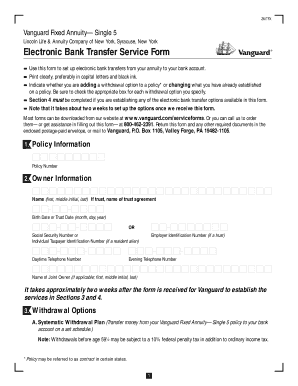
Get Vanguard Electronic Bank Transfer Form
How it works
-

Open form follow the instructions
-

Easily sign the form with your finger
-

Send filled & signed form or save
How to fill out the Vanguard Electronic Bank Transfer Form online
The Vanguard Electronic Bank Transfer Form is designed to facilitate electronic transfers from your annuity to your bank account. This guide provides clear, step-by-step instructions on how to accurately fill out the form online.
Follow the steps to complete the Vanguard Electronic Bank Transfer Form.
- Click 'Get Form' button to obtain the form and open it in the editor.
- Fill out the policy information section. Enter your policy number in the designated field.
- Complete the owner information section. Provide your name (first, middle initial, last). If the owner is a trust, include the name of the trust agreement. Enter the birth date or trust date, or the employer identification number if applicable.
- Include your Social Security number or Individual Taxpayer Identification Number. If there is a joint owner, provide their information as well.
- Under withdrawal options, specify whether you want to add or change the systematic withdrawal plan. Choose withdrawal frequency (monthly, quarterly, semiannually, annually) and indicate the dollar amount for each withdrawal.
- For periodic or onetime withdrawals, check the appropriate box for your intention and specify the amount to be transferred to your bank account.
- In the bank information section, indicate your account type (checking or statement savings). Provide the specifics of your bank, credit union, or savings and loan, including the bank routing number, institutional telephone number, and account number.
- Address the income tax withholding section by deciding whether to withhold a percentage or dollar amount from your withdrawals. Ensure you check the appropriate boxes regarding federal and state tax options.
- Complete the signature section. Owners must sign exactly as per the Vanguard Fixed Annuity policy. Optional: Include a signature guarantee if the names on the bank account and annuity policy do not match.
- Review all sections for accuracy. Once completed, save the changes, download, print, or share the form as needed.
Complete your Vanguard Electronic Bank Transfer Form online today for efficient management of your annuity transfers.
To do an electronic bank transfer, start with completing the Vanguard Electronic Bank Transfer Form. This form captures your bank account details and transaction specifics. After submission, your transfer request will be processed, allowing you to move funds between your external bank account and Vanguard smoothly. For assistance, refer to Vanguard's customer service.