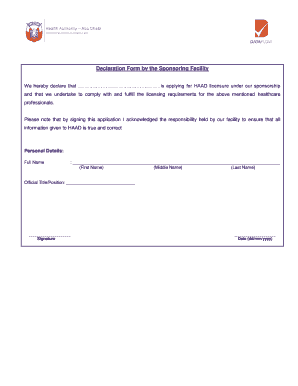
AD licensure under our sponsorship and that we undertake to comply with and fulfill the licensing requirements for the above mentioned healthcare professionals. Please note that by signing this application I acknowledged the responsibility held by our facility to ensure that all information given to HAAD is true and correct Personal Details: Full Name : (First Name) (Middle Name) (Last Name) Official Title/.

How it works
  • Open form

    Open form follow the instructions

  • Easily sign form

    Easily sign the form with your finger

  • Share form

    Send filled & signed form or save

How to fill out the Dataflow Haad Login online

Filling out the Dataflow Haad Login form is an essential step for healthcare professionals seeking licensure. This guide provides clear instructions to ensure a smooth and efficient online application process.

Follow the steps to complete the Dataflow Haad Login form online.

  1. Click ‘Get Form’ button to obtain the form and open it in the editor.
  2. In the personal details section, enter the full name of the applicant. Fill in the first name, middle name (if applicable), and last name clearly and accurately.
  3. In the official title/position field, provide the current title or position held by the individual applying for HAAD licensure. This should accurately represent their role within the sponsoring facility.
  4. Next, ensure that a signature is provided in the designated area. This signature indicates the sponsoring facility's acknowledgment and responsibility for the information submitted.
  5. Finally, enter the date of signing the form. Use the format: day/month/year to maintain consistency. Review all entries for accuracy before proceeding.
  6. After completing the form, users have the option to save changes, download, print, or share the document as necessary.

Begin your application process by filling out the Dataflow Haad Login form online today.

Get form

Experience a faster way to fill out and sign forms on the web. Access the most extensive library of templates available.

Related content

Capacity building in health care professions...

by JI Sheikh · 2019 · Cited by 71 — We discuss challenges and potential strategies for...

Learn more
Eligibility For Haad Exam

guide supports candidates navigating the complex pathways of dataflow verification mumaris...

Learn more
'TMS9909 Floppy Disk Controller

These registers are zeroed during a recalibrate command (ROAR) and are updated by the...

Learn more
Questions & Answers

Get answers to your most pressing questions about US Legal Forms API.

Contact support

How can I get a copy of my DataFlow?

To obtain a copy of your DataFlow credentials or reports, log into your account on the DataFlow platform. From your dashboard, select the relevant option for document retrieval. This convenient feature ensures you have everything you need at your fingertips after your Dataflow Haad Login.

If you need to retrieve your DataFlow account, visit the DataFlow website and navigate to the account recovery section. Follow the guidelines to recover your account using your email or DataFlow ID. This process ensures you can access your information again for a smooth Dataflow Haad Login.

To complete the DataFlow process for Abu Dhabi, first ensure you have all necessary documents. Use the DataFlow platform to submit your application online and track your progress. This systematic approach makes accessing your results after doing a Dataflow Haad Login effortless.

Logging into your DoH account is simple. Navigate to the DoH login page, enter your username and password, then click 'Login.' With successful authentication, you will access your account, allowing you to utilize services like those associated with Dataflow Haad Login.

To get your DataFlow username and password, you should register on the DataFlow platform. Once registered, you will receive your credentials in your email. If you forget your login details, the password recovery option will help you regain access for your Dataflow Haad Login.

Applying for DataFlow online is straightforward. Start by visiting the official DataFlow website and creating an account. With your account set up, proceed to submit your application, ensuring that all required documents are uploaded. This will simplify your experience when you do a Dataflow Haad Login.

To obtain your DataFlow password, visit the DataFlow login page and select the password recovery option. Follow the prompts to receive reset instructions in your registered email. Completing this step allows you to log in to your account and access all related services.

A DataFlow ID is a unique identification number assigned to your account. It serves as a key reference for accessing your DataFlow services. Whenever you perform a Dataflow Haad Login, you'll need this ID to manage your application effectively.

Registering with the DOH in Abu Dhabi requires an application that includes your professional qualifications and examination results. You will also need to submit a DataFlow report as part of the registration process. Utilize your DataFlow Haad Login to manage your submissions and track your application status easily.

Obtaining a Department of Health (DOH) license in Abu Dhabi involves fulfilling specific requirements, such as valid professional qualifications and passing examinations. The DataFlow report is essential for this process, verifying your credentials for approval. Using your DataFlow Haad Login will help you navigate the application efficiently.

Get This Form Now!

Use professional pre-built templates to fill in and sign documents online faster. Get access to thousands of forms.

If you believe that this page should be taken down, please follow our DMCA take down process here.

Get Dataflow Haad Login