Get Da Form 5521
How it works
-

Open form follow the instructions
-

Easily sign the form with your finger
-

Send filled & signed form or save
How to fill out the Da Form 5521 online
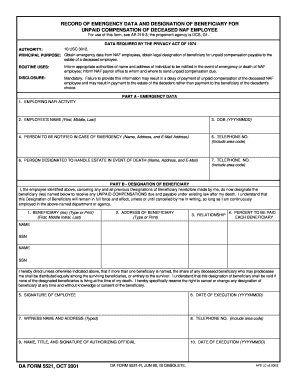
Filling out the Da Form 5521 can seem daunting, but this guide will provide you with clear instructions to complete the form efficiently. This record is essential for emergency data and designating a beneficiary for unpaid compensation of a deceased NAF employee.
Follow the steps to complete the form accurately.
- Press the ‘Get Form’ button to obtain the Da Form 5521 and open it in your preferred editor for completion.
- In Part A, provide information for the employing NAFI activity in the first field. Next, enter the employee's full name, including their first, middle, and last names.
- Input the date of birth in the format YYYYMMDD. This should be the employee's birth date.
- Identify a person to be notified in case of an emergency. Fill in their name, address, and email address in the designated fields.
- Include the telephone number of the emergency contact person, ensuring to include the area code.
- Designate a person to handle the estate in the event of death. Similar to the emergency contact, provide their name, address, and email address.
- Again, add the telephone number for the designated estate handler, ensuring the area code is included.
- Proceed to Part B. Here, indicate the beneficiary or beneficiaries for the unpaid compensation, including their full names.
- Provide the address for each beneficiary. This should include the complete address details.
- List the relationship of each beneficiary to the employee.
- Specify the percent to be paid for each beneficiary. Ensure that the total percentage for all beneficiaries adds up to 100.
- Sign and date the form in the appropriate fields. This date should be recorded in the format YYYYMMDD.
- Include the witness's name, address, and their telephone number. This step ensures there is a record of the signature.
- Lastly, ensure an authorized official signs the document, including their name, title, and signature, along with the date of execution in the format YYYYMMDD.
- Once you have completed all sections, save your changes, download the form for your records, and print it if necessary. You can also share the document as needed.
Begin filling out the Da Form 5521 online today to manage emergency data and beneficiary designations effectively.
A DA Form 5841 is a legal document used in the military to designate powers of attorney. It allows individuals to grant authority to others to act on their behalf regarding specific matters. Accurate completion of this form ensures proper legal standing and protection of your rights. For additional templates and details on how to manage this process, visit the US Legal Forms website, which can provide the necessary tools.