Loading
Form preview
  • US Legal Forms
  • Other Templates
  • More Forms
  • More Multi-State Forms
  • Advanced Surgical Hospital Employment Application 2014

Get Advanced Surgical Hospital Employment Application 2014-2026

How it works

  1. Open form

    Open form follow the instructions

  2. Easily sign form

    Easily sign the form with your finger

  3. Share form

    Send filled & signed form or save

How to fill out the Advanced Surgical Hospital Employment Application online

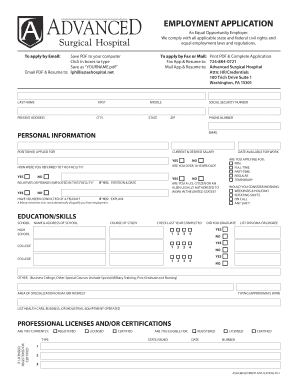
Filling out the Advanced Surgical Hospital Employment Application online is an important step in your job search. This guide will walk you through each section of the application, ensuring that you provide all necessary information clearly and accurately.

Follow the steps to complete your application with ease.

  1. Click ‘Get Form’ button to access the application and open it in the editor.
  2. Begin by providing your last name, first name, and middle name in the designated fields. Ensure that you enter the correct spelling and format.
  3. Next, fill in your present address, including city, state, and ZIP code. Accurate contact information is essential for follow-up communication.
  4. Enter your phone number and email address for the hospital to reach you regarding your application.
  5. In the personal information section, specify the position(s) you are applying for and your current and desired salary.
  6. Indicate how you were referred to this facility, and confirm that you are over 18 years old.
  7. Respond to the question regarding relatives or friends employed at the facility and provide information about your citizenship status.
  8. Disclose whether you have been convicted of a felony, if applicable, and specify your availability for work, including any preferences for shifts.
  9. Complete the education and skills section by listing schools attended along with addresses, course of study, and any degrees obtained.
  10. Provide details about your employment history, listing previous employers, job titles, dates of employment, and your responsibilities.
  11. Fill out the referrals section by listing individuals who can vouch for your qualifications and provide their contact information.
  12. Read and acknowledge the hospital's drug and alcohol policy, followed by your signature and the date.
  13. Finally, review all the information entered for accuracy. Once completed, save changes, and consider downloading or printing the application for your records.

Complete your Advanced Surgical Hospital Employment Application online today to take the next step in your career.

Get form

Experience a faster way to fill out and sign forms on the web. Access the most extensive library of templates available.
Get form

Related content

Medical Support Assistant (Advanced) - Surgical...
To begin, click Apply Online to create a USAJOBS account or log in to your existing...
Learn more
UF Health Careers
Your UF Health journey starts here. Join our Talent Community. Not yet ready to apply?...
Learn more
2024 Patient Safety Annual Hospital Survey TOI
Select from the choices below all the groups your hospital provides education to during...
Learn more

Related links form

RUTH E ROACH MEMORIAL SCHOLARSHIP FUND 17608 W River - Mercycollege Submit By Email Kent State University Degree Verification Form (Applicant) Instructions: Please Employee Illness Reporting Form SAF Proposal Form - Meredith College - Meredith

Get This Form Now!

Use professional pre-built templates to fill in and sign documents online faster. Get access to thousands of forms.
Get form
If you believe that this page should be taken down, please follow our DMCA take down processhere.
Get Advanced Surgical Hospital Employment Application
Get form
  • Adoption
  • Bankruptcy
  • Contractors
  • Divorce
  • Home Sales
  • Employment
  • Identity Theft
  • Incorporation
  • Landlord Tenant
  • Living Trust
  • Name Change
  • Personal Planning
  • Small Business
  • Wills & Estates
  • Packages A-Z
  • Affidavits
  • Bankruptcy
  • Bill of Sale
  • Corporate - LLC
  • Divorce
  • Employment
  • Identity Theft
  • Internet Technology
  • Landlord Tenant
  • Living Wills
  • Name Change
  • Power of Attorney
  • Real Estate
  • Small Estates
  • Wills
  • All Forms
  • Forms A-Z
  • Other Templates
  • Legal Hub
  • About Us
  • Help Portal
  • Legal Resources
  • Blog
  • Affiliates
  • Contact Us
  • Delete My Account
  • Site Map
  • Industries
  • Forms in Spanish
  • Localized Forms
  • State-specific Forms
  • Forms Kit
  • Real Estate Handbook
  • All Guides
  • Notarize
  • Incorporation services
  • For Consumers
  • For Small Business
  • For Attorneys
  • USLegal
  • FormsPass
  • pdfFiller
  • signNow
  • altaFlow
  • DocHub
  • Instapage
Form Packages
  • Adoption
  • Bankruptcy
  • Contractors
  • Divorce
  • Home Sales
  • Employment
  • Identity Theft
  • Incorporation
  • Landlord Tenant
  • Living Trust
  • Name Change
  • Personal Planning
  • Small Business
  • Wills & Estates
  • Packages A-Z
Form Categories
  • Affidavits
  • Bankruptcy
  • Bill of Sale
  • Corporate - LLC
  • Divorce
  • Employment
  • Identity Theft
  • Internet Technology
  • Landlord Tenant
  • Living Wills
  • Name Change
  • Power of Attorney
  • Real Estate
  • Small Estates
  • Wills
  • All Forms
  • Forms A-Z
  • Other Templates
Customer Service
  • Legal Hub
  • About Us
  • Help Portal
  • Legal Resources
  • Blog
  • Affiliates
  • Contact Us
  • Delete My Account
  • Site Map
  • Industries
  • Forms in Spanish
  • Localized Forms
  • State-specific Forms
  • Forms Kit
Legal Guides
  • Real Estate Handbook
  • All Guides
Prepared for you
  • Notarize
  • Incorporation services
Our Customers
  • For Consumers
  • For Small Business
  • For Attorneys
Our Sites
  • USLegal
  • FormsPass
  • pdfFiller
  • signNow
  • altaFlow
  • DocHub
  • Instapage
Social Media
Call us now toll free:
+1 833 426 79 33
As seen in:
© Copyright 1999-2026 airSlate Legal Forms, Inc. 17 Station Street, Ste. 203, Brookline, MA 02445
  • Your Privacy Choices
  • Terms of Service
  • Privacy Notice
  • Content Takedown Policy
  • Bug Bounty Program