Open form follow the instructions
Easily sign the form with your finger
Send filled & signed form or save
How to use or fill out the Mr667 online
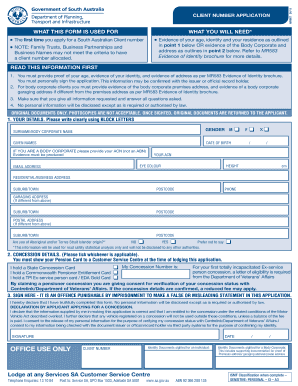
The Mr667 form is essential for applying for a South Australian Client number. This guide provides clear, step-by-step instructions to help you accurately complete the form online, ensuring you provide all necessary information.
Follow the steps to fill out the Mr667 form effectively.
- Click 'Get Form' button to obtain the form and open it in the editor.
- Enter your details in the 'Your Details' section. Use block letters to fill out your surname or body corporate name, given names, date of birth, eye color, email address, height, and residential or business address including the suburb/town and postcode.
- If applicable, provide additional details about a garaging address that differs from your residential or business address. Ensure to include the suburb/town and postcode.
- Complete the concession details section. Indicate if you hold a State Concession Card, Commonwealth Pensioner Entitlement Card, or TPI Ex-service person card. If applicable, provide your concession number, and be prepared to show your Pension Card at a Customer Service Centre.
- Sign the declaration in the 'Sign Here' section. Ensure that you fully understand that providing false or misleading information is an offense. The signature must be followed by the date of signing.
- After completing the form, review all your entries for accuracy. Make any necessary corrections.
- Finally, save your changes, download, print, or share the form as needed for your submission.
Complete your Mr667 application online today for a hassle-free experience.
Experience a faster way to fill out and sign forms on the web. Access the most extensive library of templates available.
Related content
by ME Ramsey · 2015 · Cited by 9 — ... MR667 (C*D*), MR664 (BCD), KH641 (A*BCD). The...
The effect of military base closures on the pupil-teacher ratios of neighboring elementary...
Jul 17, 2024 — Media in category "Wiki Movimento Brasil's initiative with Museu...
Get answers to your most pressing questions about US Legal Forms API.
How to fill out a US customs declaration form?
Filling out a US customs declaration form is straightforward. Provide the necessary information, such as your personal details, travel information, and a complete list of items you are bringing into the US. If at any point you feel uncertain, remember that platforms like US Legal Forms can guide you through the process, ensuring you accurately meet all requirements related to the declaration, including any special considerations for Mr667.
How to connect zhiyun to Bluetooth?
To connect the Zhiyun to Bluetooth, start by ensuring that your smartphone or camera device is compatible. Turn on the Zhiyun device and enable its Bluetooth settings. Then, on your mobile device, search for nearby Bluetooth devices and select the Zhiyun unit. With the connection established, you can take advantage of the Mr667 features for enhanced functionality.
How to connect merach bluetooth?
Connecting your Merach Bluetooth device requires a few simple steps. First, power on the device and access its Bluetooth settings. From your smartphone or computer, enable Bluetooth and search for devices nearby. Find your Merach device in the list, select it, and enjoy your connections, including the efficient features related to Mr667.
How to connect Mackie Bluetooth?
To connect Mackie Bluetooth speakers, begin by turning on the speaker and enabling its Bluetooth functionality in the settings. Use your device to search for Bluetooth connections and select your Mackie speaker from the list. Once connected, you can stream your audio seamlessly, whether you're using music apps or tools related to the Mr667 feature.
How to Bluetooth connect a projector?
Connecting a projector via Bluetooth can enhance your presentation experience. First, ensure your projector supports Bluetooth and is powered on. Navigate to the projector's Bluetooth settings using the remote or onboard controls, and make it discoverable. On your device, search for available Bluetooth networks and select the projector, such as Mr667, to establish the connection.
How to put pairing mode in Bluetooth?
To put your device into Bluetooth pairing mode, start by accessing the Settings menu. Look for the Bluetooth option and ensure it is switched on. Once Bluetooth is activated, you should see an option to make your device discoverable or to enter pairing mode. Many devices also have a dedicated button for this, which allows them to connect with compatible devices like Mr667 effortlessly.
How to file client files?
When filing client files using Mr667, organization is key. Gather all client documents you intend to file, then visit the uslegalforms website. Utilize the resources available to assist you in filing your client files correctly and maintaining detailed records for future reference.
How to file a conso file?
To file a consolidated file, such as a conso file with Mr667, ensure all relevant documents are compiled accurately. Navigate to the uslegalforms platform, where you can find the template for a conso file. Complete it carefully before submitting for review to ensure compliance with applicable regulations.
How to file adt2?
Filing ADT2 through Mr667 is a seamless process. Start by collecting the necessary information and documents, then log onto the uslegalforms platform. Follow the instructions provided for a smooth and efficient submission experience to meet your filing requirements.
What is the time limit for ADT 2?
The time limit for submitting ADT 2 is essential to understand when using Mr667. Typically, you have a specific period defined by regulatory guidelines. Check the latest updates on the uslegalforms website to stay informed about deadlines and ensure timely submissions.
Use professional pre-built templates to fill in and sign documents online faster. Get access to thousands of forms.
If you believe that this page should be taken down, please follow our DMCA take down process here.