Loading
Form preview
  • US Legal Forms
  • Other Templates
  • More Forms
  • More Uncategorized Forms
  • Early Steps Form Florida Mami

Get Early Steps Form Florida Mami

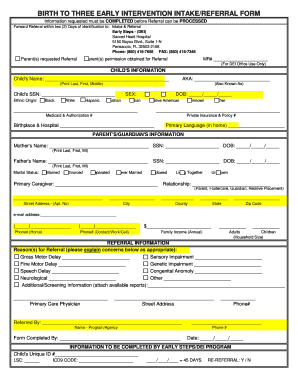
BIRTH TO THREE EARLY INTERVENTION INTAKE/REFERRAL FORM Information requested must be COMPLETED before Referral can be PROCESSED Forward Referral within two (2) Days of identification to: Intake &.

How it works

  1. Open form

    Open form follow the instructions

  2. Easily sign form

    Easily sign the form with your finger

  3. Share form

    Send filled & signed form or save

How to fill out the Early Steps Form Florida Mami online

This guide provides a step-by-step approach to completing the Early Steps Form Florida Mami online. By following these instructions, users can ensure a smooth and accurate submission process for early intervention referrals.

Follow the steps to complete the Early Steps Form effectively.

  1. Press the ‘Get Form’ button to access the Early Steps Form Florida Mami and open it in your chosen digital editor.
  2. Begin filling out the child's information section. Enter the child’s name, also known as their ‘aka’, social security number (SSN), ethnic origin, sex, date of birth (DOB), birthplace, and primary language spoken at home.
  3. Next, complete the parent's or guardian's information. Provide the mother's and father's names, SSNs, DOBs, marital status, and primary caregiver's name. Include the living situation and the relationship to the child.
  4. Fill out the address details including street address, city, county, state, and zip code. Do not forget to enter an email address and phone numbers for contact.
  5. Indicate family income and household size by filling in the annual income and the number of adults and children in the household.
  6. Move on to the referral information section. Clearly state the reasons for referral, checking any applicable concerns. Include any additional screening information and details of the primary care physician.
  7. Complete the section for who referred the child, including their name, program or agency, and phone number.
  8. Finally, note who completed the form and the date of completion. Ensure all information is accurate and complete before proceeding.
  9. After filling out the form, save changes, download the completed document for your records, and you may also choose to print or share the form as necessary.

Complete your Early Steps Form online today for a streamlined referral process.

Get form

Experience a faster way to fill out and sign forms on the web. Access the most extensive library of templates available.
Get form

Related content

Early Steps | Florida Department of Health
Oct 16, 2024 — Early Steps is Florida's early intervention system that offers services...
Learn more
Early Intervention Center
Our center provides daily early intervention services to infants and young children with...
Learn more
INSTRUCTIONS FOR COMPLETING THE FLORIDA ...
A Long Form report (HSMV 90010S) in its entirety must include a Narrative/Diagram when the...
Learn more

Related links form

MTH113A Pre-Algebra Unit 1 Lesson 3 Variable Expressions Before Completing This Form, Carefully Read The Entire Form - Myfedloan Download Late Entrant Application - OMA Insurance Book Reports Worksheets

Questions & Answers

Get answers to your most pressing questions about US Legal Forms API.

Contact support

In Florida, the Early Steps program serves children from birth up to three years of age. This program is designed to address developmental concerns early, allowing for timely interventions that can significantly impact a child's development trajectory. If you are looking for assistance, completing the Early Steps Form Florida Mami is a straightforward way to begin this journey. Early support can create lasting benefits for a child’s future.

The Early Steps program in Florida provides support to families with children who have developmental delays or disabilities. This program aims to enhance a child's development through personalized services and resources tailored to meet their needs. By submitting the Early Steps Form Florida Mami, families can initiate their enrollment process, which opens pathways to various supports and services. It's a vital resource for encouraging growth during crucial early years.

You can contact Florida Early Steps by calling their main number, or by visiting their official website where you can find specific regional contact information. Online resources also allow you to download necessary forms like the Early Steps Form Florida Mami. Engaging with their services early on ensures you receive support that aligns with a child's developmental needs. Being proactive can make a significant difference.

In Florida, children under three years old may qualify for early intervention services if they have developmental delays or are at risk for these delays. The eligibility criteria are evaluated through assessments conducted by professionals. The Early Steps program, part of Florida's early intervention framework, helps children develop essential skills early. Completing the Early Steps Form Florida Mami begins the process for assessing eligibility and accessing services.

You can reach out to the Florida Department of Children and Families (DCF) by email using the contact information provided on their official website. Make sure to include relevant details about your inquiry to receive a prompt response. Moreover, incorporating the Early Steps Form Florida Mami in your email can help clarify your request regarding support services. Keeping communication clear and concise is key.

To contact People First in Florida, visit their official website for comprehensive information. You can access resources and forms, including the Early Steps Form Florida Mami, or directly reach their customer service via phone. They offer assistance for various needs, making connections easier for families and individuals alike. Don't hesitate to explore their offerings.

To legally become a stepparent in Florida, you must complete an adoption process if you wish to adopt your partner's child. You will need to file the required forms, including an Early Steps Form Florida Mami, which assists in the legal transition. Additionally, both biological parents may need to consent to the adoption, ensuring a smooth process. Consulting with a legal professional can provide guidance tailored to your situation.

Eligibility for Early Steps in Florida includes children from birth to three years who have developmental delays or are at risk for delays due to certain conditions. Families can seek services regardless of income level. By utilizing the Early Steps Form Florida Mami, parents can easily find out if their child qualifies and receive the necessary support.

Examples of early intervention include speech therapy, occupational therapy, physical therapy, and special education services. These interventions aim to address specific developmental needs and enhance a child's growth. Families can access these services through the Early Steps Form Florida Mami, which simplifies the process of finding appropriate support.

A baby may qualify for early intervention if they exhibit developmental delays or disabilities that affect their ability to learn or interact with their environment. Eligibility is often determined through assessments and evaluations by professionals. The Early Steps Form Florida Mami assists in guiding families through the qualification process and connecting them to essential services.

Get This Form Now!

Use professional pre-built templates to fill in and sign documents online faster. Get access to thousands of forms.
Get form
If you believe that this page should be taken down, please follow our DMCA take down processhere.
Get Early Steps Form Florida Mami
Get form
  • Adoption
  • Bankruptcy
  • Contractors
  • Divorce
  • Home Sales
  • Employment
  • Identity Theft
  • Incorporation
  • Landlord Tenant
  • Living Trust
  • Name Change
  • Personal Planning
  • Small Business
  • Wills & Estates
  • Packages A-Z
  • Affidavits
  • Bankruptcy
  • Bill of Sale
  • Corporate - LLC
  • Divorce
  • Employment
  • Identity Theft
  • Internet Technology
  • Landlord Tenant
  • Living Wills
  • Name Change
  • Power of Attorney
  • Real Estate
  • Small Estates
  • Wills
  • All Forms
  • Forms A-Z
  • Other Templates
  • Legal Hub
  • About Us
  • Help Portal
  • Legal Resources
  • Blog
  • Affiliates
  • Contact Us
  • Delete My Account
  • Site Map
  • Industries
  • Forms in Spanish
  • Localized Forms
  • State-specific Forms
  • Forms Kit
  • Real Estate Handbook
  • All Guides
  • Notarize
  • Incorporation services
  • For Consumers
  • For Small Business
  • For Attorneys
  • USLegal
  • FormsPass
  • pdfFiller
  • signNow
  • altaFlow
  • DocHub
  • Instapage
Form Packages
  • Adoption
  • Bankruptcy
  • Contractors
  • Divorce
  • Home Sales
  • Employment
  • Identity Theft
  • Incorporation
  • Landlord Tenant
  • Living Trust
  • Name Change
  • Personal Planning
  • Small Business
  • Wills & Estates
  • Packages A-Z
Form Categories
  • Affidavits
  • Bankruptcy
  • Bill of Sale
  • Corporate - LLC
  • Divorce
  • Employment
  • Identity Theft
  • Internet Technology
  • Landlord Tenant
  • Living Wills
  • Name Change
  • Power of Attorney
  • Real Estate
  • Small Estates
  • Wills
  • All Forms
  • Forms A-Z
  • Other Templates
Customer Service
  • Legal Hub
  • About Us
  • Help Portal
  • Legal Resources
  • Blog
  • Affiliates
  • Contact Us
  • Delete My Account
  • Site Map
  • Industries
  • Forms in Spanish
  • Localized Forms
  • State-specific Forms
  • Forms Kit
Legal Guides
  • Real Estate Handbook
  • All Guides
Prepared for you
  • Notarize
  • Incorporation services
Our Customers
  • For Consumers
  • For Small Business
  • For Attorneys
Our Sites
  • USLegal
  • FormsPass
  • pdfFiller
  • signNow
  • altaFlow
  • DocHub
  • Instapage
Social Media
Call us now toll free:
+1 833 426 79 33
As seen in:
© Copyright 1999-2026 airSlate Legal Forms, Inc. 17 Station Street, Suite 303, Brookline, MA 02445
  • Your Privacy Choices
  • Terms of Service
  • Privacy Notice
  • Content Takedown Policy
  • Bug Bounty Program