We use cookies to improve security, personalize the user experience, enhance our marketing activities (including cooperating with our marketing partners) and for other business use.
Click "here" to read our Cookie Policy. By clicking "Accept" you agree to the use of cookies. Read less
Read more
Accept
Loading
Form preview
  • US Legal Forms
  • Form Library
  • More Forms
  • More Uncategorized Forms
  • Download Late Entrant Application - Oma Insurance

Get Download Late Entrant Application - Oma Insurance

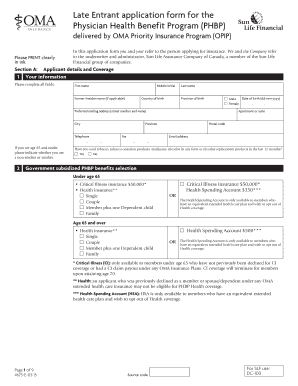
Late Entrant application form for the Physician Health Benefit Program (PHBP) delivered by OMA Priority Insurance Program (OPIP) Please PRINT clearly in ink. In this application form you and your.

How it works

  1. Open form

    Open form follow the instructions

  2. Easily sign form

    Easily sign the form with your finger

  3. Share form

    Send filled & signed form or save

How to fill out the Download Late Entrant Application - OMA Insurance online

This guide provides detailed guidance on how to accurately complete the Download Late Entrant Application for OMA Insurance online. By following these steps, users can ensure they provide all necessary information correctly.

Follow the steps to complete the application with ease.

  1. Click ‘Get Form’ button to obtain the application form and open it in the editor.
  2. Begin with Section A, where you will need to provide your personal information. Fill in your first name, middle initial, last name, former/maiden name (if applicable), date of birth, country and province of birth, preferred mailing address, telephone number, fax number, and email address. Clearly indicate if you are a smoker or non-smoker, and check the appropriate box regarding your tobacco use in the past 12 months.
  3. In Section A, also indicate your coverage choice under Government subsidized PHBP benefits. Choose from options available for under age 65 or age 65 and over, indicating if you are selecting single, couple, member plus one dependent child, or family coverage. Additionally, specify if you are applying for health insurance and/or critical illness insurance.
  4. Proceed to Section B, where personal health information is required. Fill in your height, weight, and any changes in weight over the last 12 months. Document reasons for any weight changes and provide details of your last consultation with a physician.
  5. Complete medical history sections by providing information about your family history with specific diseases. Also, disclose any treatments or medications taken recently along with conditions for yourself, your spouse, and your dependents.
  6. In the payment information section, select your payment schedule for any self-funded options you are applying for. Attach a blank cheque marked void to authorize Pre-Authorized Debit (PAD) payments.
  7. Review the Application for Subsidy section and choose whether you or your professional corporation is applying for the OMA subsidy. Sign and date this section as applicable.
  8. Finalize your application by signing the declaration and authorization section, confirming that your answers are accurate. Ensure you include your spouse’s signature if relevant.
  9. Once all sections are filled out correctly, save your form changes. You can download, print, or share the completed application for submission.

Complete your application online today to secure your benefits.

Get form

Experience a faster way to fill out and sign forms on the web. Access the most extensive library of templates available.
Get form

Related content

Life Insurance Products and Consumer Information...
face value death benefit plus a surrender value and an end-of-term cash valuc...
Learn more
International Competition in the Products of U.S...
Similarly, the application of new ... capital-intensive, and until recently have exhibited...
Learn more
C13 10 100 - UserManual.wiki
This year we have further refined our communications processor coverage by identifying...
Learn more

Related links form

Transfer Form 3120D F1 District School Or Grade In Which Enrollment Has Been Sought Tri-Fest 5K Classic Run & Walk Registration Form

Questions & Answers

Get answers to your most pressing questions about US Legal Forms API.

Contact support

Strikethrough is a font effect that creates a horizontal line straight through the center of a word or phrase in your document. The strikethrough line doesn't hide the content underneath it, so the reader can still see the words you're striking through.

There is, however, a Word strikethrough shortcut. On a PC, use the following shortcut to strike through text: Select the text you want to strike through. Press Ctrl+D.

Keyboard shortcuts for Google Docs Common actionsBoldCtrl + bItalicizeCtrl + iUnderlineCtrl + uStrikethroughAlt + Shift + 5110 more rows

To achieve CSS strikethrough, you enable the text-decoration property in the CSS file. It creates a strikethrough effect for text data. It can also be considered as one of the animation effects in CSS, utilizing default values like “line-through,” which is a common value specified by the text-decoration property.

Using markdown, you can cross out text (strikethrough text) by putting two tildes (~) before and after the words you want to cross out.

Apply or remove strikethrough text formatting Select the text that you want to format. Go to Home > Strikethrough.

On a PC, use the following shortcut to strike through text: Select the text you want to strike through. Press Ctrl+D. A font dialog box will appear. Press Alt+K. The strikethrough feature should now be selected. Press OK. The text will now have a line through it.

The <s> tag specifies text that is no longer correct, accurate or relevant. The <del> tag is used to identify text that has been deleted from a document but retained to show the history of modifications made to the document.

The <strike> HTML element places a strikethrough (horizontal line) over text. Warning: This element is deprecated in HTML 4 and XHTML 1, and obsoleted in the HTML Living Standard. If semantically appropriate, i.e., if it represents deleted content, use <del> instead. In all other cases use <s> .

On a PC, use the following shortcut to strike through text: Select the text you want to strike through. Press Ctrl+D. A font dialog box will appear. Press Alt+K. The strikethrough feature should now be selected. Press OK. The text will now have a line through it.

Get This Form Now!

Use professional pre-built templates to fill in and sign documents online faster. Get access to thousands of forms.
Get form
If you believe that this page should be taken down, please follow our DMCA take down processhere.

Industry-leading security and compliance

US Legal Forms protects your data by complying with industry-specific security standards.
  • In businnes since 1997
    25+ years providing professional legal documents.
  • Accredited business
    Guarantees that a business meets BBB accreditation standards in the US and Canada.
  • Secured by Braintree
    Validated Level 1 PCI DSS compliant payment gateway that accepts most major credit and debit card brands from across the globe.
Get Download Late Entrant Application - OMA Insurance
Get form
Form Packages
Adoption
Bankruptcy
Contractors
Divorce
Home Sales
Employment
Identity Theft
Incorporation
Landlord Tenant
Living Trust
Name Change
Personal Planning
Small Business
Wills & Estates
Packages A-Z
Form Categories
Affidavits
Bankruptcy
Bill of Sale
Corporate - LLC
Divorce
Employment
Identity Theft
Internet Technology
Landlord Tenant
Living Wills
Name Change
Power of Attorney
Real Estate
Small Estates
Wills
All Forms
Forms A-Z
Form Library
Customer Service
Terms of Service
Privacy Notice
Legal Hub
Content Takedown Policy
Bug Bounty Program
About Us
Help Portal
Legal Resources
Blog
Affiliates
Contact Us
Delete My Account
Site Map
Industries
Forms in Spanish
Localized Forms
State-specific Forms
Forms Kit
Legal Guides
Real Estate Handbook
All Guides
Prepared for You
Notarize
Incorporation services
Our Customers
For Consumers
For Small Business
For Attorneys
Our Sites
US Legal Forms
USLegal
FormsPass
pdfFiller
signNow
airSlate WorkFlow
DocHub
Instapage
Social Media
Call us now toll free:
+1 833 426 79 33
As seen in:
  • USA Today logo picture
  • CBC News logo picture
  • LA Times logo picture
  • The Washington Post logo picture
  • AP logo picture
  • Forbes logo picture
© Copyright 1997-2025
airSlate Legal Forms, Inc.
3720 Flowood Dr, Flowood, Mississippi 39232
Form Packages
Adoption
Bankruptcy
Contractors
Divorce
Home Sales
Employment
Identity Theft
Incorporation
Landlord Tenant
Living Trust
Name Change
Personal Planning
Small Business
Wills & Estates
Packages A-Z
Form Categories
Affidavits
Bankruptcy
Bill of Sale
Corporate - LLC
Divorce
Employment
Identity Theft
Internet Technology
Landlord Tenant
Living Wills
Name Change
Power of Attorney
Real Estate
Small Estates
Wills
All Forms
Forms A-Z
Form Library
Customer Service
Terms of Service
Privacy Notice
Legal Hub
Content Takedown Policy
Bug Bounty Program
About Us
Help Portal
Legal Resources
Blog
Affiliates
Contact Us
Delete My Account
Site Map
Industries
Forms in Spanish
Localized Forms
State-specific Forms
Forms Kit
Legal Guides
Real Estate Handbook
All Guides
Prepared for You
Notarize
Incorporation services
Our Customers
For Consumers
For Small Business
For Attorneys
Our Sites
US Legal Forms
USLegal
FormsPass
pdfFiller
signNow
airSlate WorkFlow
DocHub
Instapage
Social Media
Call us now toll free:
+1 833 426 79 33
As seen in:
  • USA Today logo picture
  • CBC News logo picture
  • LA Times logo picture
  • The Washington Post logo picture
  • AP logo picture
  • Forbes logo picture
© Copyright 1997-2025
airSlate Legal Forms, Inc.
3720 Flowood Dr, Flowood, Mississippi 39232