Loading

Open form follow the instructions

Easily sign the form with your finger

Send filled & signed form or save
How to fill out the Metropcs Rebate Site online
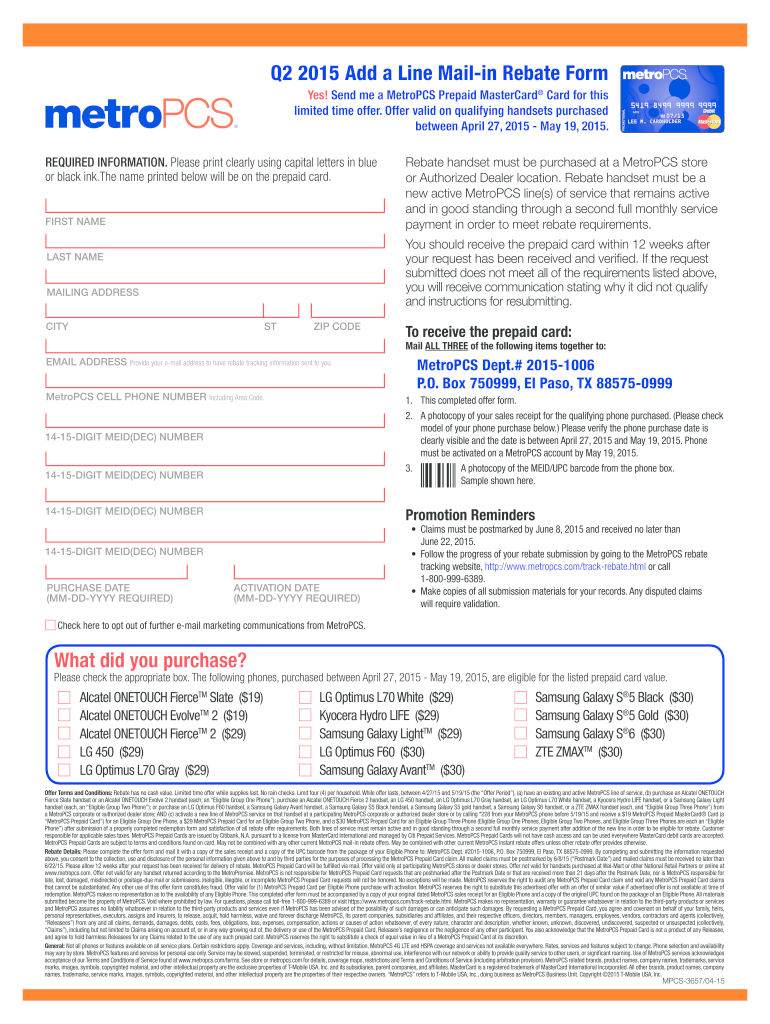
This guide provides step-by-step instructions on how to successfully complete the Metropcs rebate form online. By following these clear directions, users can ensure they gather all necessary information and submissions to qualify for their rebate.
Follow the steps to complete your rebate form accurately.
- Press the ‘Get Form’ button to access the rebate form and open it within your preferred editing tool.
- Print your first name clearly in capital letters using blue or black ink. This name will appear on your prepaid card.
- Continue by filling in your last name in capital letters as well, maintaining clarity.
- Provide your complete mailing address, including street, city, state, and zip code, ensuring it is clear and accurate.
- Enter your email address to receive tracking information about your rebate.
- Include your MetroPCS cell phone number, making sure to include the area code.
- Record the 14-15 digit MEID(DEC) number from your device, as this is necessary for processing your rebate.
- Specify your purchase date using the format MM-DD-YYYY, ensuring the date falls within the eligible timeframe.
- Select what device you have purchased by checking the appropriate box from the provided list of eligible devices.
- Finalize the form by reviewing all entries for accuracy. Save your changes, and prepare to submit the completed form along with required documents.
Get started on your rebate submission online today!
Experience a faster way to fill out and sign forms on the web. Access the most extensive library of templates available.
Related content
The Lifeline program has provided a discount on phone service for qualifying low-income...
Mail-in Rebate Offer: Limited time offer. Purchase a new MetroPCS phone in-store or...
Feb 6, 2019 — MetroPCS CDMA network and redundant network cell sites. Asset retirement...
Get answers to your most pressing questions about US Legal Forms API.
Can you get an extension on your Metro PCS bill?
Yes, you can request an extension on your Metro PCS bill. Contact their customer service team to discuss your options and the process involved. They will evaluate your request based on your account status and history. To alleviate your financial stress, check the Metropcs Rebate Site for any ongoing rebate offers that could help.
How long can you go without paying your Metro PCS bill?
You can usually go for a few weeks without paying your Metro PCS bill before service is interrupted. However, make sure to communicate with customer support to avoid complications. It's beneficial to set up a payment plan if you anticipate challenges. Additionally, the Metropcs Rebate Site can present options for rebates that may help you manage your payments.
How to get a refund from MetroPCS?
Getting a refund from MetroPCS typically requires you to contact their customer service department. They'll guide you through the necessary steps to initiate a refund request. Keep any receipts or account information on hand, as this can expedite the process. For further assistance, the Metropcs Rebate Site can provide useful insights into available refunds or credits.
How to get an extension through MetroPCS?
To request an extension with MetroPCS, you should call their customer service line. They will ask for some account details to assist you effectively. Keep in mind that extensions may depend on your account history and standing. Be sure to explore the Metropcs Rebate Site for ongoing promotions that could ease your payment obligations.
What is the number for Metro rebate?
To access Metro rebate information, you can typically reach customer service at 1-888-863-8768. They can assist you with any questions about current rebates and how to claim them. Additionally, the Metropcs Rebate Site often lists contact information and helpful tips for redeeming rebates. Make sure to have your account details handy for a smoother experience.
Can you get an extension on your phone bill?
Yes, you may be able to request a bill extension through MetroPCS. It's essential to reach out to their customer support team, who can guide you through the process. They typically assess your account history and other factors when considering your request. Don't forget to explore the Metropcs Rebate Site for available deals that can lower your payments.
Does Metro PCS do payment arrangements?
Yes, MetroPCS does offer payment arrangements to help customers manage their bills. You can contact customer service directly to discuss your options. Setting up arrangements can ease the financial burden and ensure you maintain service. For additional savings, consider visiting the Metropcs Rebate Site to check on any potential rebates.
How to get metro number back?
If you've lost your metro number, start by visiting the MetroPCS Rebate Site for potential recovery options. The site provides information on how to retrieve your number and what to do next. Reach out to customer support for personalized help, ensuring you can regain access to your account.
What is the phone number for T-Mobile payments?
For T-Mobile payment inquiries, check the MetroPCS Rebate Site, where you'll find the appropriate contact numbers. It's important to have this information handy, especially when managing payments or addressing issues. Customer support is available to help ensure your payment experience is smooth.
How do I file a claim with MetroPCS?
Filing a claim with MetroPCS is easy, and you can start by accessing the MetroPCS Rebate Site. Here, you will find step-by-step instructions on how to submit your claim online or through customer support. Following the guidelines provided will help ensure your claim is processed efficiently.
Use professional pre-built templates to fill in and sign documents online faster. Get access to thousands of forms.
If you believe that this page should be taken down, please follow our DMCA take down process here.