Loading
Form preview
  • US Legal Forms
  • Form Library
  • More Forms
  • More Multi-State Forms
  • Temperature Log For Refrigerator And Zer Celsius 2020

Get Temperature Log For Refrigerator And Zer Celsius 2020-2026

How it works

  1. Open form

    Open form follow the instructions

  2. Easily sign form

    Easily sign the form with your finger

  3. Share form

    Send filled & signed form or save

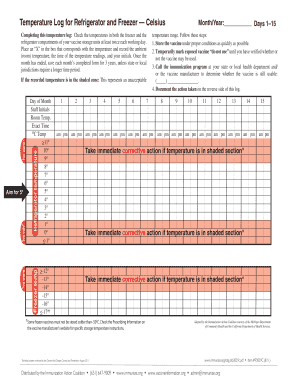
How to fill out the temperature log for refrigerator and freezer — Celsius online

This guide provides step-by-step instructions for accurately filling out the temperature log for refrigerator and freezer, ensuring proper storage of vaccines. Following these guidelines supports the health and safety of vaccine management.

Follow the steps to complete the temperature log accurately.

  1. Click ‘Get Form’ button to access the online version of the temperature log for refrigerator and freezer.
  2. Enter the month and year at the top of the form to specify the period for which you are logging temperatures.
  3. Record the current date in the 'Day of Month' fields provided in the form.
  4. Check the temperature in the freezer compartment. Place an ‘X’ in the box that corresponds with the temperature reading, and record the exact time of the reading.
  5. Repeat the process for the refrigerator compartment by placing an ‘X’ in the appropriate box for the temperature. Note the time of this reading as well.
  6. Fill in the room temperature and your initials for each reading to confirm who completed the log.
  7. If any of the recorded temperatures fall within the shaded zones indicating unacceptable ranges, follow the corrective actions outlined within the form.
  8. After completing the log for each day, review your entries for accuracy and completeness.
  9. At the end of the month, save the completed form securely for a minimum of three years, or as required by local guidelines.
  10. Consider downloading, printing, or sharing the completed form as needed for your records.

Begin completing your temperature log online to ensure proper vaccine storage today.

Get form

Experience a faster way to fill out and sign forms on the web. Access the most extensive library of templates available.
Get form

Related content

Storage Unit Purchasing Guidance
**The refrigerator must be able to maintain temperatures consistently between 36° and...
Learn more
design of a multichannel outdoor data logger for...
by K Dolgikh · 2018 — To monitor and log temperature inside the freezer and the...
Learn more
6712SR Refrigerated Sampler
Sep 15, 2005 — Current ratings when input power is 12.5 VDC and ambient temperature is...
Learn more

Related links form

Wage And Income Transcripts - Internal Revenue Service - Irs Vtr 214 Rf 1209 Residential Claim For Moving And Related Expenses - HUD - Nls

Questions & Answers

Get answers to your most pressing questions about US Legal Forms API.

Contact support

The actual temperature of a standard refrigerator should be set around 4 degrees Celsius. This temperature is optimal for keeping food safe and fresh. If your fridge's temperature falls too high or too low, consider adjusting the thermostat and using a temperature log for refrigerator and zer Celsius to monitor changes effectively.

There are several apps designed to log refrigerator temperatures effectively. Apps like Fridge Temperature Monitor or Govee Home allow you to connect temperature sensors to your smartphone. This way, you can keep track of your temperature log for refrigerator and zer Celsius remotely, ensuring your food stays at safe temperatures even when you're away.

To check your fridge temperature accurately, invest in a standalone appliance thermometer. Place it in the warmest part of the fridge, typically near the door, and let it sit for about five to six hours. Ideally, the temperature should read around 4 degrees Celsius. And by using a temperature log for refrigerator and zer Celsius, you can maintain ideal conditions over time.

For an accurate reading of your fridge's actual temperature, use an appliance thermometer. Place the thermometer in the middle of the refrigerator and wait for a few hours to get a stable reading. Aim for a temperature around 4 degrees Celsius to ensure your food stays fresh. Tracking this with a temperature log for refrigerator and zer Celsius can enhance your food safety routine.

To see if your fridge is cooling properly, place a few items inside and then check their temperature after a few hours. If they remain at or below 4 degrees Celsius, your fridge is functioning correctly. Additionally, you may use a temperature log for refrigerator and zer Celsius to track changes over time and ensure consistent cooling.

To check your fridge temperature without a thermometer, you can place a glass of water in the center of the refrigerator. After a few hours, check the temperature of the water. Ideally, it should be around 4 degrees Celsius, which is the optimal range for food preservation. This method is simple and requires no special tools.

All fridges should ideally maintain a temperature between 1.7°C and 4°C. Regularly checking this temperature ensures food remains safe and fresh. Using a Temperature Log For Refrigerator And Zer Celsius makes it easy to track temperature changes, helping you maintain a high standard of food quality.

Yes, 7°C is generally too warm for a fridge and can put food safety at risk. This temperature can promote bacteria growth, potentially leading to food spoilage. To maintain an appropriate temperature, monitor it regularly with a Temperature Log For Refrigerator And Zer Celsius to avoid unsafe levels.

Vaccines should ideally be frozen at temperatures lower than -15°C in Celsius. This temperature preserves their efficacy until they are needed for use. Having a precise Temperature Log For Refrigerator And Zer Celsius is important for healthcare facilities to ensure vaccines are stored correctly.

The normal temperature range for a refrigerator is generally between 2°C and 4°C. Maintaining this temperature is crucial for food safety and quality. To ensure your refrigerator operates properly, you can utilize a Temperature Log For Refrigerator And Zer Celsius to track the temperature over time.

Get This Form Now!

Use professional pre-built templates to fill in and sign documents online faster. Get access to thousands of forms.
Get form
If you believe that this page should be taken down, please follow our DMCA take down processhere.
Get Temperature Log For Refrigerator And Zer Celsius
Get form
  • Adoption
  • Bankruptcy
  • Contractors
  • Divorce
  • Home Sales
  • Employment
  • Identity Theft
  • Incorporation
  • Landlord Tenant
  • Living Trust
  • Name Change
  • Personal Planning
  • Small Business
  • Wills & Estates
  • Packages A-Z
  • Affidavits
  • Bankruptcy
  • Bill of Sale
  • Corporate - LLC
  • Divorce
  • Employment
  • Identity Theft
  • Internet Technology
  • Landlord Tenant
  • Living Wills
  • Name Change
  • Power of Attorney
  • Real Estate
  • Small Estates
  • Wills
  • All Forms
  • Forms A-Z
  • Form Library
  • Legal Hub
  • About Us
  • Help Portal
  • Legal Resources
  • Blog
  • Affiliates
  • Contact Us
  • Delete My Account
  • Site Map
  • Industries
  • Forms in Spanish
  • Localized Forms
  • State-specific Forms
  • Forms Kit
  • Real Estate Handbook
  • All Guides
  • Notarize
  • Incorporation services
  • For Consumers
  • For Small Business
  • For Attorneys
  • USLegal
  • FormsPass
  • pdfFiller
  • signNow
  • altaFlow
  • DocHub
  • Instapage
Form Packages
  • Adoption
  • Bankruptcy
  • Contractors
  • Divorce
  • Home Sales
  • Employment
  • Identity Theft
  • Incorporation
  • Landlord Tenant
  • Living Trust
  • Name Change
  • Personal Planning
  • Small Business
  • Wills & Estates
  • Packages A-Z
Form Categories
  • Affidavits
  • Bankruptcy
  • Bill of Sale
  • Corporate - LLC
  • Divorce
  • Employment
  • Identity Theft
  • Internet Technology
  • Landlord Tenant
  • Living Wills
  • Name Change
  • Power of Attorney
  • Real Estate
  • Small Estates
  • Wills
  • All Forms
  • Forms A-Z
  • Form Library
Customer Service
  • Legal Hub
  • About Us
  • Help Portal
  • Legal Resources
  • Blog
  • Affiliates
  • Contact Us
  • Delete My Account
  • Site Map
  • Industries
  • Forms in Spanish
  • Localized Forms
  • State-specific Forms
  • Forms Kit
Legal Guides
  • Real Estate Handbook
  • All Guides
Prepared for you
  • Notarize
  • Incorporation services
Our Customers
  • For Consumers
  • For Small Business
  • For Attorneys
Our Sites
  • USLegal
  • FormsPass
  • pdfFiller
  • signNow
  • altaFlow
  • DocHub
  • Instapage
Social Media
Call us now toll free:
+1 833 426 79 33
As seen in:
© Copyright 1999-2026 airSlate Legal Forms, Inc. 3720 Flowood Dr, Flowood, Mississippi 39232
  • Your Privacy Choices
  • Terms of Service
  • Privacy Notice
  • Content Takedown Policy
  • Bug Bounty Program