Loading
Get Makana Municipality Tenders
How it works
-

Open form follow the instructions
-

Easily sign the form with your finger
-

Send filled & signed form or save
How to fill out the Makana Municipality Tenders online
Filling out the Makana Municipality Tenders application form is a vital step for individuals seeking employment opportunities within the municipality. This guide will provide clear, step-by-step instructions to help you complete the form accurately and efficiently.
Follow the steps to complete your application successfully.
- Click 'Get Form' button to obtain the form and open it in your preferred editing tool.
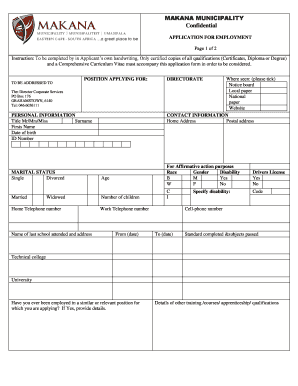
- Begin with the personal information section. Fill out your title, surname, first name, date of birth, and ID number. Ensure that these are accurate as they are essential for identification purposes.
- For affirmative action purposes, indicate your race, gender, and whether you have a disability by selecting 'Yes' or 'No' as appropriate.
- Proceed to the marital status field. Select from the options of 'Single', 'Married', 'Divorced', or 'Widowed' and provide your age and the number of children, if applicable.
- Enter your home telephone number, followed by the name and address of the last school you attended. This information is necessary for background verification.
- In the contact information section, fill out your home address and postal address. Ensure all details are correct to avoid issues with communication.
- Provide your work telephone number, specify if you have a driver’s license, and include the code. Also, include your cell-phone number for easier contact.
- List your educational qualifications, detailing the standard completed, subjects passed, and any relevant technical colleges or universities attended.
- Answer whether you have been employed in a similar or relevant position. If yes, provide the necessary details regarding your previous employment.
- Include details of other training, courses, apprenticeship, or qualifications you have completed.
- Provide your present annual salary and the name of your current employer. Also, state your reasons for leaving if you plan to quit your current position.
- Name two referees, preferably previous employers, along with their contact details. Ensure you have their permission to reference them.
- At the end of the form, sign and date it to confirm that all information provided is true and accurate.
- Once the form is completed, save your changes and consider downloading, printing, or sharing it as required.
Take the next step in your career by completing the Makana Municipality Tenders application online today.