
Open form follow the instructions

Easily sign the form with your finger

Send filled & signed form or save
How to fill out the Maersk Letterhead online
Filling out the Maersk Letterhead is an essential step in ensuring your import container survey request is processed efficiently. This guide provides a detailed overview of each component of the letterhead, helping you complete it accurately and submit it successfully.
Follow the steps to complete the Maersk Letterhead online efficiently.
- Click ‘Get Form’ button to access the form and open it in your preferred document editor.
- Begin by filling in the 'To' field with 'Maersk Hong Kong Limited'. This identifies the recipient of your request.
- Enter the 'Date' in the specified format. This indicates when the request is being submitted.
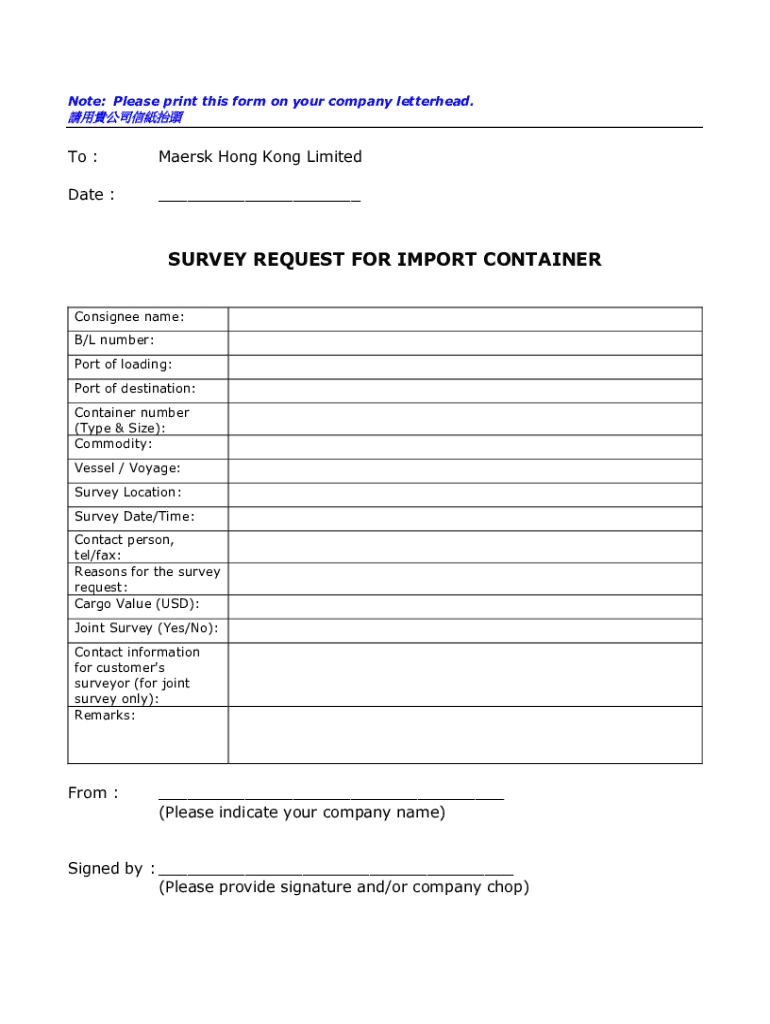
- Complete the section labeled 'SURVEY REQUEST FOR IMPORT CONTAINER' by providing the consignee name, bill of lading number, port of loading, and port of destination.
- Input the container number along with its type and size. This helps in the identification of the cargo.
- Provide the commodity details, including the name of the item being imported, and specify the vessel and voyage if applicable.
- Indicate the survey location and the desired survey date and time. This ensures that the survey is scheduled at a convenient time and place.
- Fill in the contact person's details, including their telephone and fax numbers for communication purposes.
- State the reasons for the survey request clearly. This assists Maersk in understanding the need for the survey.
- Include the cargo value in USD, which is essential for insurance and processing.
- Indicate if this is a joint survey by selecting 'Yes' or 'No'. If yes, provide the contact information for the customer's surveyor.
- Add any additional remarks that may be relevant to the survey request in the 'Remarks' section.
- At the bottom, indicate the name of your company in the 'From' section.
- Finally, provide your signature and/or company chop in the designated area, which confirms the authenticity of the request.
- After completing all sections, make sure to save your changes. Then, print the form on your company letterhead before submitting it via fax or email as specified.
Complete your Maersk Letterhead online today to ensure timely processing of your survey request.
Experience a faster way to fill out and sign forms on the web. Access the most extensive library of templates available.
Related content
USA Maritime, a coalition of ship-owning companies, maritime labor organizations, and...
A Shipper's Letter of Instruction is a document that outlines specific instructions...
Get answers to your most pressing questions about US Legal Forms API.
How to file SI in Maersk?
To file SI in Maersk, access the Maersk online platform using your credentials. Enter all required shipment details, ensuring accuracy and clarity. Including a Maersk Letterhead may help centralize your information and confirm the validity of your submission.
How to create shipping instructions?
Creating shipping instructions involves gathering all relevant shipment data, such as consignee, consignor, and cargo type. Fill out the details in your shipping provider's required format. Ensure to format your instructions well, perhaps on a Maersk Letterhead, to maintain professionalism.
Is Maersk a legit shipping company?
Yes, Maersk is a legitimate shipping company with a global presence. They offer reliable services and solutions tailored to meet shipping needs. Using a Maersk Letterhead as part of your documentation can increase trust in your shipping activities and enhance your communication.
What is SI filing in shipping?
SI filing in shipping stands for Shipping Instructions filing, which involves providing necessary details about a shipment. This process is important as it ensures your cargo is prepared and handled according to your requirements. Using a Maersk Letterhead can serve to affirm the legitimacy of your documents.
Who files shipping instructions?
Typically, the shipper or freight forwarder files shipping instructions. It's crucial that whoever files SI provides accurate information to avoid complications. A properly formatted submission on a Maersk Letterhead can enhance the professionalism of your documentation.
How to submit SI in Maersk?
To submit SI in Maersk, log in to your Maersk account, or create one if you haven't already. Locate the SI submission module and fill it out with precise shipping details. Including your Maersk Letterhead can give your submission added authority and clarity, making it easier to manage.
How to file shipping instructions?
You can file shipping instructions by navigating to the online platform of your shipping provider. Provide the necessary details like cargo description, packaging type, and contact information. Incorporating a Maersk Letterhead reinforces authenticity and helps in consistent communication.
How do you write shipping information?
Writing shipping information involves clearly stating the sender's details, receiver's details, and package specifications. Make sure to be concise and accurate to avoid shipment delays. Using a Maersk Letterhead can help you present this information in a professional manner.
How to submit SI on MSC?
Submitting SI on MSC requires you to have an active online account. After logging in, follow the instructions to enter your shipping details accurately. Utilizing a Maersk Letterhead can streamline the process and ensure that all your information meets company standards.
How do I submit my shipping instructions?
To submit your shipping instructions, access the portal provided by your shipping line. Input essential details such as consignor and consignee information. If you are using a Maersk Letterhead, attach it to your documentation to keep everything organized and professional.
Use professional pre-built templates to fill in and sign documents online faster. Get access to thousands of forms.
If you believe that this page should be taken down, please follow our DMCA take down process here.