Loading
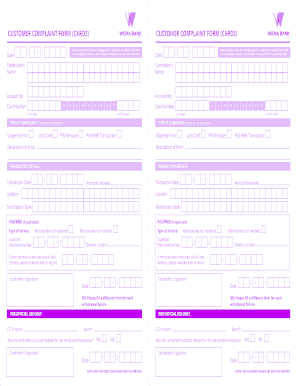
Get Bank Complaint Form
How it works
-

Open form follow the instructions
-

Easily sign the form with your finger
-

Send filled & signed form or save
How to fill out the Bank Complaint Form online
Filling out the Bank Complaint Form online can be a straightforward process if you follow the right steps. This guide will help you navigate each section of the form to ensure your complaint is submitted accurately and efficiently.
Follow the steps to complete the Bank Complaint Form.
- Click ‘Get Form’ button to obtain the form and launch it in the online editor.
- Start by entering the date in the provided fields using the format: day/month/year.
- Input your full name as the cardholder in the 'Cardholder’s Name' section.
- Enter your account number and the last four digits of your card number in the respective fields.
- Indicate the type of complaint by checking the relevant box (Lost Card, PIN Re-issue, PoS/Web Transaction, or Dispense Error).
- Provide a brief description of the error or issue you encountered in the 'Description of Error' field.
- Fill in the transaction details, including the transaction date, amount involved, and the location of the transaction.
- If applicable, indicate the type of service and any relevant merchandise dates.
- Sign the form where indicated, confirming that the information provided is accurate.
- Review all entered information for accuracy, then save the changes, and choose to download, print, or share the form as needed.
Complete your Bank Complaint Form online today to ensure your concerns are addressed promptly.
The best way to complain about a bank is to follow their formal complaint procedure, which usually involves documenting your concerns in writing. You can start by contacting customer service, followed by sending a well-structured complaint letter or email. If necessary, use a Bank Complaint Form to guide your communication, ensuring clarity and thoroughness in your complaint.