Loading
Form preview
  • US Legal Forms
  • Other Templates
  • More Forms
  • More Uncategorized Forms
  • Notarized Request For Personal Driving And Motor Vehicle Information. Notarized Request For

Get Notarized Request For Personal Driving And Motor Vehicle Information. Notarized Request For

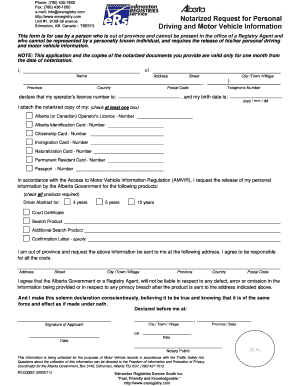
Phone: (780) 435-7800 Fax: (780) 436-1000 e-mail: info ersregistry.com http://www.ersregistry.com Unit #1, 9109-39 avenue Edmonton, AB Canada :: T6E5Y2 Print Form Notarized Request for Personal Driving.

How it works

  1. Open form

    Open form follow the instructions

  2. Easily sign form

    Easily sign the form with your finger

  3. Share form

    Send filled & signed form or save

How to fill out the Notarized Request For Personal Driving And Motor Vehicle Information online

This guide provides clear instructions on how to complete the Notarized Request For Personal Driving And Motor Vehicle Information form, particularly for individuals who are unable to visit a registry office in person. By following these steps, users can efficiently submit their request and obtain necessary driving and vehicle information.

Follow the steps to submit your notarized request online:

  1. Locate and click the ‘Get Form’ button to access the Notarized Request For Personal Driving And Motor Vehicle Information form. This will open the form in an online editor where you can fill it out.
  2. Begin by entering your full name in the designated ‘Name’ field. This is the name that will be associated with the request.
  3. Fill in your complete address in the ‘Address’ section, including the street, city or town, province, country, and postal code.
  4. Provide your operator's licence number in the relevant field. This is important for identifying your driving record.
  5. Add your telephone number and birth date in the provided format (yyyy/mm/dd) to verify your identity.
  6. Attach a notarized copy of one or more of the required identification documents by checking the appropriate box. Ensure you include either your Alberta (or Canadian) Operator's Licence, Identification Card, Citizenship Card, Immigration Card, Naturalization Card, Permanent Resident Card, or Passport.
  7. Indicate the motor vehicle information products you wish to request by checking all relevant options, such as Driver Abstracts for different durations, Court Certificate, or Confirmation Letter.
  8. As you are out of province, provide the address where the requested information should be sent. This should include your street address, city or town, province, country, and postal code.
  9. Acknowledge your responsibility for associated costs and any potential privacy issues by signing the declaration.
  10. Complete the declaration by entering the date and city or town where the request is made. Ensure you sign the form and have it notarized.
  11. Finally, save your filled form, then download or print it as required for submission.

Complete your Notarized Request for Personal Driving And Motor Vehicle Information online to access your records efficiently.

Get form

Experience a faster way to fill out and sign forms on the web. Access the most extensive library of templates available.
Get form

Related content

Request for Access to Vehicle Records - TRDL-302
(A licensed private investigative agency or security service can obtain DMV records as...
Learn more
Fla. Admin. Code Ann. R. 15A-5.0022...
The request must contain the following: the name, address, email address if available...
Learn more
Official Florida Driver's Handbook • 2014
Under section 322.36, Florida Statutes, it is unlawful for any person to authorize or...
Learn more

Related links form

Sample IRA QDRO (PDF) - TIAA-CREF - Tiaa-cref Usda 4714 Form Wyoming Quarterly Ui Wc Summary Report Form PARENT COORDINATOR APPLICATION - Schools Nyc

Questions & Answers

Get answers to your most pressing questions about US Legal Forms API.

Contact support

The Commissioner may review a decision of the Registrar of Motor Vehicle Services to grant or deny access to personal driving and motor vehicle information under the Access to Motor Vehicle Information Regulation (AMVIR).

Motor Vehicle Accident Recoveries (MVAR) enforces the MVAC judgment decisions by recovering the funds paid out on your behalf by MVAC from the at-fault parties. The debt you owe MVAR is separate from debts owing for traffic violations or criminal action related to the accident.

How do I obtain my AMVIC provincial automotive salesperson registration? You must apply for and pay for your AMVIC registration ($100) and enroll in the Salesperson Registration Course ($160). Please note: course fees are non-refundable and you have 30 days to complete your registration, including the course.

Automotive businesses in Alberta, including sales, service and repair, consignment, lease, wholesale and agent or broker businesses must hold a valid AMVIC licence.

AMVIC strives for a fair marketplace in Alberta's automotive industry. All automotive businesses in Alberta including sales, service and repair, consignment, lease, wholesale, and agent or broker businesses must be AMVIC-licensed.

Get This Form Now!

Use professional pre-built templates to fill in and sign documents online faster. Get access to thousands of forms.
Get form
If you believe that this page should be taken down, please follow our DMCA take down processhere.
Get Notarized Request For Personal Driving And Motor Vehicle Information. Notarized Request For
Get form
  • Adoption
  • Bankruptcy
  • Contractors
  • Divorce
  • Home Sales
  • Employment
  • Identity Theft
  • Incorporation
  • Landlord Tenant
  • Living Trust
  • Name Change
  • Personal Planning
  • Small Business
  • Wills & Estates
  • Packages A-Z
  • Affidavits
  • Bankruptcy
  • Bill of Sale
  • Corporate - LLC
  • Divorce
  • Employment
  • Identity Theft
  • Internet Technology
  • Landlord Tenant
  • Living Wills
  • Name Change
  • Power of Attorney
  • Real Estate
  • Small Estates
  • Wills
  • All Forms
  • Forms A-Z
  • Other Templates
  • Legal Hub
  • About Us
  • Help Portal
  • Legal Resources
  • Blog
  • Affiliates
  • Contact Us
  • Delete My Account
  • Site Map
  • Industries
  • Forms in Spanish
  • Localized Forms
  • State-specific Forms
  • Forms Kit
  • Real Estate Handbook
  • All Guides
  • Notarize
  • Incorporation services
  • For Consumers
  • For Small Business
  • For Attorneys
  • USLegal
  • FormsPass
  • pdfFiller
  • signNow
  • altaFlow
  • DocHub
  • Instapage
Form Packages
  • Adoption
  • Bankruptcy
  • Contractors
  • Divorce
  • Home Sales
  • Employment
  • Identity Theft
  • Incorporation
  • Landlord Tenant
  • Living Trust
  • Name Change
  • Personal Planning
  • Small Business
  • Wills & Estates
  • Packages A-Z
Form Categories
  • Affidavits
  • Bankruptcy
  • Bill of Sale
  • Corporate - LLC
  • Divorce
  • Employment
  • Identity Theft
  • Internet Technology
  • Landlord Tenant
  • Living Wills
  • Name Change
  • Power of Attorney
  • Real Estate
  • Small Estates
  • Wills
  • All Forms
  • Forms A-Z
  • Other Templates
Customer Service
  • Legal Hub
  • About Us
  • Help Portal
  • Legal Resources
  • Blog
  • Affiliates
  • Contact Us
  • Delete My Account
  • Site Map
  • Industries
  • Forms in Spanish
  • Localized Forms
  • State-specific Forms
  • Forms Kit
Legal Guides
  • Real Estate Handbook
  • All Guides
Prepared for you
  • Notarize
  • Incorporation services
Our Customers
  • For Consumers
  • For Small Business
  • For Attorneys
Our Sites
  • USLegal
  • FormsPass
  • pdfFiller
  • signNow
  • altaFlow
  • DocHub
  • Instapage
Social Media
Call us now toll free:
+1 833 426 79 33
As seen in:
© Copyright 1999-2026 airSlate Legal Forms, Inc. 17 Station Street, Ste. 203, Brookline, MA 02445
  • Your Privacy Choices
  • Terms of Service
  • Privacy Notice
  • Content Takedown Policy
  • Bug Bounty Program