Loading
Get Omb 2502 0265 2020-2026
How it works
-

Open form follow the instructions
-

Easily sign the form with your finger
-

Send filled & signed form or save
How to fill out the Omb 2502 0265 online
Filling out the Omb 2502 0265, also known as the settlement statement, can seem complex. This guide is designed to walk you through each section of the form, ensuring you understand how to provide the required information accurately and efficiently.
Follow the steps to successfully complete the Omb 2502 0265 online.
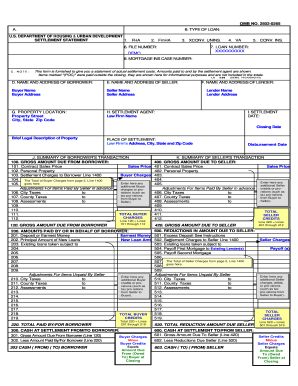
- Click the ‘Get Form’ button to access the form and open it in your preferred digital editor.
- Begin by filling out section B, where you need to indicate the type of loan. Choose from the options provided, such as FHA, VA, or conventional loans, and ensure you fill in the loan number and mortgage insurance case number if applicable.
- In section D, input the name and address of the borrower. Clearly list the buyer's details to avoid any errors in identification.
- Next, fill in section E with the name and address of the seller. Accuracy in this section is crucial for transaction records.
- Section G requires the property's location, including the street address and city, state, and zip code. Make sure this information matches public records.
- In section F, provide the name and address of the lender. This helps in identifying the financing party involved in the settlement.
- Fill out section I by entering the settlement date, which indicates when the closing process will take place.
- Complete section J, which summarizes the borrower's transaction. Carefully input the gross amount due from the borrower, detailing sales price, personal property, and any settlement charges.
- When you move to section K, summarize the seller's transaction. Include all relevant amounts due to the seller, similar to the previous section, ensuring all adjustments for items paid by the seller are clearly noted.
- Proceed to enter any reductions due to the seller in section 500 and the cash at settlement in section 600.
- Finally, review sections L and 1400 for total settlement charges and ensure all necessary charges have been included accurately.
- Once all fields are completed, save your changes, and choose to download, print, or share the form as needed.
Complete your documents online today for a smoother transaction process.
A Closing Disclosure is a five-page form that provides final details about the mortgage loan you have selected. It includes the loan terms, your projected monthly payments, and how much you will pay in fees and other costs to get your mortgage (closing costs).