We use cookies to improve security, personalize the user experience, enhance our marketing activities (including cooperating with our marketing partners) and for other business use.
Click "here" to read our Cookie Policy. By clicking "Accept" you agree to the use of cookies. Read less
Read more
Accept
Loading
Form preview
  • US Legal Forms
  • Form Library
  • More Forms
  • More Uncategorized Forms
  • Credit Card Authorization Form - Cox Media

Get Credit Card Authorization Form - Cox Media

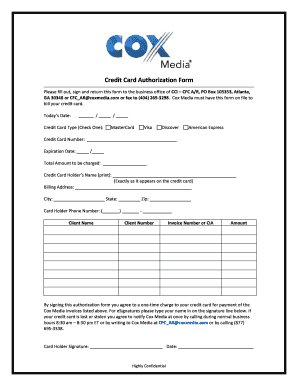
Credit Card Authorization Form Please fill out, sign and return this form to the business office of CCI CFC A/R, PO Box 105353, Atlanta, GA 30348 or CFC AR coxmedia.com or fax to (404) 269?3298. Cox.

How it works

  1. Open form

    Open form follow the instructions

  2. Easily sign form

    Easily sign the form with your finger

  3. Share form

    Send filled & signed form or save

How to fill out the Credit Card Authorization Form - Cox Media online

Filling out the Credit Card Authorization Form for Cox Media is a straightforward process that ensures your payment is processed efficiently. This guide provides clear step-by-step instructions to help you complete the form accurately and securely.

Follow the steps to complete the credit card authorization form with ease.

  1. Click ‘Get Form’ button to obtain the form and open it in the editor.
  2. Enter today’s date in the designated field. This helps track the timing of your authorization.
  3. Select your credit card type by checking one of the options available: MasterCard, Visa, Discover, or American Express.
  4. Input your credit card number in the appropriate section, ensuring accuracy to avoid processing issues.
  5. Fill in the expiration date of your credit card in the specified format (month/year).
  6. Indicate the total amount to be charged on your credit card for the services provided.
  7. Clearly print the credit card holder’s name as it appears on the card in the designated field.
  8. Provide the billing address associated with the credit card, including the city, state, and zip code.
  9. Enter the card holder's phone number in the format provided to ensure timely communication if needed.
  10. Fill in the client name, client number, and invoice number or CIA as reference points for processing.
  11. Sign the authorization form by typing your name in the signature line to consent to the one-time charge.
  12. Finally, ensure to save changes, and choose to download, print, or share the completed form as required.

Complete your document submissions online to ensure prompt processing of your authorization.

Get form

Experience a faster way to fill out and sign forms on the web. Access the most extensive library of templates available.
Get form

Related content

cmg - cox media group
Nov 2, 2021 — Annual Credit Report Request Form and mailing it to the Annual Credit...
Learn more
Request for Authorization to Accept Credit Card...
NOTE: Cardholder Data is defined as the entire Personal Account Number (full credit card...
Learn more
idaho-tariff-access.pdf
The Cox Intrastate Access Service Tariff (“Tariff”) sets forth the service offerings...
Learn more

Related links form

Maintenance Declaration Form Germany Atv Worksheet EPF_Form 3A.pdf - Sssomega.net Stundenaufzeichnungen

Questions & Answers

Get answers to your most pressing questions about US Legal Forms API.

Contact support

To get a credit card authorization code, initiate a transaction through your payment management system. The system will automatically generate the code upon approval of the payment. Always check the transaction details to ensure you have the correct authorization code for your records.

To retrieve a payment authorization code, you should check the confirmation of your transaction through your payment provider. Most systems display the authorization code immediately after a successful transaction. If you cannot find it, contacting your payment processor can help you obtain this crucial code.

To obtain a 6-digit authorization code, you generally need to process a transaction through a payment gateway or processor. Upon authorizing the payment, the code will automatically generate as part of the transaction approval. Checking your payments system for transaction details will help you locate this code quickly.

You can obtain a transaction authorization code through your payment processor or merchant account provider. Typically, when a payment is approved, they generate this code automatically. It's essential to check your transaction logs or contact customer service for precise guidance in obtaining this code.

To create an authorization letter for credit card use, include your name, the card details, the recipient's information, and a clear authorization statement. Clearly specify the transactions allowed and any limitations. Using a standard template like the Credit Card Authorization Form - Cox Media can help you craft a formal document.

The authorization process for a credit card transaction typically begins when you provide your card details at the point of sale. The merchant's systems communicate with your card issuer to verify funds. Using a Credit Card Authorization Form - Cox Media helps ensure that this process is secure and efficient.

To write an authorization for a credit card, include your name, the credit card number, and a statement granting authorization to the individual or business. Adding a signature and date can enhance the form's validity. Utilizing a structured Credit Card Authorization Form - Cox Media can streamline this process for you.

To authorize someone on your credit card, you usually need to contact your credit card issuer. They will provide guidance on the necessary steps, which may include filling out a Credit Card Authorization Form - Cox Media. Make sure to specify the authorized person's details to ensure they can make transactions.

To add a credit card to your Cox account, log in to your account portal. Navigate to the billing section and select 'Payment Methods.' From there, you can enter your credit card details and save the information. Remember, using a Credit Card Authorization Form - Cox Media ensures a smooth payment process.

To fill out an authorization form, begin with your personal information and the recipient's details. Provide a clear explanation of what you are authorizing, followed by any necessary identification numbers. Conclude by signing and dating the document for it to be valid, using templates like the Credit Card Authorization Form - Cox Media for guidance.

Get This Form Now!

Use professional pre-built templates to fill in and sign documents online faster. Get access to thousands of forms.
Get form
If you believe that this page should be taken down, please follow our DMCA take down processhere.

Industry-leading security and compliance

US Legal Forms protects your data by complying with industry-specific security standards.
  • In businnes since 1997
    25+ years providing professional legal documents.
  • Accredited business
    Guarantees that a business meets BBB accreditation standards in the US and Canada.
  • Secured by Braintree
    Validated Level 1 PCI DSS compliant payment gateway that accepts most major credit and debit card brands from across the globe.
Get Credit Card Authorization Form - Cox Media
Get form
Form Packages
Adoption
Bankruptcy
Contractors
Divorce
Home Sales
Employment
Identity Theft
Incorporation
Landlord Tenant
Living Trust
Name Change
Personal Planning
Small Business
Wills & Estates
Packages A-Z
Form Categories
Affidavits
Bankruptcy
Bill of Sale
Corporate - LLC
Divorce
Employment
Identity Theft
Internet Technology
Landlord Tenant
Living Wills
Name Change
Power of Attorney
Real Estate
Small Estates
Wills
All Forms
Forms A-Z
Form Library
Customer Service
Terms of Service
Privacy Notice
Legal Hub
Content Takedown Policy
Bug Bounty Program
About Us
Help Portal
Legal Resources
Blog
Affiliates
Contact Us
Delete My Account
Site Map
Industries
Forms in Spanish
Localized Forms
State-specific Forms
Forms Kit
Legal Guides
Real Estate Handbook
All Guides
Prepared for You
Notarize
Incorporation services
Our Customers
For Consumers
For Small Business
For Attorneys
Our Sites
US Legal Forms
USLegal
FormsPass
pdfFiller
signNow
airSlate WorkFlow
DocHub
Instapage
Social Media
Call us now toll free:
+1 833 426 79 33
As seen in:
  • USA Today logo picture
  • CBC News logo picture
  • LA Times logo picture
  • The Washington Post logo picture
  • AP logo picture
  • Forbes logo picture
© Copyright 1997-2025
airSlate Legal Forms, Inc.
3720 Flowood Dr, Flowood, Mississippi 39232
Form Packages
Adoption
Bankruptcy
Contractors
Divorce
Home Sales
Employment
Identity Theft
Incorporation
Landlord Tenant
Living Trust
Name Change
Personal Planning
Small Business
Wills & Estates
Packages A-Z
Form Categories
Affidavits
Bankruptcy
Bill of Sale
Corporate - LLC
Divorce
Employment
Identity Theft
Internet Technology
Landlord Tenant
Living Wills
Name Change
Power of Attorney
Real Estate
Small Estates
Wills
All Forms
Forms A-Z
Form Library
Customer Service
Terms of Service
Privacy Notice
Legal Hub
Content Takedown Policy
Bug Bounty Program
About Us
Help Portal
Legal Resources
Blog
Affiliates
Contact Us
Delete My Account
Site Map
Industries
Forms in Spanish
Localized Forms
State-specific Forms
Forms Kit
Legal Guides
Real Estate Handbook
All Guides
Prepared for You
Notarize
Incorporation services
Our Customers
For Consumers
For Small Business
For Attorneys
Our Sites
US Legal Forms
USLegal
FormsPass
pdfFiller
signNow
airSlate WorkFlow
DocHub
Instapage
Social Media
Call us now toll free:
+1 833 426 79 33
As seen in:
  • USA Today logo picture
  • CBC News logo picture
  • LA Times logo picture
  • The Washington Post logo picture
  • AP logo picture
  • Forbes logo picture
© Copyright 1997-2025
airSlate Legal Forms, Inc.
3720 Flowood Dr, Flowood, Mississippi 39232