Loading
Form preview
  • US Legal Forms
  • Form Library
  • More Forms
  • More Uncategorized Forms
  • Telegraphic Transfer

Get Telegraphic Transfer

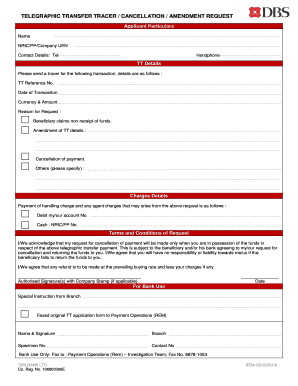
TELEGRAPHIC TRANSFER TRACER / CANCELLATION / AMENDMENT REQUEST Applicant Particulars Name NRIC/PP/Company UEN Contact Details Tel Handphone TT Details Please send a tracer for the following transaction details are as follows TT Reference No. Date of Transaction Currency Amount Reason for Request Beneficiary claims non-receipt of funds. Amendment of TT details Cancellation of payment. Others please specify Charges Details Payment of handling charge and any agent charges that may arise from the above request is as follows Debit my/our account No. Cash NRIC/PP No. Terms and Conditions of Request I/We acknowledge that my request for cancellation of payment will be made only when you are in possession of the funds in respect of the above telegraphic transfer payment. This is subject to the beneficiary and/or his bank agreeing to my/our request for cancellation and returning the funds to you. I/We agree that you will have no responsibility or liability towards me/us if the beneficiary fails ....

How it works

  1. Open form

    Open form follow the instructions

  2. Easily sign form

    Easily sign the form with your finger

  3. Share form

    Send filled & signed form or save

How to fill out the telegraphic transfer online

Filling out a telegraphic transfer form online is a straightforward process that ensures your request for tracing, cancellation, or amendment is handled efficiently. This guide provides a clear overview of the necessary steps to complete the form accurately.

Follow the steps to complete the telegraphic transfer form online.

  1. Click ‘Get Form’ button to obtain the form and open it in the editor.
  2. Provide your personal information in the applicant particulars section. Enter your full name, NRIC number, passport number, or company UEN as applicable. Include your contact details, including telephone and handphone numbers.
  3. In the TT details section, indicate that you are requesting a tracer for a previous transaction. Fill in the TT reference number, the date of the transaction, and the currency and amount involved.
  4. Specify the reason for your request. Choose from options such as the beneficiary claiming non-receipt of funds, amendment of TT details, cancellation of payment, or others. If selecting 'others', provide additional details as needed.
  5. In the charges details section, indicate how you wish to handle any applicable charges. You can either debit your account number or provide your NRIC/Passport number for cash payments.
  6. Review the terms and conditions of the request carefully. You must acknowledge your understanding of the conditions related to cancellation, funds possession, and potential liabilities by confirming your agreement.
  7. Sign the form, including company stamp if applicable, and provide the date of submission.
  8. Once you have completed all sections, ensure all information is accurate, then save your changes. You can choose to download, print, or share the completed form as needed.

Complete your telegraphic transfer request online today!

Get form

Experience a faster way to fill out and sign forms on the web. Access the most extensive library of templates available.
Get form

Related content

Electronic Funds Transfer (EFT) Requirements
Dec 13, 2021 — Payments by the FDIC under legal referrals may be made by check or...
Learn more
Has Monash University received my telegraphic...
Transfer time from Convera (formerly Western Union), is five working days. You can check...
Learn more
Outbound Telegraphic Transfers
May 1, 2020 — Outbound international telegraphic transfers provide a means by which you...
Learn more

Related links form

Police Verification Report Form Bharathiar University B Sc Costume Design And Fashion Syllabus Cuestionario Medico Application For Annuity *APP* Issued By American National Insurance Company One Moody Plaza

Questions & Answers

Get answers to your most pressing questions about US Legal Forms API.

Contact support

To complete a telegraphic transfer, you will need the recipient's full name, bank account details, and often their IBAN or SWIFT code. Additionally, your identification and bank account information are required. By having all these details ready, you can streamline the process and ensure your transfer goes smoothly.

To make a telegraphic transfer, start by gathering the required information such as the recipient's bank details and your identification. Then, visit your bank's website or branch to initiate the transfer. Your bank's customer service can guide you through the process to ensure everything is done correctly.

Making a telegraphic transfer involves visiting your bank or using their online platform. You will need to fill out a transfer form, providing the necessary recipient details and the amount to send. After you submit the form, your bank will process the transfer electronically, typically within a few business days.

Key documents for telegraphic transfer typically include your bank account details and identification. Some banks may request additional documents, such as proof of the transaction’s purpose or the recipient's information. Having these documents prepared will make the transfer process smoother and more efficient.

Filling out the telegraphic transfer form requires careful attention to detail. You should start by entering your personal information, and then accurately include the recipient's information and bank details. Double-checking all entries will help avoid any errors and ensure timely processing.

To conduct a telegraphic transfer, start by visiting your bank or using their online banking service. Provide the required details about yourself and the recipient, then authorize the transfer. Once completed, keep the confirmation for your records, as it verifies the transaction.

Filling out a telegraphic transfer form involves entering key information accurately. Begin by filling in your details, including your account number and contact information. Next, input the recipient’s information, their bank details, and the amount you wish to send, ensuring everything is complete and correct.

To complete a TT transfer, you must gather specific information about both your account and the recipient’s account. This includes the sender’s details, the recipient’s name, account number, and bank information, such as the bank's name and SWIFT code. Having these details ensures a smooth transaction.

The IBAN, or International Bank Account Number, is a unique identifier that aids in ensuring your telegraphic transfer reaches the correct account. It typically includes the country code, check digits, and the bank account number. You can find the IBAN on your bank statement or request it from your bank directly.

For a telegraphic transfer, you must provide several crucial details. You will need the recipient's name, bank account number, and the bank's name and address. Additionally, having the recipient’s SWIFT code or IBAN is essential for accurate processing.

Get This Form Now!

Use professional pre-built templates to fill in and sign documents online faster. Get access to thousands of forms.
Get form
If you believe that this page should be taken down, please follow our DMCA take down processhere.

Industry-leading security and compliance

US Legal Forms protects your data by complying with industry-specific security standards.
  • In businnes since 1997
    25+ years providing professional legal documents.
  • Accredited business
    Guarantees that a business meets BBB accreditation standards in the US and Canada.
  • Secured by Braintree
    Validated Level 1 PCI DSS compliant payment gateway that accepts most major credit and debit card brands from across the globe.
Get Telegraphic Transfer
Get form
  • Adoption
  • Bankruptcy
  • Contractors
  • Divorce
  • Home Sales
  • Employment
  • Identity Theft
  • Incorporation
  • Landlord Tenant
  • Living Trust
  • Name Change
  • Personal Planning
  • Small Business
  • Wills & Estates
  • Packages A-Z
  • Affidavits
  • Bankruptcy
  • Bill of Sale
  • Corporate - LLC
  • Divorce
  • Employment
  • Identity Theft
  • Internet Technology
  • Landlord Tenant
  • Living Wills
  • Name Change
  • Power of Attorney
  • Real Estate
  • Small Estates
  • Wills
  • All Forms
  • Forms A-Z
  • Form Library
  • Legal Hub
  • About Us
  • Help Portal
  • Legal Resources
  • Blog
  • Affiliates
  • Contact Us
  • Delete My Account
  • Site Map
  • Industries
  • Forms in Spanish
  • Localized Forms
  • State-specific Forms
  • Forms Kit
  • Real Estate Handbook
  • All Guides
  • Notarize
  • Incorporation services
  • For Consumers
  • For Small Business
  • For Attorneys
  • USLegal
  • FormsPass
  • pdfFiller
  • signNow
  • altaFlow
  • DocHub
  • Instapage
Form Packages
  • Adoption
  • Bankruptcy
  • Contractors
  • Divorce
  • Home Sales
  • Employment
  • Identity Theft
  • Incorporation
  • Landlord Tenant
  • Living Trust
  • Name Change
  • Personal Planning
  • Small Business
  • Wills & Estates
  • Packages A-Z
Form Categories
  • Affidavits
  • Bankruptcy
  • Bill of Sale
  • Corporate - LLC
  • Divorce
  • Employment
  • Identity Theft
  • Internet Technology
  • Landlord Tenant
  • Living Wills
  • Name Change
  • Power of Attorney
  • Real Estate
  • Small Estates
  • Wills
  • All Forms
  • Forms A-Z
  • Form Library
Customer Service
  • Legal Hub
  • About Us
  • Help Portal
  • Legal Resources
  • Blog
  • Affiliates
  • Contact Us
  • Delete My Account
  • Site Map
  • Industries
  • Forms in Spanish
  • Localized Forms
  • State-specific Forms
  • Forms Kit
Legal Guides
  • Real Estate Handbook
  • All Guides
Prepared for you
  • Notarize
  • Incorporation services
Our Customers
  • For Consumers
  • For Small Business
  • For Attorneys
Our Sites
  • USLegal
  • FormsPass
  • pdfFiller
  • signNow
  • altaFlow
  • DocHub
  • Instapage
Social Media
Call us now toll free:
+1 833 426 79 33
As seen in:
© Copyright 1999-2026 airSlate Legal Forms, Inc. 3720 Flowood Dr, Flowood, Mississippi 39232
  • Your Privacy Choices
  • Terms of Service
  • Privacy Notice
  • Content Takedown Policy
  • Bug Bounty Program