Loading

Open form follow the instructions

Easily sign the form with your finger

Send filled & signed form or save
How to fill out the Medicare Transfer Form online
Filling out the Medicare Transfer Form online is a straightforward process designed to help users efficiently manage their Medicare cards. This guide provides step-by-step instructions to navigate through each section of the form with ease.
Follow the steps to successfully complete your Medicare Transfer Form.
- Click ‘Get Form’ button to obtain the form and open it in the editor.
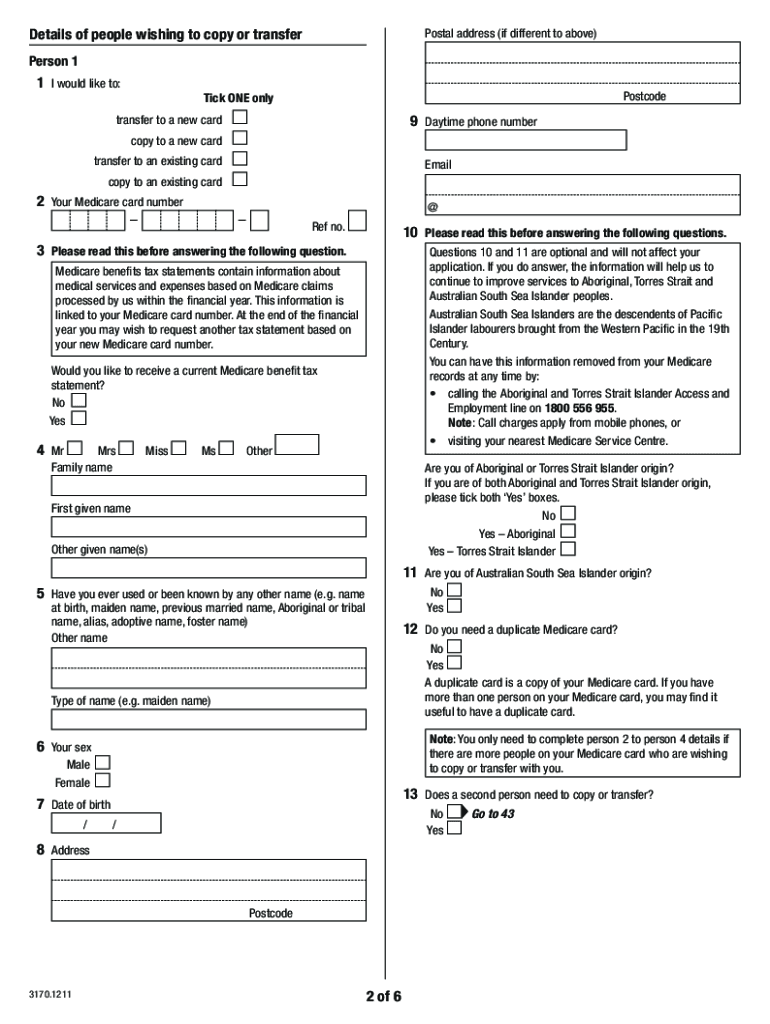
- Identify the purpose of your request by selecting one of the four options: transfer to a new Medicare card, copy to a new Medicare card, transfer to an existing Medicare card, or copy to an existing Medicare card. Make sure to tick only one option.
- Provide your Medicare card number and reference number in the designated fields to ensure accurate processing.
- Fill in your personal details, including your first and last name, date of birth, and address. Ensure that the information is printed in block letters for clarity.
- If applicable, indicate your relationship to any children under 15 years of age requiring a transfer or copy of the Medicare card, and ensure that necessary signatures are provided.
- Report any necessary details regarding bank account information for future electronic payments, and review the privacy notice section.
- Check your entries for accuracy and completeness. Ensure that you have signed and dated the form where required.
- Once completed, you can save changes, download, print, or share the form as required.
Begin filling out your Medicare Transfer Form online today to make necessary updates with ease.
Experience a faster way to fill out and sign forms on the web. Access the most extensive library of templates available.
Related content
PART I: REASON FOR SUBMISSION. Indicate your reason for completing this form by checking...
Cms requires that all providers that are enrolling in medicare. Web download and fill out...
The EFT authorization form must be signed and dated by the same Authorized Representative...
Get answers to your most pressing questions about US Legal Forms API.
How to send a Medicare form in Australia?
To send a Medicare form in Australia, you must first complete the appropriate form, such as the Medicare Transfer Form. After ensuring all details are correct, submit the form either online through the MyGov portal or by mailing it to the designated Medicare address. Keeping a copy for your records is always wise. For easier management of your forms, uslegalforms provides comprehensive instructions and services to assist you.
What is a MS011 form?
The MS011 form is a crucial document associated with the Medicare Transfer Form, used to manage and update Medicare benefits. This form allows beneficiaries to make necessary changes to their coverage, ensuring they receive the correct benefits. Understanding the MS011 form can make your healthcare management much smoother. Uslegalforms can help you access and comprehend this essential paperwork.
How to fill MS011 form?
Filling out the MS011 form requires careful attention to detail to avoid errors in your Medicare Transfer Form submission. Begin by gathering all necessary personal information, including your Medicare number and contact details. Follow the provided instructions step by step, ensuring each section is completed accurately. If you encounter difficulties, uslegalforms offers guidance and templates to assist you.
What is a DS60 form?
The DS60 form is a document related to the Medicare Transfer Form process. It is primarily used for reporting specific changes in a beneficiary's information. If you need to update your Medicare details, completing the DS60 form can streamline the process and ensure accurate information. Utilizing resources like uslegalforms can simplify obtaining and submitting this form.
How do you upload a document to Medicare?
To upload a document to Medicare, visit the Medicare online portal and log into your account. Once logged in, you will find options to upload various documents, including the Medicare Transfer Form. Ensure your documents meet the specified format and size requirements. This online approach is efficient and allows you to track your submission easily.
How do I email Medicare Australia?
To email Medicare Australia, you need to visit their official website and find the contact section. They usually provide an email address to communicate specific queries. When reaching out, consider including your Medicare Transfer Form for context. This could help expedite your request and provide clarity on your situation.
How do I get a Medicare eligibility letter in Australia?
To obtain a Medicare eligibility letter in Australia, you can contact Medicare directly or visit their website. You may need to provide personal details and proof of identity to access your information. After completing the necessary steps, you can use the Medicare Transfer Form if you require further documentation. It's a good idea to check for updates on the process regularly.
Are foreigners covered by Medicare in Australia?
Foreigners are generally not covered by Medicare in Australia unless they meet specific criteria. Typically, only Australian citizens, permanent residents, and certain eligible visitors have access to Medicare services. If you need to use a Medicare Transfer Form, ensure that you understand your eligibility and options. For comprehensive guidance, consider using platforms like uslegalforms.
How do I change my Medicare card?
If your Medicare card is lost, stolen or damaged, you can ask for a new card. You can do this using: your Medicare online account through myGov. the Express Plus Medicare mobile app.
Can you add Medicare card to Apple wallet?
To add your Medicare card, you'll need to have Medicare linked to your myGov account. Once linked, open the myGov app and go to Wallet on your home screen. Select Add to wallet and follow the steps.
Use professional pre-built templates to fill in and sign documents online faster. Get access to thousands of forms.
If you believe that this page should be taken down, please follow our DMCA take down process here.