Loading
Get Emp5604 2020-2026
How it works
-

Open form follow the instructions
-

Easily sign the form with your finger
-

Send filled & signed form or save
How to fill out the Emp5604 online
Filling out the Emp5604 form is an essential step in establishing a caregiver employment contract. This guide provides clear, step-by-step instructions to help users complete the form accurately and efficiently.
Follow the steps to fill out the Emp5604 form online.
- Click the 'Get Form' button to access the Emp5604 form and open it in the editor.
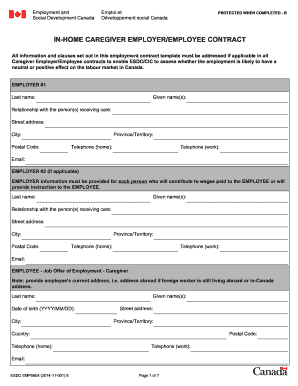
- Begin by entering the information for Employer #1. Provide details such as last name, given name, relationship with the person receiving care, street address, city, postal code, province/territory, home and work telephone numbers, and email address.
- If applicable, complete the Employer #2 section with similar details as Employer #1.
- In the Employee section, fill in the employee's last name, given name, date of birth, current address, city, province/territory, country, home and work telephone numbers, and email address.
- Answer whether the employee will work at the employer's residence in Canada. If 'No,' provide the details of where the employee will work, including street address, city, province/territory, postal code, and contact information.
- Provide a description of the house and household where care will be provided, including the total number of rooms and bedrooms, and details of all household members.
- Indicate the duration of the contract and the anticipated start date.
- Document the job description, specifying the type of care, age, and care responsibilities or duties the employee will undertake.
- Fill in the work schedule and wages, including weekly work hours, expected workdays, any entitled breaks, and the payment frequency.
- Review sections pertaining to recruitment fees, accommodation, transportation costs, health care insurance, and workplace safety insurance, filling in the relevant information based on your agreement.
- Address notice requirements for resignation and termination of employment as per provincial/territorial standards.
- Sign and date the contract for all employers and the employee, ensuring that all names and details match the provided information.
- Once the form is completed, you can save changes, download, print, or share the completed Emp5604 form.
Complete your documents online for a seamless experience.
Obtaining a Labor Market Impact Assessment (LMIA) typically takes between 2 to 12 weeks, depending on the complexity of the application and the workload of the government office. Ensuring your application is well-prepared can significantly reduce wait times. Following up with Service Canada can also provide updates on your application progress. Leverage the guidance from Emp5604 to streamline your LMIA submission process.