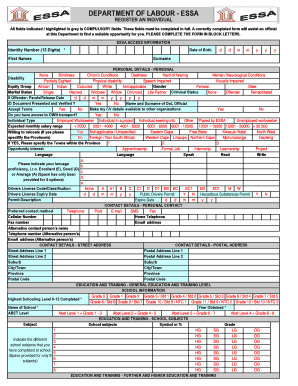
An official at this Department to find a suitable opportunity for you. PLEASE COMPLETE THE FORM IN BLOCK LETTERS. ESSA ACCESS INFORMATION Identity Number (13 Digits) * First Names Date of Birth d d m m y y y Surname PERSONAL DETAILS - PERSONAL Hard of hearing None Blindness Chronic Conditions Deafness Mental / Neurological Conditions Disability Partially Sighted Physical disability Speech Impaired Visually Impaired Gender Equity Group African Indian Coloured Not applicable Male White.

How it works
  • Open form

    Open form follow the instructions

  • Easily sign form

    Easily sign the form with your finger

  • Share form

    Send filled & signed form or save

How to fill out the Essa Form online

The Essa Form is a crucial document for registering individuals with the Department of Labour. This guide provides clear, step-by-step instructions to help you complete the Essa Form online effectively and ensure a successful application.

Follow the steps to fill out the Essa Form accurately.

  1. Click ‘Get Form’ button to obtain the form and open it in your preferred editor.
  2. Complete all compulsory fields indicated in grey. Start with your identity number (13 digits), followed by your first names, surname, and date of birth. Ensure each field is accurately filled.
  3. Provide information regarding your personal details by selecting any applicable disabilities from the options provided. Specify your gender and equity group as required.
  4. Input your marital status, if applicable, and any relevant criminal status. If you are an offender, include your parole or release date.
  5. Indicate if your ID document has been presented and verified by selecting 'Yes' or 'No'.
  6. Make a decision on making your CV details available to other organizations by selecting 'Yes' or 'No' and accept the terms provided in the form.
  7. Detail your transport access and individual type by selecting the appropriate options reflecting your current status.
  8. Proceed to input your expected monthly salary range and willingness to relocate, specifying any towns or provinces if applicable.
  9. Fill out your opportunity interests by selecting from options like apprenticeship, formal job, or project.
  10. Complete the contact details section, including preferred contact method and personal address information, both street and postal.
  11. Provide your educational background, including school information, qualifications, and subjects completed, as well as any further education or training undertaken.
  12. Input your employment history, including previous job details, duties performed, and reasons for leaving each job.
  13. Complete the section for professional affiliations and references, ensuring all information is accurate and comprehensive.
  14. Finally, specify the services you require from the Department of Labour by ticking the relevant boxes.
  15. Once all sections are completed, review your form for accuracy. You may then choose to save changes, download, print, or share the form as required.

Ensure your application is seamless by completing the Essa Form online today.

Get form

Experience a faster way to fill out and sign forms on the web. Access the most extensive library of templates available.

Related content

Enterprise Self Service Authorization (ESSA)

Dec 13, 2024 — The Florida Department of Environmental Protection is the state's lead...

Learn more
Affirmation of Consultation Form

This form, which documents consultation for Titles I, IIA, IIIA, and IVA, should be...

Learn more
Gender neutral language in Portuguese

The pronouns esta and essa can follow one of two paths when being converted to neutral...

Learn more
Questions & Answers

Get answers to your most pressing questions about US Legal Forms API.

Contact support

How to join Essa?

Joining Essa is simple and beneficial. Start by visiting the Essa website and clicking on the 'Join' button. Fill out the registration form with your relevant information and submit it for review. Upon approval, you can start utilizing various features, including accessing the Essa Form.

To get matched by Essa, you need to complete your profile with accurate and detailed information. This helps the system understand your needs and preferences better. Once your profile is complete, Essa uses its algorithms to connect you with suitable options. The Essa Form plays a vital role in this matching process.

Logging into Essa is essential for managing your account effectively. Simply navigate to the Essa homepage and find the login field. Enter your username and password, and you should gain access without a hitch. Using your Essa account allows you to interact with various features, including accessing the Essa Form.

To access CES, go to the CES login page and input your username and password. Ensure you have registered for an account previously; if not, you’ll need to register first. If you forget your credentials, use the recovery options provided to regain access. Once logged in, you can efficiently manage your Essa Form submissions.

Registering in Essa is a straightforward process. Begin by visiting the registration page on the Essa website and filling out the required information. After you submit your details, you will receive a confirmation email to activate your account. Once registered, you can start utilizing the benefits of the Essa Form.

To log into the ESS portal, first visit the official website and locate the login section. Enter your valid credentials, including your username and password. If you encounter any issues, make sure to verify your login information or reset your password if necessary. The ESS portal is where you can access important documents, including the Essa Form.

Essa stands for 'Electronic Student Services Application.' This platform is designed to streamline various educational processes, including applications and student management. Understanding what Essa stands for helps users appreciate the breadth of services and innovations it provides. Thus, engaging with the Essa Form effectively connects you to all available functionalities.

To obtain Essa accreditation, you must complete the necessary requirements outlined on the Esse website. This includes submitting an application and the relevant documentation via the Esse Form. After a successful review, you'll receive your accreditation, enhancing your professional credibility.

The Every Student Succeeds Act (ESSA) is the federal K–12 education law. ESSA was signed into law in 2015, replaced No Child Left Behind, and reauthorized the Elementary and Secondary Education Act (ESEA). ESEA was signed into law in 1965 by President Lyndon Baines Johnson.

Every Student Succeeds Act (ESSA)

Get This Form Now!

Use professional pre-built templates to fill in and sign documents online faster. Get access to thousands of forms.

If you believe that this page should be taken down, please follow our DMCA take down process here.

Get Essa Form