Loading
Form preview
  • US Legal Forms
  • Form Library
  • More Forms
  • More Multi-State Forms
  • Bexar County Alarm Permit 2020

Get Bexar County Alarm Permit 2020-2026

How it works

  1. Open form

    Open form follow the instructions

  2. Easily sign form

    Easily sign the form with your finger

  3. Share form

    Send filled & signed form or save

How to fill out the Bexar County Alarm Permit online

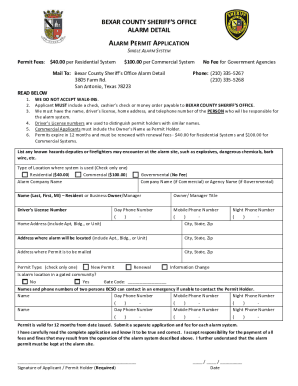
Filling out the Bexar County Alarm Permit is a straightforward process designed to ensure the safety and security of your property. This guide provides step-by-step instructions to help you successfully complete the application online, providing the necessary details as required by the Bexar County Sheriff’s Office.

Follow the steps to accurately complete your alarm permit application.

  1. Click ‘Get Form’ button to obtain the Bexar County Alarm Permit and open it for review.
  2. Begin by entering your information as the Permit Holder. This includes your name (last, first, middle initial), driver’s license number, home address, and a mobile phone number.
  3. Select the type of permit you are applying for by checking the appropriate box: Residential ($40), Commercial ($100), or Governmental (No fee). Be sure to list the alarm company name if applicable.
  4. Provide the address where the alarm will be located, including any apartment or building numbers. Also, specify the address where the permit should be mailed.
  5. Indicate whether the alarm location is in a gated community and, if so, provide the gate code.
  6. List any known hazards that emergency responders may encounter at your alarm site to ensure their safety.
  7. Input the names and phone numbers of two emergency contacts whom the Bexar County Sheriff’s Office can reach if the Permit Holder cannot be contacted.
  8. Review your application for accuracy, sign the document where indicated, and include the date.
  9. Prepare the payment in the form of a cashier’s check, check, or money order made out to Bexar County Sheriff’s Office, and ensure it is included with your application.
  10. Save your changes, download the completed form, print it for your records, and mail it along with your payment to the specified address.

Complete your alarm permit application online today to ensure compliance and security for your property.

Get form

Experience a faster way to fill out and sign forms on the web. Access the most extensive library of templates available.
Get form

Related content

Apply for an Alarm Permit
Alarm Permits are valid for one year from the issue date and must be renewed before the...
Learn more
DOMESTIC VIOLENCE SAFETY PLAN
Add additional safety devices to secure your window. Invest in an alarm. • Discuss a...
Learn more
Advanced Energy Design Guide
that permit elongating the building in the east-west direction and permit ... and send an...
Learn more

Related links form

Printable D 400v Form Typable D400x Form Kenosha Wi Low Voltage Permit Form Hud Form 52850

Questions & Answers

Get answers to your most pressing questions about US Legal Forms API.

Contact support

As of now, the sheriff of Bexar County, Texas, is Javier Salazar. He oversees the operations of the Bexar County Sheriff's Office and is responsible for maintaining public safety in the area. Engaging with the sheriff's office is important for matters concerning law enforcement and regulations like the Bexar County Alarm Permit. Staying informed about local leaders can help you navigate community safety initiatives effectively.

For immediate assistance from the Bexar County Sheriff's Office in emergencies, you should dial 911. This number connects you directly with emergency response teams ready to assist. In less urgent situations, it's important to know the Sheriff's Office's non-emergency contact number for inquiries related to the Bexar County Alarm Permit or other concerns. Having these contact numbers ensures quick access to support when you need it.

In Texas, the primary emergency number is 911, which connects you to local emergency services for urgent matters. Additionally, for non-emergencies, you can reach out to local authorities through numbers like 311 in certain cities, including San Antonio. Understanding these numbers helps you respond quickly in emergencies while adhering to local regulations, such as the Bexar County Alarm Permit. Familiarizing yourself with these numbers can be beneficial to ensure safety.

The 311 non-emergency number for San Antonio allows residents to connect with city services for non-urgent matters. This service addresses various inquiries, including issues related to public safety or city regulations like the Bexar County Alarm Permit. Utilizing the 311 line can help streamline your questions and concerns without tying up emergency resources. Keeping this number handy can enhance your awareness of municipal services available.

In Harris County, you are required to have an alarm permit to operate an alarm system legally. This regulation helps local authorities manage false alarm responses and enhance public safety. If you're relocating from Bexar County, make sure to get informed about the specific requirements for a Harris County Alarm Permit, as rules can vary.

To find out your house alarm code, you can reference your alarm system's manual, which usually includes default codes and reset instructions. If you cannot locate your manual, contact your alarm service provider for assistance. Also, if your system is registered under a Bexar County Alarm Permit, ensure your contact information is updated with the provider, making it easier for them to assist you.

To register your alarm in San Antonio, you need to complete an application for a Bexar County Alarm Permit, which can typically be done online. Provide necessary details, such as your alarm system type and contact information. Once registered, keep your information updated to avoid fines for false alarms. The city's website offers detailed steps for registration.

Starting your own alarm company involves several steps, including research, planning, and compliance with local regulations. First, define your business model and target market. Next, ensure you obtain a Bexar County Alarm Permit if you plan to operate in the area. Additionally, consider using platforms like uslegalforms to streamline your paperwork and licensing process.

Yes, San Antonio requires an alarm permit for residential and commercial alarm systems. This registration helps the city manage false alarms and enhance public safety. When you apply for the Bexar County Alarm Permit, you ensure compliance and avoid potential fines for unregistered systems. To get started, check the City of San Antonio's official website for details.

Yes, Bexar County requires building permits for various construction projects to ensure safety and compliance with local codes. A permit is usually necessary for new construction, additions, and significant remodels. You can apply online or at your local building department. For specific requirements, consider consulting the Bexar County website.

Get This Form Now!

Use professional pre-built templates to fill in and sign documents online faster. Get access to thousands of forms.
Get form
If you believe that this page should be taken down, please follow our DMCA take down processhere.

Industry-leading security and compliance

US Legal Forms protects your data by complying with industry-specific security standards.
  • In businnes since 1997
    25+ years providing professional legal documents.
  • Accredited business
    Guarantees that a business meets BBB accreditation standards in the US and Canada.
  • Secured by Braintree
    Validated Level 1 PCI DSS compliant payment gateway that accepts most major credit and debit card brands from across the globe.
Get Bexar County Alarm Permit
Get form
  • Adoption
  • Bankruptcy
  • Contractors
  • Divorce
  • Home Sales
  • Employment
  • Identity Theft
  • Incorporation
  • Landlord Tenant
  • Living Trust
  • Name Change
  • Personal Planning
  • Small Business
  • Wills & Estates
  • Packages A-Z
  • Affidavits
  • Bankruptcy
  • Bill of Sale
  • Corporate - LLC
  • Divorce
  • Employment
  • Identity Theft
  • Internet Technology
  • Landlord Tenant
  • Living Wills
  • Name Change
  • Power of Attorney
  • Real Estate
  • Small Estates
  • Wills
  • All Forms
  • Forms A-Z
  • Form Library
  • Legal Hub
  • About Us
  • Help Portal
  • Legal Resources
  • Blog
  • Affiliates
  • Contact Us
  • Delete My Account
  • Site Map
  • Industries
  • Forms in Spanish
  • Localized Forms
  • State-specific Forms
  • Forms Kit
  • Real Estate Handbook
  • All Guides
  • Notarize
  • Incorporation services
  • For Consumers
  • For Small Business
  • For Attorneys
  • USLegal
  • FormsPass
  • pdfFiller
  • signNow
  • altaFlow
  • DocHub
  • Instapage
Form Packages
  • Adoption
  • Bankruptcy
  • Contractors
  • Divorce
  • Home Sales
  • Employment
  • Identity Theft
  • Incorporation
  • Landlord Tenant
  • Living Trust
  • Name Change
  • Personal Planning
  • Small Business
  • Wills & Estates
  • Packages A-Z
Form Categories
  • Affidavits
  • Bankruptcy
  • Bill of Sale
  • Corporate - LLC
  • Divorce
  • Employment
  • Identity Theft
  • Internet Technology
  • Landlord Tenant
  • Living Wills
  • Name Change
  • Power of Attorney
  • Real Estate
  • Small Estates
  • Wills
  • All Forms
  • Forms A-Z
  • Form Library
Customer Service
  • Legal Hub
  • About Us
  • Help Portal
  • Legal Resources
  • Blog
  • Affiliates
  • Contact Us
  • Delete My Account
  • Site Map
  • Industries
  • Forms in Spanish
  • Localized Forms
  • State-specific Forms
  • Forms Kit
Legal Guides
  • Real Estate Handbook
  • All Guides
Prepared for you
  • Notarize
  • Incorporation services
Our Customers
  • For Consumers
  • For Small Business
  • For Attorneys
Our Sites
  • USLegal
  • FormsPass
  • pdfFiller
  • signNow
  • altaFlow
  • DocHub
  • Instapage
Social Media
Call us now toll free:
+1 833 426 79 33
As seen in:
© Copyright 1999-2026 airSlate Legal Forms, Inc. 3720 Flowood Dr, Flowood, Mississippi 39232
  • Your Privacy Choices
  • Terms of Service
  • Privacy Notice
  • Content Takedown Policy
  • Bug Bounty Program