Loading
Get Durban Ro-ro Mpt Point-containers Late Arrival Application 2020-2025
How it works
-

Open form follow the instructions
-

Easily sign the form with your finger
-

Send filled & signed form or save
How to fill out the DURBAN RO-RO MPT POINT-CONTAINERS LATE ARRIVAL APPLICATION online
Filling out the Durban Ro-Ro MPT Point-Containers Late Arrival Application online is a straightforward process. This guide will provide you with clear, step-by-step instructions to complete the application accurately and efficiently.
Follow the steps to complete your late arrival application
- Click ‘Get Form’ button to access the form and display it in your chosen digital format.
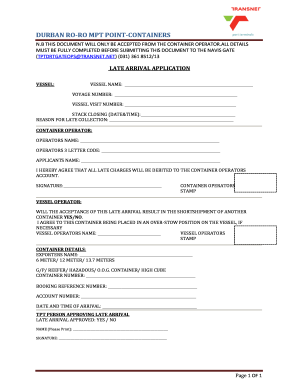
- In the vessel section, enter the following details: vessel name, voyage number, and vessel visit number. Make sure these details are accurate as they are essential for processing your application.
- Provide the stack closing date and time. Be precise to ensure there are no issues with the late arrival request.
- Indicate the reason for late collection. Ensure you provide a clear explanation, as this field is crucial for justifying your application.
- Fill in the container operator's details, including the operator's name and three-letter code. This information helps identify the contractor responsible for the shipment.
- Enter your name as the applicant. This is needed to ensure that the application can be attributed correctly.
- Acknowledge the terms by signing in the designated signature area. This confirms you agree that all late charges will be debited to the container operator's account.
- For the vessel operator section, indicate whether the acceptance of this late arrival will result in the short shipment of another container by selecting yes or no.
- If necessary, confirm your agreement regarding the container being placed in an over-stow position on the vessel by providing the vessel operator's name.
- In the container details section, provide the exporter’s name, the size of the container (6 meter, 12 meter, 13.7 meter), and the type of container (GP, reefer, hazardous, O.O.G., high cube).
- Fill in the container number, booking reference number, and account number accurately.
- Record the date and time of arrival to ensure all details are correct and consistent.
- Finally, ensure that a Transport (TPT) person approves the late arrival. Approvals should be marked as yes or no, and their name and signature should be printed in the last section.
- Once the form is completely filled out, save your changes, and proceed to download or print the document for submission.
Complete your documents online for a seamless application process.
Industry-leading security and compliance
US Legal Forms protects your data by complying with industry-specific security standards.
-
In businnes since 199725+ years providing professional legal documents.
-
Accredited businessGuarantees that a business meets BBB accreditation standards in the US and Canada.
-
Secured by BraintreeValidated Level 1 PCI DSS compliant payment gateway that accepts most major credit and debit card brands from across the globe.