Loading
Get Ahi Pa Breceipt Formbai - America Hears 2020-2026
How it works
-

Open form follow the instructions
-

Easily sign the form with your finger
-

Send filled & signed form or save
How to fill out the AHI PA Breceipt Formbai - America Hears online
Filling out the AHI PA Breceipt Formbai - America Hears online can seem daunting, but this guide will provide you with step-by-step instructions to ensure a smooth process. By following these guidelines, you will be able to complete the form accurately and efficiently.
Follow the steps to complete your hearing aid sales receipt.
- Click ‘Get Form’ button to access the AHI PA Breceipt Formbai and open it in your browser.
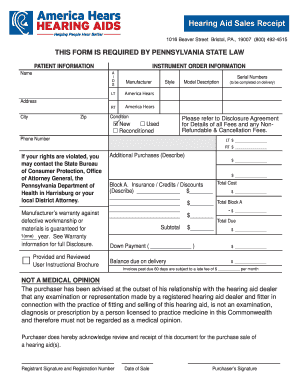
- Begin by entering the patient's information. Fill in the 'Name' field with the patient's full name, and provide the 'Address', 'City', and 'Zip' code in the respective fields.
- In the 'Instrument Order Information' section, specify the hearing aids being purchased. Select either ‘LT’ for left ear or ‘RT’ for right ear, and enter the 'Serial Numbers', 'Manufacturer', 'Style', and 'Model Description' as applicable.
- For the condition of the hearing aids, choose whether they are new, used, or reconditioned by checking the appropriate box.
- Provide the details regarding any additional purchases in the designated section. List any extra items or services and their costs.
- Calculate the total cost, including subtotal, down payment, and balance due upon delivery. Make sure to clearly document any insurance, credits, or discounts in Block A and adjust the total due accordingly.
- Once all fields are filled out, review your entries for accuracy. Ensure that both the purchaser's and registrant's signatures are provided along with the registration number and date of sale.
- When you are satisfied with the information entered, you may save your changes, download a copy of the form, print it, or share it as needed.
Complete your AHI PA Breceipt Formbai online today for a seamless hearing aid purchasing process.