Loading

Open form follow the instructions

Easily sign the form with your finger

Send filled & signed form or save
How to fill out the Tax File Number Declaration Form - ATO online
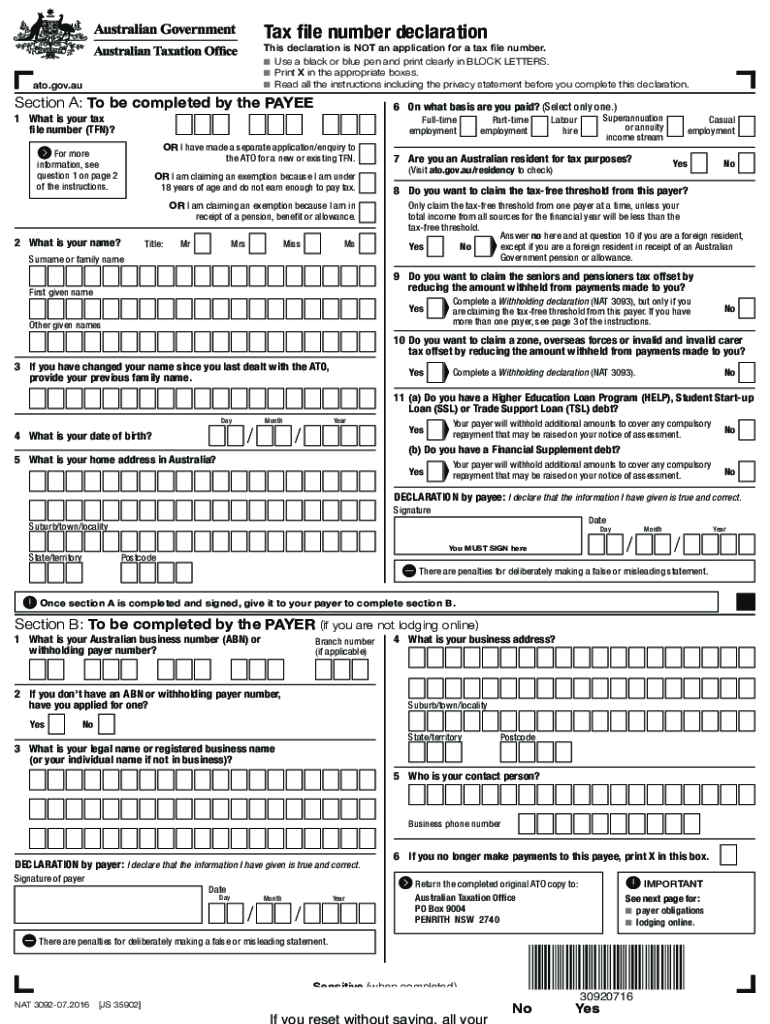
Filling out the Tax File Number Declaration Form is an essential step for individuals looking to ensure that the correct amount of tax is withheld from their income. This comprehensive guide will walk you through each section of the form to help you complete it accurately and efficiently.
Follow the steps to complete your Tax File Number Declaration Form online.
- Click ‘Get Form’ button to obtain the form and open it in the editor.
- In Section A, provide your tax file number (TFN) in Question 1. Only share your TFN with your employer after starting work to minimize the risk of administrative errors.
- Next, complete your personal information. Enter your name, date of birth, and home address in Australia as instructed.
- For Question 6, specify the basis on which you are paid, selecting from the provided options like full-time employment or casual employment.
- In Questions 7 and 8, answer whether you are an Australian resident for tax purposes and if you wish to claim the tax-free threshold from this payer.
- Progress through Questions 9 to 11 regarding tax offsets, ensuring you only claim with one payer at a time.
- Once you have filled out all sections of Section A, sign and date the declaration at the bottom.
- Submit the completed declaration to your payer, who will fill out Section B.
- Finally, save your changes, and if necessary, download or print the completed form for your records.
Start filling out your Tax File Number Declaration Form online today to ensure accurate tax withholding!
Experience a faster way to fill out and sign forms on the web. Access the most extensive library of templates available.
Related content
At its core, the Tax File Number (TFN) Declaration Form is a government document...
This declaration is for the payee to sign and return to the payer, Monash University, and...
2006 · Cited by 86 — This order updates the FAA agency-wide policies and procedures for...
Get answers to your most pressing questions about US Legal Forms API.
What is the ATO clearance certificate for Australian citizens?
The ATO clearance certificate verifies that a taxpayer has no outstanding tax debts, ensuring they're compliant with tax obligations. Citizens often use this certificate when selling property or applying for loans. To obtain this certification, you must also have submitted your Tax File Number Declaration Form - ATO accurately. This process helps reassure lenders and other parties of your financial reliability.
What happens if you don't provide TFN?
Choosing not to provide your TFN can lead to the ATO taxing your income at the highest marginal rate. This may significantly impact your finances and cause complications during tax time. By completing the Tax File Number Declaration Form - ATO, you can prevent these issues and ensure accurate tax calculations. It is always best to submit your TFN promptly.
What is the TFN format in Australia?
In Australia, the TFN consists of nine digits, which may appear in groups separated by spaces. The format usually looks like this: 123 456 789. Ensuring you present your TFN correctly on the Tax File Number Declaration Form - ATO is vital. This helps the ATO and your employer process your tax details accurately.
Should you give your TFN?
Yes, you should provide your TFN when necessary. Sharing your TFN helps your employer report your income accurately, reducing the likelihood of overpaying taxes. The Tax File Number Declaration Form - ATO serves as an essential tool in this process. However, be cautious and share your TFN only with trusted organizations to protect your identity.
How to declare ATO?
To declare your ATO, you need to fill out the Tax File Number Declaration Form - ATO. This form allows you to provide your personal details, including your TFN, so the ATO can process your tax correctly. Make sure to include accurate information to avoid any issues with your tax obligations. Once completed, submit the form to your employer or relevant entity.
What is an invalid tax file number?
An invalid Tax File Number is one that does not conform to the correct format or does not match ATO records. Common causes for an invalid TFN include errors in submission or the number being canceled due to tax-related issues. If you're facing challenges, you may wish to refer to the Tax File Number Declaration Form - ATO for clarification on proper filing.
Why is my TFN invalid?
Your Tax File Number could be invalid due to a few reasons, such as entering it incorrectly or if the number has been canceled by the ATO. It's critical to double-check the number you’re using and ensure it matches the official records. If issues persist, access the Tax File Number Declaration Form - ATO to re-establish your details.
How to submit a TFN declaration online?
Submitting the Tax File Number Declaration Form - ATO online can often be done through your employer's online portal or via the ATO's website. Ensure you have all necessary details prepared before you begin the process. If you need further assistance with the submission, platforms like uslegalforms provide tools that can make the process easier.
How to submit tfn declaration form online?
To submit the Tax File Number Declaration Form - ATO online, you may need to use the ATO's online services or your employer's payroll software that is linked to ATO. Check if your employer has specific online requirements for submission. If you encounter any difficulty, consider using uslegalforms for additional guidance and resources.
Can I download a TFN declaration form?
Yes, you can download the Tax File Number Declaration Form - ATO directly from the official ATO website. This form is essential for employees to provide their Tax File Number to employers. Once you download it, you can fill it out and submit it to your employer. Make sure you keep a copy for your records.
Use professional pre-built templates to fill in and sign documents online faster. Get access to thousands of forms.
If you believe that this page should be taken down, please follow our DMCA take down process here.