Loading
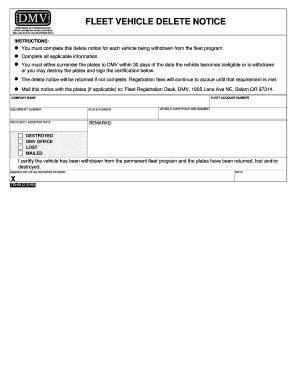
Get Fleet Vehicle Delete Notice - Odotstateorus - Odot State Or 2020-2025
How it works
-

Open form follow the instructions
-

Easily sign the form with your finger
-

Send filled & signed form or save
How to use or fill out the FLEET VEHICLE DELETE NOTICE - Odotstateorus - Odot State Or online
The FLEET VEHICLE DELETE NOTICE is a crucial document for ensuring that vehicles are properly withdrawn from the fleet program. This guide provides clear instructions on how to complete this form online, ensuring compliance with the Department of Transportation's requirements.
Follow the steps to complete the delete notice accurately.
- Click the 'Get Form' button to access the delete notice form. This will allow you to open the document in an online editor for completion.
- Begin by entering your company name in the designated field. Ensure that you provide the official name as registered with the Department of Transportation.
- Next, locate the fleet account number field and enter your specific fleet account number. This number is essential for processing your request.
- In the equipment number field, input the unique equipment number associated with the vehicle you wish to delete from the fleet program.
- Provide the plate number of the vehicle being withdrawn from the fleet in the designated section. This helps identify the vehicle in question.
- Fill in the received/counter date, which is the date on which this notice is submitted or processed at the DMV.
- Add any remarks relevant to the vehicle withdrawal in the remarks section. This can include special instructions or notes regarding the vehicle.
- Input the vehicle identification number (VIN) to allow for precise identification of the vehicle being deleted from the fleet.
- Select the status of the plates (destroyed, lost, or mailed). This informs the DMV of what has been done with the vehicle's plates.
- The authorized person must sign in the designated signature field, affirming that the information is accurate and that the vehicle has been withdrawn from the fleet program.
- Finally, enter the date of signature in the specified area. This date should match the submission date of the delete notice.
- Review the completed form to ensure all applicable information is accurate and complete before mailing it along with the plates (if applicable) to the Fleet Registration Desk at the DMV.
Ensure your compliance today by completing the FLEET VEHICLE DELETE NOTICE online.
To delete a vehicle from Fleetio, first, log into your account. Navigate to the 'Vehicles' section, select the vehicle you wish to delete, and click on the 'Delete' option. Confirm your action to ensure the vehicle is removed from your fleet management. For detailed guidance, you can refer to the FLEET VEHICLE DELETE NOTICE - Odotstateorus - Odot State Or.
Industry-leading security and compliance
US Legal Forms protects your data by complying with industry-specific security standards.
-
In businnes since 199725+ years providing professional legal documents.
-
Accredited businessGuarantees that a business meets BBB accreditation standards in the US and Canada.
-
Secured by BraintreeValidated Level 1 PCI DSS compliant payment gateway that accepts most major credit and debit card brands from across the globe.