We use cookies to improve security, personalize the user experience, enhance our marketing activities (including cooperating with our marketing partners) and for other business use.
Click "here" to read our Cookie Policy. By clicking "Accept" you agree to the use of cookies. Read less
Read more
Accept
Loading
Form preview
  • US Legal Forms
  • Form Library
  • More Forms
  • More Multi-State Forms
  • Biweekly Payroll Calendar Generator

Get Biweekly Payroll Calendar Generator

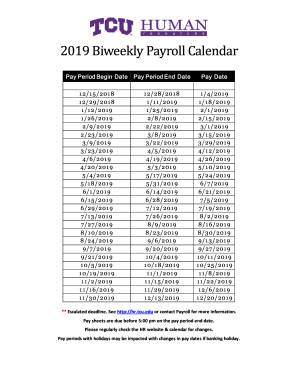
6/201 9 8 /9/201 9 8 /23/201 9 9/6/201 9 9/20/201 9 1 0/4/201 9 1 0/1 8 /201 9 1 1 /1 /201 9 1 1 /1 5 /201 9 1 1 /29/201 9 1 2/1 3/201 9 Pay Date 1 /4/201 9 1 /1 8 /201 9 2/1 /201 9 2/1 5 /201 9 3/1 /201 9 3/1 5 /201 9 3/29/201 9 4/1 2/201 9 4/26/201 9 5 /1 0/201 9 5 /24/201 9 6/7/201 9 6/21 /201 9 7/5 /201 9 7/1 9/201 9 8 /2/201 9 8 /1 6/201 9 8 /30/201 9 9/1 3/201 9 9/27/201 9 1 0/1 1 /201 9 1 0/25 /201 9 1 1 /8 /201 9 1 1 /22/201 9 1 2/6/201 9 1 2/20/201 9 ** Escalated deadline. See http:/.

How it works

  1. Open form

    Open form follow the instructions

  2. Easily sign form

    Easily sign the form with your finger

  3. Share form

    Send filled & signed form or save

How to fill out the Biweekly Payroll Calendar Generator online

Filling out the Biweekly Payroll Calendar Generator is essential for ensuring timely and accurate payroll processing. This guide offers a clear, step-by-step approach to assist users in completing this important form efficiently.

Follow the steps to fill out the Biweekly Payroll Calendar Generator successfully.

  1. Press the ‘Get Form’ button to access the Biweekly Payroll Calendar Generator and open it for editing.
  2. Review the pay period begin and end dates listed in the form. Ensure that you are aware of the appropriate periods for your payroll needs.
  3. Check the corresponding pay dates for each pay period. These dates indicate when employees will receive their payments.
  4. Be mindful of any escalated deadlines noted in the form. If you encounter any questions or need clarification, refer to the HR website or contact the Payroll department for assistance.
  5. Prepare your pay sheets in accordance with the pay period end dates. Remember that all pay sheets must be submitted before 5:00 pm on these dates.
  6. Stay informed about any changes by regularly checking the HR website and calendar, especially regarding pay periods that may coincide with holidays.
  7. Once you have filled out the form completely and verified the accuracy of the information, you can save your changes. Consider downloading or printing a copy for your records or sharing it with your team as needed.

Complete your Biweekly Payroll Calendar Generator online today for accurate payroll management.

Get form

Experience a faster way to fill out and sign forms on the web. Access the most extensive library of templates available.
Get form

Related content

Payroll Schedule Calendars | U.S. Department of...
Payroll Schedule Calendars for employees of agencies who receive payroll services from the...
Learn more
Biweekly 2025 Payroll Calendar
Pay Period. Begin Date. Pay Period. End Date. Paycheck. Date. Labor Import. 1. 12/15/2024...
Learn more
PayClock PC600 Series Time and Attendance System...
You can view employee data for open or closed pay periods. When you click on the...
Learn more

Related links form

Form 8396 Nyc Wmbe Certification Pip Form Minority And Women Business Enterprise Certification Program ... - Mwbe Ky Opm 71doc Form

Questions & Answers

Get answers to your most pressing questions about US Legal Forms API.

Contact support

In a standard calendar year, there are typically 26 biweekly payments. This schedule arises from dividing the year into 52 weeks, resulting in 26 two-week periods. Using our Biweekly Payroll Calendar Generator can simplify this process for you, ensuring accuracy in your payroll planning. It’s an efficient tool that helps you visualize and manage your payment cycles effortlessly.

A biweekly payroll schedule typically consists of paying employees every two weeks. For instance, if your payroll period begins on a Sunday, it might run from February 1 to February 14. Employees would receive their paycheck on the following Friday, February 15. Utilizing our Biweekly Payroll Calendar Generator can help you create a clear visual of your schedule, ensuring you manage your payroll dates effectively.

0:40 3:59 So let's go to the events sheet. And then type in first let's do a weekly daily. So I'm going toMoreSo let's go to the events sheet. And then type in first let's do a weekly daily. So I'm going to call it a weekly payday. And I will choose the week event time to be payday.

0:18 2:03 If you're paying people twice a month remember to pick to check dates. Take the time period you'reMoreIf you're paying people twice a month remember to pick to check dates. Take the time period you're paying your employees. For. And then the day you want the checks to go. Out.

(Pay/Hour * Total Hours Worked) + (Overtime/Hour * Total Overtime Hours). The payroll sheet can be formulated under cell F4 as =(B2*C2)+(D2*E2). It's a simple formula, anyway. However, you can see the screenshot below for a better understanding.

Select the Sheet1 tab. On the Tools menu, point to Macro, and then select Macros. Select CalendarMaker, and then select Run to create the calendar.

Download a calendar template: Browse through the calendar templates, choose an Excel calendar template that is best for you. Click the Download button on the template page, open the template file in Excel, and then edit and save your calendar.

Employees receive 26 paychecks per year with a biweekly pay schedule. Depending on the calendar year, there are sometimes 27 pay periods, which can increase payroll costs. Both hourly and salaried employees may receive biweekly pay.

To calculate biweekly pay for an hourly employee, multiply the number of hours worked in a two-week period by the hourly rate. If employees want to check their hourly rate based on their gross pay, they simply divide the payment amount by the total number of hours worked.

How to create a work schedule in Excel Open a blank spreadsheet. Start by searching for the Excel application on your computer or clicking on the Excel icon on your desktop. ... Create a header. ... Title your columns with weekdays. ... List employee names in each row. ... Enter shift details. ... Save your schedule.

Get This Form Now!

Use professional pre-built templates to fill in and sign documents online faster. Get access to thousands of forms.
Get form
If you believe that this page should be taken down, please follow our DMCA take down processhere.

Industry-leading security and compliance

US Legal Forms protects your data by complying with industry-specific security standards.
  • In businnes since 1997
    25+ years providing professional legal documents.
  • Accredited business
    Guarantees that a business meets BBB accreditation standards in the US and Canada.
  • Secured by Braintree
    Validated Level 1 PCI DSS compliant payment gateway that accepts most major credit and debit card brands from across the globe.
Get Biweekly Payroll Calendar Generator
Get form
Form Packages
Adoption
Bankruptcy
Contractors
Divorce
Home Sales
Employment
Identity Theft
Incorporation
Landlord Tenant
Living Trust
Name Change
Personal Planning
Small Business
Wills & Estates
Packages A-Z
Form Categories
Affidavits
Bankruptcy
Bill of Sale
Corporate - LLC
Divorce
Employment
Identity Theft
Internet Technology
Landlord Tenant
Living Wills
Name Change
Power of Attorney
Real Estate
Small Estates
Wills
All Forms
Forms A-Z
Form Library
Customer Service
Terms of Service
Privacy Notice
Legal Hub
Content Takedown Policy
Bug Bounty Program
About Us
Help Portal
Legal Resources
Blog
Affiliates
Contact Us
Delete My Account
Site Map
Industries
Forms in Spanish
Localized Forms
State-specific Forms
Forms Kit
Legal Guides
Real Estate Handbook
All Guides
Prepared for You
Notarize
Incorporation services
Our Customers
For Consumers
For Small Business
For Attorneys
Our Sites
US Legal Forms
USLegal
FormsPass
pdfFiller
signNow
airSlate WorkFlow
DocHub
Instapage
Social Media
Call us now toll free:
+1 833 426 79 33
As seen in:
  • USA Today logo picture
  • CBC News logo picture
  • LA Times logo picture
  • The Washington Post logo picture
  • AP logo picture
  • Forbes logo picture
© Copyright 1997-2025
airSlate Legal Forms, Inc.
3720 Flowood Dr, Flowood, Mississippi 39232
Form Packages
Adoption
Bankruptcy
Contractors
Divorce
Home Sales
Employment
Identity Theft
Incorporation
Landlord Tenant
Living Trust
Name Change
Personal Planning
Small Business
Wills & Estates
Packages A-Z
Form Categories
Affidavits
Bankruptcy
Bill of Sale
Corporate - LLC
Divorce
Employment
Identity Theft
Internet Technology
Landlord Tenant
Living Wills
Name Change
Power of Attorney
Real Estate
Small Estates
Wills
All Forms
Forms A-Z
Form Library
Customer Service
Terms of Service
Privacy Notice
Legal Hub
Content Takedown Policy
Bug Bounty Program
About Us
Help Portal
Legal Resources
Blog
Affiliates
Contact Us
Delete My Account
Site Map
Industries
Forms in Spanish
Localized Forms
State-specific Forms
Forms Kit
Legal Guides
Real Estate Handbook
All Guides
Prepared for You
Notarize
Incorporation services
Our Customers
For Consumers
For Small Business
For Attorneys
Our Sites
US Legal Forms
USLegal
FormsPass
pdfFiller
signNow
airSlate WorkFlow
DocHub
Instapage
Social Media
Call us now toll free:
+1 833 426 79 33
As seen in:
  • USA Today logo picture
  • CBC News logo picture
  • LA Times logo picture
  • The Washington Post logo picture
  • AP logo picture
  • Forbes logo picture
© Copyright 1997-2025
airSlate Legal Forms, Inc.
3720 Flowood Dr, Flowood, Mississippi 39232