Open form follow the instructions
Easily sign the form with your finger
Send filled & signed form or save
How to fill out the Navpers 1306 92 online
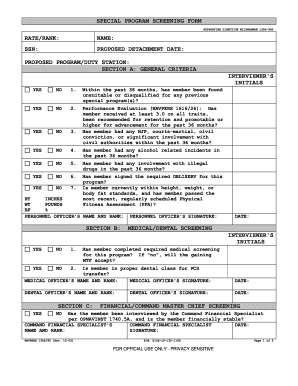
The Navpers 1306 92 is a special program screening form used to evaluate eligibility for various military programs. This guide will provide you with clear, step-by-step instructions on how to complete the form online, ensuring a smooth submission process.
Follow the steps to successfully fill out the Navpers 1306 92 online.
- Click the ‘Get Form’ button to access the Navpers 1306 92 form and open it in your preferred editor.
- Begin by filling out your personal information in the top section, including your rate or rank, name, Social Security Number (SSN), proposed detachment date, and proposed program or duty station.
- Proceed to Section A: General Criteria. For each question, select 'Yes' or 'No' based on your situation. Make sure to note the interviewer's initials after completing this section.
- Complete Section B, which focuses on medical and dental screening. Provide the necessary initials from the medical officer and dental officer, as well as signatures in the designated areas.
- In Section C: Financial/Command Master Chief Screening, verify if you have been interviewed by a Command Financial Specialist about your financial stability. Ensure that the specialist provides their signature and date.
- Proceed to Section D: Additional Requirements. Answer all questions with 'Yes' or 'No' and have your Command Career Counselor fill out their information, including name, rank, and signature.
- After completing all sections, review the entire form for accuracy, then provide your own name, rank, and signature in the final section to certify the information is true.
- Lastly, save your changes. You can download, print, or securely share the completed form as required.
Start filling out your Navpers 1306 92 online today to ensure your eligibility for special programs.
Experience a faster way to fill out and sign forms on the web. Access the most extensive library of templates available.
Related content
1.U.S. Navy personnel: In addition to submitting the online application, Sailors must...
Get answers to your most pressing questions about US Legal Forms API.
How to get Navpers 1070 602?
You can acquire the Navpers 1070 602 by contacting your Navy unit's administrative office or visiting an official military website that provides access to service records. This form is essential for maintaining an accurate account of your history in the service. If you need additional guidance, services like USLegalForms can assist in obtaining necessary military forms conveniently.
How do I get my Navpers 1070 602?
To obtain your Navpers 1070 602, you should reach out to your command's administrative office or check official military websites. This form contains valuable information about your service history. If you encounter challenges, using platforms like USLegalForms can simplify your search for military documentation.
What does the Navpers stand for?
Navpers stands for Navy Personnel, which encompasses various forms and documents related to Navy personnel management. Understanding this acronym is essential for anyone navigating through military administrative processes. The term highlights the focus on service members and the documentation necessary for efficient personnel management.
What is Navpers 1336 3?
Navpers 1336 3 is a form utilized in Navy assessments focusing on various personnel matters. This documentation is key for managing evaluations and feedback within the Navy's framework. Knowing how to fill out Navpers 1336 3 accurately can greatly support your career advancement efforts.
What is Navpers 1300 16?
Navpers 1300 16 serves as a documentation guide that outlines evaluation reports and personnel recommendations. This form ensures that your performance is documented properly, affecting future opportunities. Familiarizing yourself with Navpers 1300 16 can help you maintain an accurate account of your service record.
What is Navpers 1306-92?
Navpers 1306-92 is a specific version of the Navpers form designed for administrative requests pertaining to the Navy's personnel program. This form provides a structured approach to submit important requests and gather essential data. For anyone looking to make personnel adjustments, mastering this form is essential.
What is Navpers 1306?
Navpers 1306 is a form used within the Navy to facilitate personnel actions such as duty assignments and evaluations. This form plays a vital role in various administrative processes. Understanding Navpers 1306 can significantly streamline your interactions regarding service-related changes, enhancing your overall experience.
Where can I find Navpers 1070 604?
You can find Navpers 1070 604 at various official military websites or by contacting your unit's administrative office. It’s crucial to have access to this document for maintaining your service records. Furthermore, sites like USLegalForms can help you navigate the process of obtaining necessary military forms efficiently.
What is the Navpers form to process immediate reenlistment contracts?
The specific Navpers form for processing immediate reenlistment contracts is the Navpers 1306-92. This form assists service members in formally indicating their intention to reenlist, facilitating necessary approvals and documentation. Accurately filling out this form is essential to ensure that your reenlistment is processed smoothly. Platforms like USLegalForms provide valuable resources to help you with the process.
What is a 1306 in the Navy?
A 1306 in the Navy refers to a set of forms that facilitate various personnel actions, predominantly focusing on requests for changes in status or orders. These forms help officers manage their assignments and transitions effectively. By accurately filling out a Navpers 1306, sailors can ensure their needs are clearly communicated to the command. This clarity helps streamline administrative processes.
Use professional pre-built templates to fill in and sign documents online faster. Get access to thousands of forms.
If you believe that this page should be taken down, please follow our DMCA take down process here.