Loading
Get Tabel Nominal Cu Rudele Completat
How it works
-

Open form follow the instructions
-

Easily sign the form with your finger
-

Send filled & signed form or save
How to fill out the Tabel Nominal Cu Rudele Completat online
Filling out the Tabel Nominal Cu Rudele Completat is an essential task for individuals who need to report their family relations accurately. This guide provides clear, step-by-step instructions to help you complete the form online with confidence.
Follow the steps to successfully complete the form.
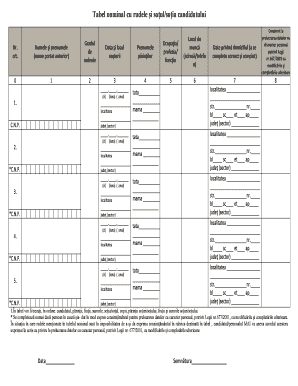
- Click the ‘Get Form’ button to access the Tabel Nominal Cu Rudele Completat. This action will open the form in your chosen document editor.
- In the first section, enter the serial number in the designated area as indicated on the form. Ensure that this number is accurate, as it serves as an identifier.
- For the second field, fill in the full name (including any previous names) of the individual you are reporting. It is crucial to enter this information clearly.
- In the next column, specify the degree of kinship. This could be 'parent', 'sibling', 'spouse', or 'child', depending on the relationship of the person listed to you.
- Continue filling out each row with the corresponding information for each family member. This includes the CNP (personal identification number), date and place of birth, and parental names.
- Complete the occupation, profession, or function and the workplace details, including the address and contact number for each listed family member.
- Provide accurate domicile information, ensuring that the local area, street address, and county are all correctly entered.
- If applicable, check the consent box for data processing in accordance with personal data laws. Remember that consent needs to be explicitly given for this section.
- Finally, review all the entries for accuracy, then save your changes. You can download, print, or share the completed form as needed.
Complete your documents online today for a seamless experience.