We use cookies to improve security, personalize the user experience, enhance our marketing activities (including cooperating with our marketing partners) and for other business use.
Click "here" to read our Cookie Policy. By clicking "Accept" you agree to the use of cookies. Read less
Read more
Accept
Loading
Form preview
  • US Legal Forms
  • Form Library
  • More Forms
  • More Multi-State Forms
  • Postal International Declaration Form 2020

Get Postal International Declaration Form 2020-2025

How it works

  1. Open form

    Open form follow the instructions

  2. Easily sign form

    Easily sign the form with your finger

  3. Share form

    Send filled & signed form or save

How to fill out the Postal International Declaration Form online

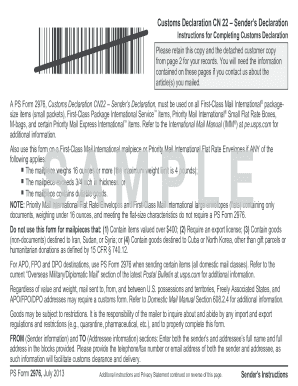
Filling out the Postal International Declaration Form online is a crucial step for ensuring your international shipment meets customs regulations. This guide will lead you through each section of the form, providing clear instructions to help you complete it accurately.

Follow the steps to successfully complete the Postal International Declaration Form.

  1. Click ‘Get Form’ button to obtain the form and open it in the editor.
  2. In the 'From' section, enter the full name and address of the sender. It is important to include the telephone or email address to facilitate customs clearance.
  3. In the 'To' section, provide the full name and address of the addressee. Adding a contact number or email here is also recommended.
  4. Check the appropriate box that categorizes your item, such as 'Gift' or 'Commercial sample.' If the shipment includes dangerous goods, make sure to specify that.
  5. In the detailed description field, provide a specific description of each article being sent, avoiding general terms. This will help prevent customs issues.
  6. Fill in the quantity, weight in pounds and ounces, and value for each item. Accurate numbers are crucial to avoid delays.
  7. If applicable, enter the 6-digit Harmonized Tariff Schedule number, which categorizes your item for customs. Also, indicate the country of origin, identifying where the goods were produced.
  8. Check the applicable AES Exemption box based on the value and type of your goods. Make sure to read the criteria to choose correctly.
  9. Finally, sign and date the form. Your signature certifies the accuracy of the information provided and asserts compliance with all regulations.
  10. Once you have completed all sections, save your changes, and you can download, print, or share the form as needed.

Ensure your international shipment is processed smoothly by completing the Postal International Declaration Form online today.

Get form

Experience a faster way to fill out and sign forms on the web. Access the most extensive library of templates available.
Get form

Related content

USPS.com® - Customs Forms
The form you need depends on the service you're using and the value of your shipment. Let...
Learn more
Customs Declaration Form
PS Form 2976 is required on all First Class Mail International package size items (small...
Learn more
international mail - NamuWiki
Sep 20, 2025 — International postal items can be downloaded from the CN22, CN23 Customs...
Learn more

Related links form

Shandon Varistain Xy Manual Operation Annexure8 Medical Report Form Inventory I Ze Form Delegate Form - PNW Kiwanis - Pnwkiwanis

Questions & Answers

Get answers to your most pressing questions about US Legal Forms API.

Contact support

The CP72 and CN22 are both forms used for customs declarations when sending items internationally. The CP72 is specifically for items that require a more detailed declaration, while the CN22 is a simpler form for less complex shipments. Understanding the difference between these forms can help you determine which Postal International Declaration Form to use based on your shipment's specifics.

A helpful app for filling out customs forms is the USPS mobile app. This app allows you to complete the Postal International Declaration Form quickly and efficiently. You can enter your package details, generate a label, and save your information for future shipments, making it an efficient solution for your international mailing needs.

Mailing documents internationally involves a few steps. Firstly, ensure you use the correct Postal International Declaration Form to declare the contents of your package. Next, choose a reliable shipping option from your preferred carrier, such as USPS, and affix the customs form securely to your documents before handing them over for mailing.

Absolutely, filling out a customs declaration form online simplifies your shipping process. You can access the Postal International Declaration Form from the USPS website. By entering your package details online, you save time and ensure everything is correct before heading to the Post Office.

Yes, you can complete a customs declaration online using the USPS web portal. This allows you to fill out the Postal International Declaration Form from the comfort of your home. After completing the form, make sure to print it out and include it with your package before shipping.

To fill out a US customs declaration form, start by gathering information about the contents of your package. Use clear, concise descriptions and include values for each item. You can complete the Postal International Declaration Form manually or online for a smoother process, ensuring that your shipment gets through customs without delays.

Filling out a customs form online is easy and convenient. You can visit the USPS website, where you can find the Postal International Declaration Form. After entering your package details, you can print the form, attach it to your shipment, and save time at the Post Office.

When addressing mail to Brazil, start with the recipient's name, followed by the street address and number, and then the district or neighborhood. Include the city, state abbreviation, postal code, and finally, write 'Brazil' on a new line. If you are including any products, use the Postal International Declaration Form to list these items accurately.

The format for an international mailing address typically involves writing the recipient's name, street address, city, postal code, and country. When addressing to Brazil, ensure you write 'Brazil' at the end. It’s crucial to follow this format precisely, especially when using a Postal International Declaration Form.

Filling out international mail is straightforward. Ensure that you use the Postal International Declaration Form to declare any goods, state their value, and provide a clear description. Additionally, double-check the recipient’s address format to avoid any postage issues.

Get This Form Now!

Use professional pre-built templates to fill in and sign documents online faster. Get access to thousands of forms.
Get form
If you believe that this page should be taken down, please follow our DMCA take down processhere.

Industry-leading security and compliance

US Legal Forms protects your data by complying with industry-specific security standards.
  • In businnes since 1997
    25+ years providing professional legal documents.
  • Accredited business
    Guarantees that a business meets BBB accreditation standards in the US and Canada.
  • Secured by Braintree
    Validated Level 1 PCI DSS compliant payment gateway that accepts most major credit and debit card brands from across the globe.
Get Postal International Declaration Form
Get form
Form Packages
Adoption
Bankruptcy
Contractors
Divorce
Home Sales
Employment
Identity Theft
Incorporation
Landlord Tenant
Living Trust
Name Change
Personal Planning
Small Business
Wills & Estates
Packages A-Z
Form Categories
Affidavits
Bankruptcy
Bill of Sale
Corporate - LLC
Divorce
Employment
Identity Theft
Internet Technology
Landlord Tenant
Living Wills
Name Change
Power of Attorney
Real Estate
Small Estates
Wills
All Forms
Forms A-Z
Form Library
Customer Service
Terms of Service
Privacy Notice
Legal Hub
Content Takedown Policy
Bug Bounty Program
About Us
Help Portal
Legal Resources
Blog
Affiliates
Contact Us
Delete My Account
Site Map
Industries
Forms in Spanish
Localized Forms
State-specific Forms
Forms Kit
Legal Guides
Real Estate Handbook
All Guides
Prepared for You
Notarize
Incorporation services
Our Customers
For Consumers
For Small Business
For Attorneys
Our Sites
US Legal Forms
USLegal
FormsPass
pdfFiller
signNow
airSlate WorkFlow
DocHub
Instapage
Social Media
Call us now toll free:
+1 833 426 79 33
As seen in:
  • USA Today logo picture
  • CBC News logo picture
  • LA Times logo picture
  • The Washington Post logo picture
  • AP logo picture
  • Forbes logo picture
© Copyright 1997-2025
airSlate Legal Forms, Inc.
3720 Flowood Dr, Flowood, Mississippi 39232
Form Packages
Adoption
Bankruptcy
Contractors
Divorce
Home Sales
Employment
Identity Theft
Incorporation
Landlord Tenant
Living Trust
Name Change
Personal Planning
Small Business
Wills & Estates
Packages A-Z
Form Categories
Affidavits
Bankruptcy
Bill of Sale
Corporate - LLC
Divorce
Employment
Identity Theft
Internet Technology
Landlord Tenant
Living Wills
Name Change
Power of Attorney
Real Estate
Small Estates
Wills
All Forms
Forms A-Z
Form Library
Customer Service
Terms of Service
Privacy Notice
Legal Hub
Content Takedown Policy
Bug Bounty Program
About Us
Help Portal
Legal Resources
Blog
Affiliates
Contact Us
Delete My Account
Site Map
Industries
Forms in Spanish
Localized Forms
State-specific Forms
Forms Kit
Legal Guides
Real Estate Handbook
All Guides
Prepared for You
Notarize
Incorporation services
Our Customers
For Consumers
For Small Business
For Attorneys
Our Sites
US Legal Forms
USLegal
FormsPass
pdfFiller
signNow
airSlate WorkFlow
DocHub
Instapage
Social Media
Call us now toll free:
+1 833 426 79 33
As seen in:
  • USA Today logo picture
  • CBC News logo picture
  • LA Times logo picture
  • The Washington Post logo picture
  • AP logo picture
  • Forbes logo picture
© Copyright 1997-2025
airSlate Legal Forms, Inc.
3720 Flowood Dr, Flowood, Mississippi 39232