Loading
Get Annual Training Waiver Request Pdf 2020-2026
How it works
-

Open form follow the instructions
-

Easily sign the form with your finger
-

Send filled & signed form or save
How to fill out the Annual Training Waiver Request Pdf online
This guide provides a clear and comprehensive approach to completing the Annual Training Waiver Request Pdf online. By following these instructions, users will be able to understand each component of the form and submit their requests efficiently.
Follow the steps to complete the Annual Training Waiver Request Pdf online
- Press the ‘Get Form’ button to access the form and open it in your preferred editor.
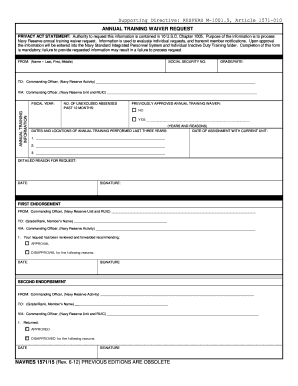
- Begin by entering your name in the 'FROM' section, specifying your last, first, and middle names.
- In the next field, accurately provide your social security number.
- Input your grade or rate in the designated section.
- Complete the 'TO' section by indicating the Commanding Officer for your Navy Reserve Activity.
- Use the 'VIA' field to note the Commanding Officer of your Navy Reserve Unit and the RUIC.
- Record the fiscal year for which you are requesting the waiver.
- Indicate the number of unexcused absences you have had in the past 12 months.
- If you have previously been approved for an annual training waiver, check 'YES' and provide details; if not, select 'NO'.
- List the dates and locations of annual training performed over the last three years, providing reasons for each entry.
- State the date of your assignment with your current unit.
- In the 'DETAILED REASON FOR REQUEST' section, thoroughly explain the reasons for your waiver request.
- Finally, enter the date and signing your name to complete the form.
Fill out your Annual Training Waiver Request Pdf online today!