Loading
Form preview
  • US Legal Forms
  • Form Library
  • More Forms
  • More Multi-State Forms
  • Sf 8 2020

Get Sf 8 2020-2026

How it works

  1. Open form

    Open form follow the instructions

  2. Easily sign form

    Easily sign the form with your finger

  3. Share form

    Send filled & signed form or save

How to fill out the Sf 8 online

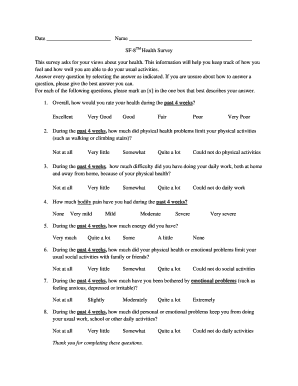
The Sf 8 Health Survey is a valuable tool for assessing your health and its impact on daily activities. This guide will provide clear, step-by-step instructions for completing the form online, ensuring you have the necessary information to accurately express your health status.

Follow the steps to fill out the Sf 8 health survey online

  1. Press the ‘Get Form’ button to access the form and open it in your preferred editor.
  2. Begin by entering the date at the top of the form where indicated.
  3. In the name section, fill in your full name to identify yourself in the survey.
  4. Review the first question regarding your overall health rating for the past four weeks. Select the box that best describes your health by marking an [x].
  5. Proceed to question two, which asks about physical health limitations. Again, choose the best answer reflecting your experience and mark it accordingly.
  6. Continue with question three, focusing on your daily work capabilities and how your physical health may have affected them.
  7. For question four, assess the level of bodily pain you've experienced in the past month and indicate your answer.
  8. Question five gauges your energy levels, so select the option that aligns with your experience over the last four weeks.
  9. Question six concerns limitations in social activities due to physical or emotional health. Choose the most appropriate response.
  10. For question seven, evaluate any emotional issues that may have affected you recently and mark the relevant option.
  11. Finally, in question eight, indicate how much personal or emotional problems have hindered your daily activities.
  12. Once all questions are answered, review your responses for accuracy. You can then save changes, download the form, print it, or share it as needed.

Complete your Sf 8 health survey online today to track your health effectively.

Get form

Experience a faster way to fill out and sign forms on the web. Access the most extensive library of templates available.
Get form

Related content

Unemployment Compensation Form SF-8
To help EXPEDITE your claim, take THIS FORM with you, your SOCIAL SECURITY ACCOUNT NUMBER...
Learn more
Unemployment Compensation Form SF-8
Form SF-8 is for federal employees to file a claim for unemployment compensation (UCFE/UI)...
Learn more
SF8
Sep 22, 2025 — SF8, a cinematic (movie-like) drama created by 8 film directors and...
Learn more

Related links form

CA MCLE Personal Log For Compliance Period - Mcle Calbar Ca Retired Seabee Directory Summary Annual Report INSTALLATION GUIDELINES - Raven Engineered Films

Questions & Answers

Get answers to your most pressing questions about US Legal Forms API.

Contact support

Standard Form 8 (SF 8) is a critical document used by federal employees to inform them about their eligibility for unemployment insurance. This form outlines important information on how to proceed with filing for benefits and helps clarify rights and responsibilities. Properly utilizing the SF 8 ensures that federal employees can access the benefits they deserve.

In Alaska, you may become disqualified for unemployment benefits if you quit your job without good cause or if you were fired due to misconduct. Additionally, refusing suitable work may lead to disqualification, impacting your eligibility. Understanding these aspects, along with proper documentation like the SF 8, is vital for navigating your unemployment options.

SF 8, also known as the 'Notice to Federal Employees About Unemployment Insurance,' is an official form used by federal employees to apply for unemployment benefits. This form provides important information regarding an employee's eligibility and is necessary for processing unemployment claims. Keeping your SF 8 organized can streamline your application process and enhance your chances of receiving benefits.

To calculate your unemployment benefits in California, you will typically look at your highest earning quarter during the base period. The state uses a formula to determine your weekly benefit amount, which can be found on the state unemployment website. Utilizing forms like the SF 8 can provide you with essential information to assist in this calculation, ensuring you have the correct documentation.

In Nebraska, disqualification for unemployment benefits typically occurs if you quit your job without a valid reason or if you were terminated for misconduct. Moreover, failing to meet the required minimum earnings during the base period could also affect your eligibility. It’s crucial to be aware of these criteria as you prepare any necessary documents, including the SF 8.

Yes, federal employees can qualify for unemployment benefits in California, but they must file a claim through the state's unemployment office. However, eligibility may depend on their specific employment circumstances and may require forms, including the SF 8. Understanding the nuances can help federal employees navigate their options more effectively.

In Maine, you may be disqualified from receiving unemployment benefits if you voluntarily left your job without good cause, or if you were terminated for misconduct. Additionally, failing to meet the work search requirements could lead to disqualification. It's essential to understand these factors, as they can significantly affect your eligibility, especially when considering documentation like the SF 8.

SF-8 Unemployment Compensation_0.pdf. This form has been given to you because (1) you have been separated from your job, or (2) you were placed in a nonpay status, or (3) your records have been transferred to a different payroll office.

If you plan to file for unemployment compensation, download and print this form. Take this form along with your furlough notice and the other documents described on the form to your local public employment service office.

The best place to look your employer's EIN (Employer Identification Number) or Tax ID is in Box b of your W-2 form. Look for a 9-digit number with a dash separating the second and third digit (NN-NNNNNNN). It's usually right above your employer's name or below their address. Don't have your W-2 yet?

Get This Form Now!

Use professional pre-built templates to fill in and sign documents online faster. Get access to thousands of forms.
Get form
If you believe that this page should be taken down, please follow our DMCA take down processhere.

Industry-leading security and compliance

US Legal Forms protects your data by complying with industry-specific security standards.
  • In businnes since 1997
    25+ years providing professional legal documents.
  • Accredited business
    Guarantees that a business meets BBB accreditation standards in the US and Canada.
  • Secured by Braintree
    Validated Level 1 PCI DSS compliant payment gateway that accepts most major credit and debit card brands from across the globe.
Get Sf 8
Get form
  • Adoption
  • Bankruptcy
  • Contractors
  • Divorce
  • Home Sales
  • Employment
  • Identity Theft
  • Incorporation
  • Landlord Tenant
  • Living Trust
  • Name Change
  • Personal Planning
  • Small Business
  • Wills & Estates
  • Packages A-Z
  • Affidavits
  • Bankruptcy
  • Bill of Sale
  • Corporate - LLC
  • Divorce
  • Employment
  • Identity Theft
  • Internet Technology
  • Landlord Tenant
  • Living Wills
  • Name Change
  • Power of Attorney
  • Real Estate
  • Small Estates
  • Wills
  • All Forms
  • Forms A-Z
  • Form Library
  • Legal Hub
  • About Us
  • Help Portal
  • Legal Resources
  • Blog
  • Affiliates
  • Contact Us
  • Delete My Account
  • Site Map
  • Industries
  • Forms in Spanish
  • Localized Forms
  • State-specific Forms
  • Forms Kit
  • Real Estate Handbook
  • All Guides
  • Notarize
  • Incorporation services
  • For Consumers
  • For Small Business
  • For Attorneys
  • USLegal
  • FormsPass
  • pdfFiller
  • signNow
  • altaFlow
  • DocHub
  • Instapage
Form Packages
  • Adoption
  • Bankruptcy
  • Contractors
  • Divorce
  • Home Sales
  • Employment
  • Identity Theft
  • Incorporation
  • Landlord Tenant
  • Living Trust
  • Name Change
  • Personal Planning
  • Small Business
  • Wills & Estates
  • Packages A-Z
Form Categories
  • Affidavits
  • Bankruptcy
  • Bill of Sale
  • Corporate - LLC
  • Divorce
  • Employment
  • Identity Theft
  • Internet Technology
  • Landlord Tenant
  • Living Wills
  • Name Change
  • Power of Attorney
  • Real Estate
  • Small Estates
  • Wills
  • All Forms
  • Forms A-Z
  • Form Library
Customer Service
  • Legal Hub
  • About Us
  • Help Portal
  • Legal Resources
  • Blog
  • Affiliates
  • Contact Us
  • Delete My Account
  • Site Map
  • Industries
  • Forms in Spanish
  • Localized Forms
  • State-specific Forms
  • Forms Kit
Legal Guides
  • Real Estate Handbook
  • All Guides
Prepared for you
  • Notarize
  • Incorporation services
Our Customers
  • For Consumers
  • For Small Business
  • For Attorneys
Our Sites
  • USLegal
  • FormsPass
  • pdfFiller
  • signNow
  • altaFlow
  • DocHub
  • Instapage
Social Media
Call us now toll free:
+1 833 426 79 33
As seen in:
© Copyright 1999-2026 airSlate Legal Forms, Inc. 3720 Flowood Dr, Flowood, Mississippi 39232
  • Your Privacy Choices
  • Terms of Service
  • Privacy Notice
  • Content Takedown Policy
  • Bug Bounty Program