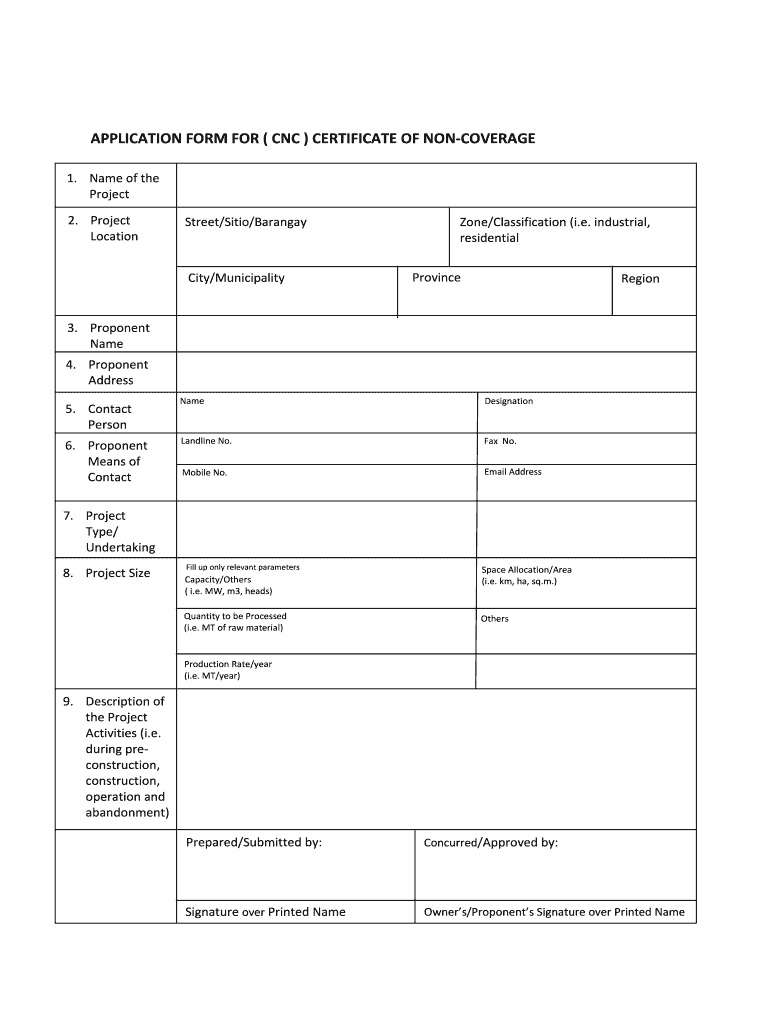
E/Classification (i.e. industrial, residential Province Region 3. Proponent Name 4. Proponent Address 5. Contact Person 6. Proponent Means of Contact Name Designation Landline No. Fax No. Mobile No. Email Address 7. Project Type/ Undertaking 8. Project Size Fill up only relevant parameters Capacity/Others ( i.e. MW, m3, heads) Quantity to be Processed (i.e. MT of raw material) Space Allocation/A.
Loading

Open form follow the instructions

Easily sign the form with your finger

Send filled & signed form or save
How to fill out the Certificate Of Non Coverage Sample online
This guide provides clear and comprehensive instructions on how to fill out the Certificate Of Non Coverage Sample online. Whether you are new to digital document management or simply looking for guidance, this resource will help you navigate each section of the form effectively.
Follow the steps to complete the Certificate Of Non Coverage Sample
- Click ‘Get Form’ button to obtain the form and open it in the editor.
- Begin by entering the name of the project in the designated field. Ensure that the project name is clear and descriptive, as this will identify the application.
- Provide the project location details. Fill in the street, sitio, or barangay, along with the city or municipality. Make sure to include the zone or classification, specifying if it's industrial or residential, and don't forget the province and region.
- Input the proponent's name in the respective field. This should be the individual or organization responsible for the project.
- Enter the proponent's address. This field should include enough information for proper identification.
- Fill in the contact person’s name, designation, and means of contact, including landline number, fax number, mobile number, and email address.
- Select the project type or undertaking. Ensure that you accurately describe the nature of the project.
- Indicate the project size. Fill up only the relevant parameters such as capacity, quantity to be processed, space allocation or area, and production rate per year.
- Provide a detailed description of the project activities throughout various phases: pre-construction, construction, operation, and abandonment. Be thorough to ensure clarity.
- At the bottom of the form, include the prepared/submitted by section, and provide a signature over the printed name of the owner or proponent.
- Once all necessary fields are completed, review the document for accuracy. Save changes, download, print, or share the form as needed.
Complete your Certificate Of Non Coverage Sample online today for a seamless experience.
Experience a faster way to fill out and sign forms on the web. Access the most extensive library of templates available.
Related content
To apply, download Form A, complete it, have the affidavit notarized, and pay $50...
THIS IS TO CERTIFY THAT THE POLICIES OF INSURANCE LISTED BELOW HAVE BEEN ISSUED TO THE...
The uncertainty of measurement has been taken into account when determining compliance...
Get answers to your most pressing questions about US Legal Forms API.
How to process a CNC application?
Processing a Certificate Of Non Coverage application typically involves gathering required documents, completing the application forms, and submitting them to the designated authority. Make sure to check for any specific instructions that your local agency may provide. Utilizing platforms like UsLegalForms can simplify this process significantly, as they offer templates and guidance tailored to your needs.
What is a certificate of non-coverage?
A Certificate Of Non Coverage is an official document that verifies a person or entity does not have coverage under certain regulations or requirements. This certificate is essential in various legal and administrative processes, providing clear proof when needed. Understanding when and how to obtain this document can save you time and ensure compliance.
How to file a CNC application?
Filing a Certificate Of Non Coverage application involves gathering the necessary documentation and filling out the required forms accurately. You can often download these forms from the official agency’s website or access them through platforms like UsLegalForms. Once completed, submit your application as instructed, either online or via mail.
How to know if ecc or cnc?
To determine whether you need an ECC or a Certificate Of Non Coverage, review the requirements for your specific case carefully. Generally, if you are engaged in activities that require proof of absence of coverage, a CNC will suffice. For other queries, contacting the issuing authority can provide clarity on which document is necessary.
Where to check ecc?
You can check for your executive clearance certificate (ECC) status directly on the relevant authority's website. They often have online portals that allow you to enter your details and retrieve the certificate. It is essential to have your application details handy, as these will help you access your ECC easily and efficiently.
How to follow up a CNC application?
To follow up on your Certificate Of Non Coverage application, first gather any reference numbers or documentation related to your submission. You can then contact the appropriate agency or service that processed your application. Additionally, check their official website to see if they provide a tracking feature for CNC applications, which can streamline the follow-up process.
What is CNC in business?
CNC, or Certificate of Non-Coverage, is a term used in business to describe a document that verifies the absence of specific insurance protection. This information is instrumental for companies when assessing risk and ensuring compliance. By utilizing a Certificate Of Non Coverage Sample, businesses can avoid potential legal issues stemming from misconceptions about their insurance status.
What is the meaning of non-coverage?
Non-coverage refers to the state where specific conditions, activities, or properties lack insurance protection. This term is crucial for individuals and businesses to understand their risk exposure. Obtaining a Certificate Of Non Coverage Sample helps clarify what is not covered by insurance, allowing for informed decision-making.
Why do we need to get ECC?
An ECC, or Exemption Certificate, is essential for organizations to document tax-exempt purchases or activity that qualifies for tax relief. Without an ECC, you may incur unnecessary taxes on qualified purchases. Therefore, obtaining the appropriate Certificate Of Non Coverage Sample helps ensure you are compliant and protected from unexpected financial obligations.
How to follow up on a CNC application?
To follow up on your CNC application, contact the office or agency where you submitted your application. Most agencies provide a tracking system or a contact number for inquiries. For a more streamlined process, templates available through US Legal Forms, including a Certificate Of Non Coverage Sample, can guide you in crafting effective follow-up communication.
Use professional pre-built templates to fill in and sign documents online faster. Get access to thousands of forms.
If you believe that this page should be taken down, please follow our DMCA take down process here.