How it works
  • Open form

    Open form follow the instructions

  • Easily sign form

    Easily sign the form with your finger

  • Share form

    Send filled & signed form or save

How to fill out the Farfetch Receipt online

Filling out the Farfetch Receipt effectively is essential for ensuring accurate documentation and compliance with export regulations. This guide will provide clear, step-by-step instructions tailored to users at all experience levels.

Follow the steps to complete the Farfetch Receipt online

  1. Press the ‘Get Form’ button to access the Farfetch Receipt form and open it for editing.
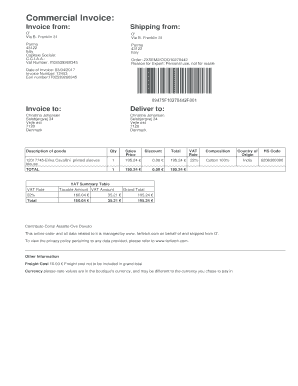
  2. Fill in the 'Invoice from' section with the sender's details. Include the company name, address at Via B. Franklin 31, Parma, Italy, and relevant business registration numbers such as VAT Number (IT02539260345).
  3. Complete the 'Invoice to' section with the recipient's name and address, ensuring all details match the person's information as shown.
  4. In the 'Description of goods' field, accurately describe the items being shipped, referencing the product name and any identifiers such as the SKU.
  5. Document the total cost of goods in the 'Total' section, including VAT and sales price. Ensure to itemize any discounts applied.
  6. Calculate and track the VAT rates and amounts as indicated, confirming that the final calculations align with the subtotal and total sections.
  7. Fill out any additional details such as the reason for export, date of invoice, and invoice number to ensure proper processing.
  8. Review all fields for accuracy before finalizing. Users can save changes, download, print, or share the form as needed.

Complete your Farfetch Receipt online quickly and accurately to ensure hassle-free transactions.

Get form

Experience a faster way to fill out and sign forms on the web. Access the most extensive library of templates available.

Related content

EX-4.1

This Registration Rights Agreement (this “Agreement”) is made and entered into as of...

Learn more
How analysts revise price targets for Farfetch...

6 days ago — How analysts revise price targets for Farfetch Limited (F1F) stock...

Learn more
Coupang - NamuWiki

On December 18, it announced that it would acquire Farfetch, an online luxury platform...

Learn more
Questions & Answers

Get answers to your most pressing questions about US Legal Forms API.

Contact support

How to fill out a delivery receipt?

Filling out a delivery receipt includes capturing the delivery date, recipient’s name, and item condition on arrival. Using the template in the Farfetch receipt helps standardize your documentation. This thoroughness aids in keeping an accurate delivery record.

To properly fill out a receipt, include all necessary information such as transaction date, item descriptions, quantities, and agreed prices. Review your Farfetch receipt for accuracy before distribution, as this supports effective communication between parties.

To fill out proof of delivery, start by adding the delivery date and the recipient’s signature, which confirms acceptance of the item. Make sure to include any tracking numbers and order details relevant to the Farfetch receipt. This practice enhances accountability and trust.

Filling out a receipt involves entering clear information such as the date, buyer's name, and item details. Use the Farfetch receipt format to ensure all required elements are included, such as transaction amount and payment method. This consistency helps in record-keeping.

To write proof of delivery, clearly state the recipient's name and address along with the item's description. Include the date and time of delivery, and ensure you collect the recipient's signature. If you use a Farfetch receipt, it helps verify that the product reached the intended person.

To return a parcel, first ensure your item is eligible based on the return policy. Log into your Farfetch account to begin the return process, where you'll generate your Farfetch return label. After this, simply print the label and attach it to your parcel for smooth returns.

You can return sale items on Farfetch, but it's essential to check the return policy specific to those items. Typically, Farfetch allows returns within a set period, and your receipt will include details about the eligibility of sale items. Always review the guidelines on your receipt to avoid any surprises.

To get your Farfetch return label, start by visiting your Farfetch account. Find your order under the 'Orders' section and select the item you want to return. You can then follow the prompts to generate the Farfetch receipt, which includes your return label. Be sure to print it out and attach it to your parcel.

Creating an official receipt involves including your business name, transaction details, and clear payment confirmation. Use templates or online software to maintain professionalism. If you are looking to generate a Farfetch receipt, ensure that all critical pieces of information are correctly presented.

Creating a receipt of payment involves clearly stating the amount received, the date, and the purpose of the payment. When creating a Farfetch receipt, ensure accuracy in the details to help both parties keep accurate records. Using online tools can simplify this process significantly.

Get This Form Now!

Use professional pre-built templates to fill in and sign documents online faster. Get access to thousands of forms.

If you believe that this page should be taken down, please follow our DMCA take down process here.

Get Farfetch Receipt