Get Trip Ticket Sample 2020-2026
How it works
-

Open form follow the instructions
-

Easily sign the form with your finger
-

Send filled & signed form or save
How to fill out the Trip Ticket Sample online
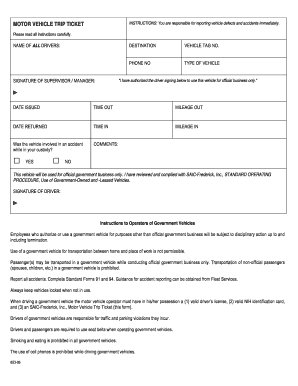
Filling out the Trip Ticket Sample online is an essential process for authorized drivers of government vehicles. This guide provides clear and supportive instructions to help users navigate the form step-by-step.
Follow the steps to complete your Trip Ticket Sample online.
- Click ‘Get Form’ button to obtain the form and open it in the editor.
- In the first section, enter the names of all drivers authorized to use the vehicle for official business. This ensures accountability and proper tracking of vehicle usage.
- Next, fill in the destination where the vehicle will be driven. Be specific to facilitate location tracking.
- Provide the vehicle tag number. This is crucial for identifying the specific government vehicle being used.
- Enter a contact phone number for the driver. This allows for communication if needed during the trip.
- Specify the type of vehicle being used. This helps with records and management of the vehicle fleet.
- A supervisor or manager must authorize the use of the vehicle. They should sign the form to confirm this authorization.
- Record the date issued, as well as the time and mileage out when the vehicle is taken. This information is vital for tracking vehicle usage.
- When returning the vehicle, enter the date returned along with the time and mileage in. This completes the trip record.
- Indicate whether the vehicle was involved in an accident while in custody by checking 'Yes' or 'No'. If applicable, use the comments section for additional information.
- Finally, the driver must sign the form to acknowledge they will use the vehicle for official government business only. Ensure that all information is final before submitting.
- Once all sections are completed, users can save their changes, download, print, or share the form as needed.
Complete your Trip Ticket Sample online today and ensure proper compliance for government vehicle usage.
A trip ticket army refers to the specific documentation used by military personnel for travel purposes. This ticket helps in tracking travel details, such as routes and expenses, supporting military logistics. Incorporating a trip ticket sample into your planning ensures that all relevant information is documented accurately, reducing errors in reimbursement requests. By properly managing trip tickets, the army can enhance operational efficiency and accountability.