Loading
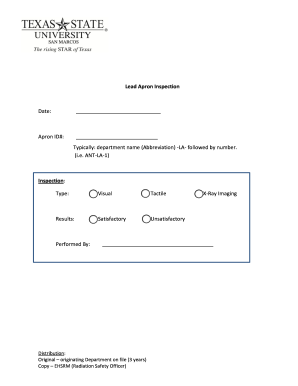
Get Lead Apron Inspection Form 2020-2026
How it works
-

Open form follow the instructions
-

Easily sign the form with your finger
-

Send filled & signed form or save
How to fill out the Lead Apron Inspection Form online
This guide provides clear instructions on how to successfully complete the Lead Apron Inspection Form online. By following these steps, users will ensure a thorough inspection and proper documentation of lead aprons used in their facilities.
Follow the steps to fill out the Lead Apron Inspection Form online
- Click ‘Get Form’ button to download the Lead Apron Inspection Form and open it using the online editor.
- Enter the date of the inspection in the designated field, ensuring it reflects the correct day, month, and year for accurate record-keeping.
- Fill in the Apron ID# following the specified format: department name abbreviation (e.g., ANT for Anticipated) -LA- followed by the sequential number (e.g., 1 for the first apron).
- Select the type of inspection performed by checking either the Visual or Tactile option in the inspection section.
- Indicate the results of the inspection by selecting either Satisfactory or Unsatisfactory to denote the condition of the lead apron.
- Input the name of the person or team performing the inspection, selecting from X-Ray Imaging or entering an alternative if applicable.
- Review all entered information for accuracy and completeness to ensure compliance with regulatory standards.
- Once finalized, users can save changes or choose to download, print, or share the Lead Apron Inspection Form as required.
Complete your Lead Apron Inspection Form online today to maintain safety and compliance.
When measuring for a lead apron, consider the length and width required to provide full coverage. It is also necessary to measure the neck and waist dimensions to ensure a proper fit. Using a Lead Apron Inspection Form can help you keep accurate measurements for future references and modifications.