Loading

Open form follow the instructions

Easily sign the form with your finger

Send filled & signed form or save
How to fill out the Waxing Consent Form online
This guide provides users with clear, step-by-step instructions on how to complete the Waxing Consent Form online. By following these instructions, you can ensure that all necessary information is accurately submitted and that you understand the terms of consent.
Follow the steps to successfully complete the form:
- Click ‘Get Form’ button to obtain the Waxing Consent Form and open it for completion.
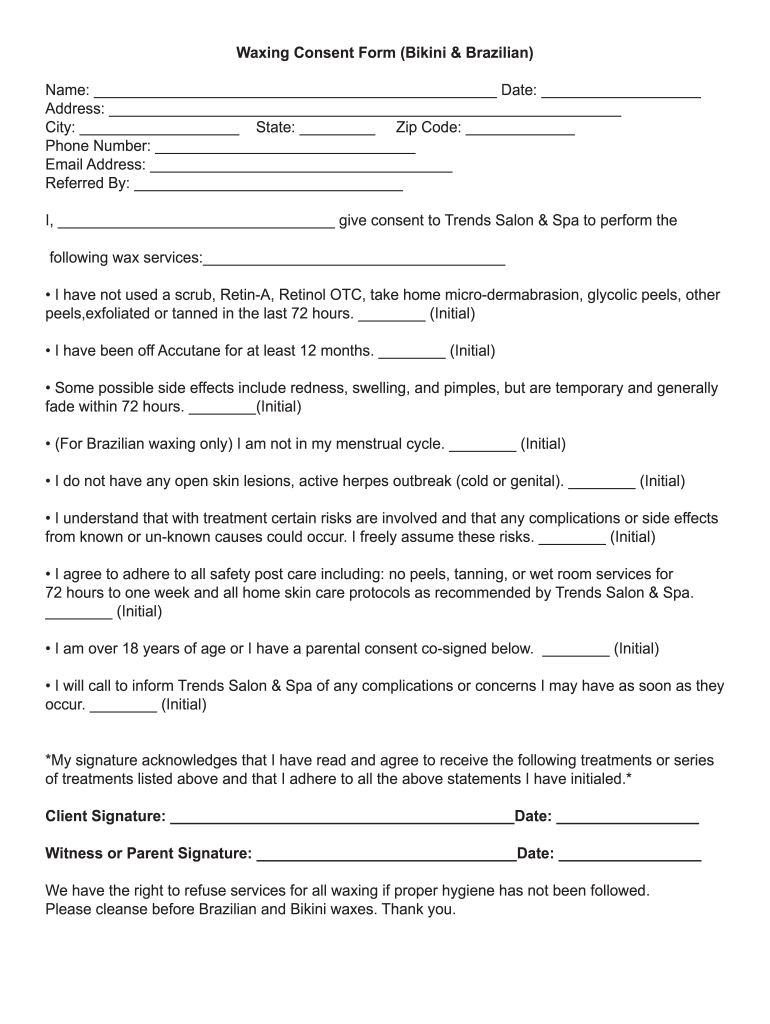
- In the first section, fill in your name, the date, your address, city, state, and zip code. Make sure all information is accurate and up-to-date.
- Provide your contact details by entering your phone number and email address in the designated fields.
- In the 'Referred By' section, indicate who referred you to Trends Salon & Spa, if applicable.
- In the consent section, clearly state your name again and check the box next to the services you consent to receive. Be sure to review each service's requirements and initial where indicated.
- Answer the health-related questions by initialing next to each statement after you have read and understood them. Ensure that you meet the conditions stated.
- If you are under 18 years of age, ensure you have a parent or guardian complete the consent by signing in the designated area.
- Finally, add your signature and date, acknowledging that you have read the entire form and agree to the terms outlined.
- Once you have filled out all necessary sections, save your changes. You may choose to download, print, or share the completed form as needed.
Complete your Waxing Consent Form online today to prepare for your appointment.
Experience a faster way to fill out and sign forms on the web. Access the most extensive library of templates available.
Related content
This form may be used to collect the required basic client information as stated in OAR...
I agree to apply a sunblock with an SPF of 15 (minimum) after the procedure. I agree to...
note: The most common error when waxing/polishing a vehicle is applying too much wax. If...
Get answers to your most pressing questions about US Legal Forms API.
What is the client information and consent waxing?
Client information and consent in waxing refers to the details collected from the client before proceeding with the service, alongside their formal agreement to receive the treatment. This includes personal data, any medical history that might affect the waxing process, and acknowledgment through a Waxing Consent Form. By gathering this information, service providers ensure client safety and informed consent.
Can you write your own consent form?
Yes, you can write your own Waxing Consent Form, but it's important to ensure it contains all necessary details to protect both you and your client. A well-crafted form should include specific information regarding the services, potential risks, and client acknowledgment. However, using a professionally designed template from platforms like uslegalforms can help ensure compliance with legal standards.
What is the purpose of a client consent form?
The purpose of a client consent form, such as a Waxing Consent Form, is to formally acknowledge that a client understands the services and any associated risks. This form also serves as a protective measure for both the client and the service provider, clarifying expectations. Additionally, it provides a record that the client has received necessary information before proceeding.
Do I need parental consent to get waxed?
Yes, individuals under the age of 18 typically need parental consent to receive waxing services. This requirement safeguards young clients by ensuring that a parent or guardian agrees to the procedure. A Waxing Consent Form can include a section for a parent or guardian's signature, meeting legal requirements and providing peace of mind.
What is the consent of a client?
The consent of a client refers to the client's agreement to undergo a specific service after being informed of all pertinent details. In the context of waxing, this means the client understands the process, any risks, and what to expect during the sessions. A properly filled Waxing Consent Form serves to protect both the client and the service provider, ensuring clear communication.
What is an example of client consent?
An example of client consent is a signed Waxing Consent Form, which signifies that a client agrees to the waxing service and understands the related procedures. This form may include acknowledgment of the client’s skin type, allergies, or previous reactions to waxing. By signing the form, clients communicate their informed decision to receive the service.
What should be on a waxing consent form?
A Waxing Consent Form should include essential information such as the client's name, contact details, and any relevant medical history. It should outline the specific waxing services the client is agreeing to, as well as any potential risks involved. Furthermore, it must have a section for the client’s signature, confirming their understanding and agreement to proceed.
How should consent forms be written?
Consent forms, including Waxing Consent Forms, should be clear and unambiguous. Use direct language that outlines what clients are consenting to and the implications of their agreement. Each section should guide the client through the process, ensuring they fully understand before signing.
How do I write a consent form for photography?
When writing a consent form for photography, similar principles apply as with a Waxing Consent Form. Introduce the form with a brief explanation of what the photography entails and any potential use of images. Outline the rights to use photos and obtain signatures to confirm that subjects agree to the terms.
How are consent forms written?
Writing an effective Waxing Consent Form involves clear language and straightforward statements. Begin with an introduction that explains the purpose of the form, and outline any risks associated with the waxing procedure. Ensure that the consent section explicitly asks for agreement to proceed, and provide space for signatures.
Use professional pre-built templates to fill in and sign documents online faster. Get access to thousands of forms.
If you believe that this page should be taken down, please follow our DMCA take down process here.