Loading
Form preview
  • US Legal Forms
  • Other Templates
  • More Forms
  • More Multi-State Forms
  • Uhaul Receipt 2020

Get Uhaul Receipt 2020-2026

How it works

  1. Open form

    Open form follow the instructions

  2. Easily sign form

    Easily sign the form with your finger

  3. Share form

    Send filled & signed form or save

How to fill out the Uhaul Receipt online

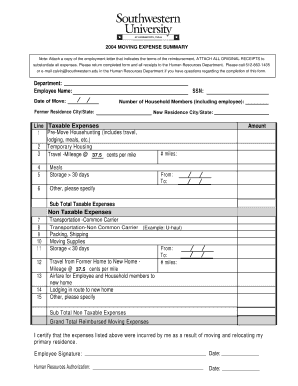
Filling out the Uhaul Receipt online can streamline your reimbursement process for moving expenses. This guide will walk you through each section of the form, ensuring that you provide all necessary information accurately.

Follow the steps to complete your Uhaul Receipt form accurately.

  1. Click ‘Get Form’ button to obtain the Uhaul Receipt and open it in your editor.
  2. Begin by entering your department name in the designated field. This helps to identify where the request originates.
  3. Next, fill in your name in the 'Employee Name' field. This should be the name of the person incurring the moving expenses.
  4. Enter the date of your move in the 'Date of Move' section. Ensure that this date reflects the actual day you relocated.
  5. Input your Social Security Number (SSN) to verify your identity and for record-keeping purposes.
  6. In the 'Number of Household Members' field, indicate the total number of individuals, including yourself, who were part of the move.
  7. Fill in the 'Former Residence City/State' to specify where you moved from.
  8. Next, enter the 'New Residence City/State' to indicate your new location.
  9. For the taxable expenses section, list amounts under respective categories such as pre-move househunting, temporary housing, and travel miles. Ensure accordance with reimbursement policies.
  10. For non-taxable expenses, input figures for transportation, packing, moving supplies, and any lodging incurred during the move.
  11. Fill in the 'Grand Total Reimbursed Moving Expenses' field to sum all qualifying expenses.
  12. Certify the listed expenses by providing your signature and the date at the bottom of the form.
  13. Lastly, leave the 'Human Resources Authorization' section blank for the HR department to complete their part of the process.
  14. Once you have completed all fields accurately, save your changes, download a copy of the form, or print it for submission or sharing.

Complete your Uhaul Receipt online today and ensure all your moving expenses are documented for reimbursement!

Get form

Experience a faster way to fill out and sign forms on the web. Access the most extensive library of templates available.
Get form

Related content

Three-SAC Property Mgmt Agrmt
Dealer shall also allow U-Haul to deduct $100 for any missing rental contract or...
Learn more
Receipt Requirements for Reimbursement | Travel
Sep 14, 2021 — Original, itemized receipts are required for reimbursement, showing...
Learn more
22 Camper Van Rental Corporations In Your Us...
The detailed receipt from the motorized vehicle rental company, connected to the travel...
Learn more

Related links form

Std 204 Rev 5 2018 San Marcos Ca School Immunization Form Warehouse Inspection Report 650-2616 (1-03).qxd. Formal Recommendation 45

Questions & Answers

Get answers to your most pressing questions about US Legal Forms API.

Contact support

Haul is a great option for longdistance moving thanks to their extensive network and various truck sizes available. Their rental trucks are designed to handle long journeys, offering features like comfortable driving spaces and ample cargo capacity. If you're planning a lengthy trip, review your haul Receipt for any additional items you may need, like a dolly or moving supplies, to enhance your experience.

To edit a U-Haul reservation, log into your U-Haul account on their website or app. From there, locate your reservation and select the option to modify it. You may change the date, pickup location, or even the equipment you reserved. Always ensure that any changes are confirmed on your updated Uhaul Receipt to avoid any mix-ups at pickup.

The longest U-Haul truck available for rent is 26 feet, ideal for larger moves and accommodating up to 10,000 pounds of cargo. This truck is perfect for moving several rooms or heavy items like furniture and appliances. Before renting, review your Uhaul Receipt for details about the truck capacity and any restrictions that may apply.

Haul offers various trailer sizes, with the longest being 6 x 12 feet. This size is perfect for larger items or multiple small loads, providing great space for your moving needs. When reserving your trailer, always check your haul Receipt to confirm the dimensions and capacity to ensure a suitable fit for your belongings.

Filling up a moving truck involves knowing the fuel tank capacity and refueling before returning it. Always use the same fuel type that is indicated on the U-Haul truck, typically unleaded gasoline. Keep your Uhaul Receipt as a confirmation to show you returned the truck with the proper fuel level, which can help you avoid additional fuel charges.

To self-checkout a U-Haul, start by visiting the U-Haul website and logging into your account. Follow the prompts to process your vehicle pickup, where you will need to enter the details from your Uhaul Receipt. Once you verify your information and complete the necessary steps, you’ll receive instructions on how to unlock your truck using your mobile device. This convenient option saves you time and ensures you’re ready to hit the road.

The duration you can keep a U-Haul depends on the type of rental agreement you choose. Typically, U-Haul offers daily rentals, but you can also choose weekly rates for longer needs. If you find yourself needing more time, you can extend your rental at any U-Haul location. Make sure to check your Uhaul Receipt for details on rental terms to avoid unexpected charges.

When driving a U-Haul, you should adhere to the speed limits set by the state you are in. Generally, U-Haul trucks should not exceed 55 mph on highways for safety and fuel efficiency. Additionally, driving too fast may impact your maneuverability and increase the risk of accidents. Always keep your Uhaul Receipt on hand as proof of your rental in case you need to refer to it while on the road.

Haul E Alert is a digital service that allows you to receive updates about your Haul rental via email or text. When you use this service, you can keep track of your rental status, important reminders, and billing information. With your haul receipt easily accessible, you gain better control over your transaction and can ensure everything is in order.

Get This Form Now!

Use professional pre-built templates to fill in and sign documents online faster. Get access to thousands of forms.
Get form
If you believe that this page should be taken down, please follow our DMCA take down processhere.
Get Uhaul Receipt
Get form
  • Adoption
  • Bankruptcy
  • Contractors
  • Divorce
  • Home Sales
  • Employment
  • Identity Theft
  • Incorporation
  • Landlord Tenant
  • Living Trust
  • Name Change
  • Personal Planning
  • Small Business
  • Wills & Estates
  • Packages A-Z
  • Affidavits
  • Bankruptcy
  • Bill of Sale
  • Corporate - LLC
  • Divorce
  • Employment
  • Identity Theft
  • Internet Technology
  • Landlord Tenant
  • Living Wills
  • Name Change
  • Power of Attorney
  • Real Estate
  • Small Estates
  • Wills
  • All Forms
  • Forms A-Z
  • Other Templates
  • Legal Hub
  • About Us
  • Help Portal
  • Legal Resources
  • Blog
  • Affiliates
  • Contact Us
  • Delete My Account
  • Site Map
  • Industries
  • Forms in Spanish
  • Localized Forms
  • State-specific Forms
  • Forms Kit
  • Real Estate Handbook
  • All Guides
  • Notarize
  • Incorporation services
  • For Consumers
  • For Small Business
  • For Attorneys
  • USLegal
  • FormsPass
  • pdfFiller
  • signNow
  • altaFlow
  • DocHub
  • Instapage
Form Packages
  • Adoption
  • Bankruptcy
  • Contractors
  • Divorce
  • Home Sales
  • Employment
  • Identity Theft
  • Incorporation
  • Landlord Tenant
  • Living Trust
  • Name Change
  • Personal Planning
  • Small Business
  • Wills & Estates
  • Packages A-Z
Form Categories
  • Affidavits
  • Bankruptcy
  • Bill of Sale
  • Corporate - LLC
  • Divorce
  • Employment
  • Identity Theft
  • Internet Technology
  • Landlord Tenant
  • Living Wills
  • Name Change
  • Power of Attorney
  • Real Estate
  • Small Estates
  • Wills
  • All Forms
  • Forms A-Z
  • Other Templates
Customer Service
  • Legal Hub
  • About Us
  • Help Portal
  • Legal Resources
  • Blog
  • Affiliates
  • Contact Us
  • Delete My Account
  • Site Map
  • Industries
  • Forms in Spanish
  • Localized Forms
  • State-specific Forms
  • Forms Kit
Legal Guides
  • Real Estate Handbook
  • All Guides
Prepared for you
  • Notarize
  • Incorporation services
Our Customers
  • For Consumers
  • For Small Business
  • For Attorneys
Our Sites
  • USLegal
  • FormsPass
  • pdfFiller
  • signNow
  • altaFlow
  • DocHub
  • Instapage
Social Media
Call us now toll free:
+1 833 426 79 33
As seen in:
© Copyright 1999-2026 airSlate Legal Forms, Inc. 17 Station Street, Suite 303, Brookline, MA 02445
  • Your Privacy Choices
  • Terms of Service
  • Privacy Notice
  • Content Takedown Policy
  • Bug Bounty Program