Loading

Open form follow the instructions

Easily sign the form with your finger

Send filled & signed form or save
How to fill out the CA Schedule 1067A online
Filling out the California Schedule 1067A online can be a straightforward process. This guide provides clear and comprehensive instructions tailored to user needs, ensuring you accurately complete the form with confidence.
Follow the steps to successfully fill out the CA Schedule 1067A.
- Press the ‘Get Form’ button to obtain the CA Schedule 1067A and open it for editing.
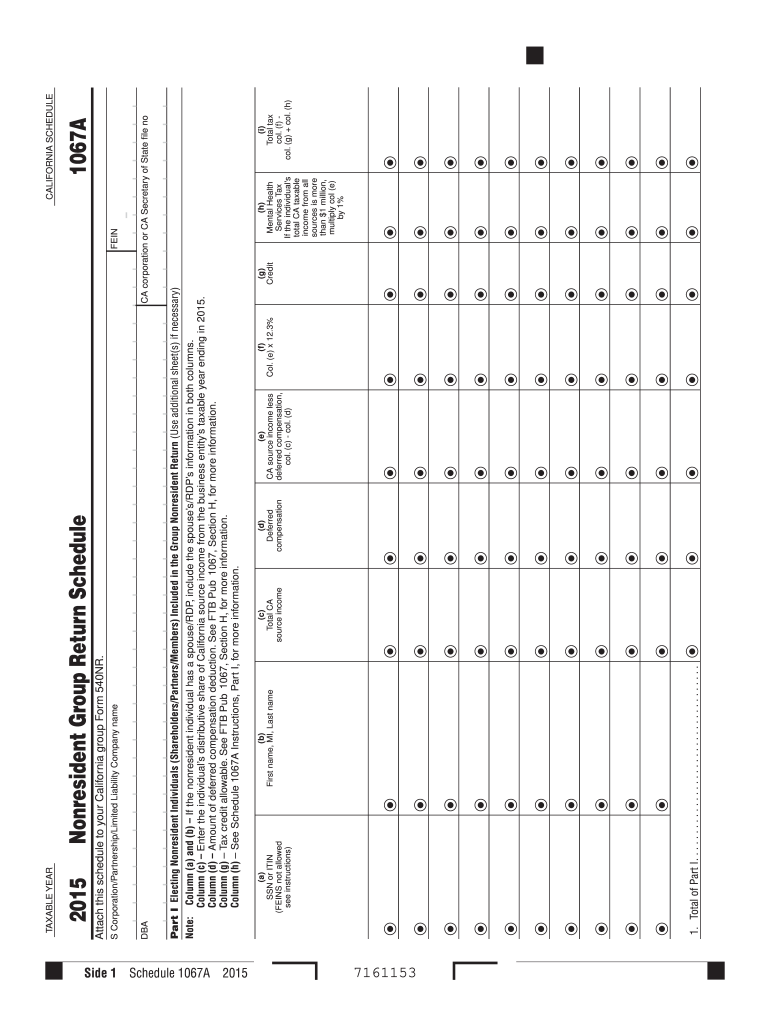
- Begin with Part I, where you will input the names and identifying information for each nonresident individual included in the group return. Fill in columns (a) and (b) with each individual's SSN or ITIN, followed by their first name, middle initial, and last name.
- In column (c), provide the total California source income for each individual as reported for the taxable year ending in 2015. Make sure to verify this amount before entering it.
- Next, in column (d), enter the amount of deferred compensation for each individual. Refer to the relevant instructions if you need more guidance.
- In column (e), calculate the California source income less deferred compensation by subtracting column (d) from column (c), and input the result.
- For column (f), multiply the amount entered in column (e) by 12.3% to determine the tax owed.
- If applicable, enter any tax credits in column (g). Consult FTB Pub 1067 for details on allowable credits.
- For column (h), if the individual's total California taxable income exceeds $1 million, calculate 1% of the amount in column (e) for the Mental Health Services Tax.
- Finally, calculate the total tax owed by adding column (f), column (g), and column (h) together, and enter this sum in column (i).
- After completing all sections of the form, you can save your changes, download, print, or share the completed CA Schedule 1067A as needed.
Complete your documents online today to ensure timely and accurate filing.
Experience a faster way to fill out and sign forms on the web. Access the most extensive library of templates available.
Related content
Schedule 1067A is a 2022 nonresident group return schedule for California, attached to...
If payee is a group return participant, attach a copy of Schedule 1067A, Nonresident Group...
Plan zamku Guillaume'a w Caen . Za panowania Wilhelma Zdobywcy „organizacja...
Get answers to your most pressing questions about US Legal Forms API.
How to get a declaration of domestic partnership in California?
To obtain a declaration of domestic partnership in California, you must complete the declaration form and submit it to the Secretary of State's office. This process creates a legal acknowledgment of your partnership, which may influence your tax filings, including the CA Schedule 1067A. For ease, consider using US Legal Forms to find the appropriate templates and instructions required.
How to file California corporate disclosure statement online?
To file a California corporate disclosure statement online, visit the California Secretary of State's website and access their online filing system. Follow the prompts to submit your disclosure statement electronically. Utilizing services like US Legal Forms can help you find the correct forms and provide guidance through the filing process.
Does California allow composite returns?
Yes, California does allow composite returns for certain partnerships. This process enables the partnership to file a single tax return on behalf of its members, simplifying the tax obligations for those involved. When filing your CA Schedule 1067A, ensure you understand how a composite return can benefit you and your partners.
How to file a declaration of domestic partnership in California?
To file a declaration of domestic partnership in California, you need to complete the official form and submit it to the Secretary of State. Ensure that both partners meet the legal requirements and provide all necessary information. Remember, this declaration can impact your filing of CA Schedule 1067A and other tax forms, so it's wise to handle it correctly.
How to fill out the California state tax form?
Filling out the California state tax form requires gathering your financial information and completing the necessary sections accurately. You should reference CA Schedule 1067A for specific details related to your domestic partnership status, as it may affect your tax obligations. For assistance, consider using US Legal Forms to find guides and templates that can simplify the process.
How do I verify a domestic partnership in California?
You can verify a domestic partnership in California through the Secretary of State's website. They provide an online verification tool that allows you to check the status of a registered domestic partnership. Make sure to have the necessary information ready when you use the CA Schedule 1067A to support any tax filings related to the partnership.
How to fight the California Franchise Tax Board?
If you need to dispute a decision or liability set by the California Franchise Tax Board, start by reviewing your notice thoroughly. You can file an appeal or submit additional documentation to clarify your situation. Utilizing forms like CA Schedule 1067A can help present your case effectively. Seeking professional guidance may provide additional strategies for addressing your concerns.
How do I speak to a live person at the California Franchise Tax Board?
Speaking to a live person at the California Franchise Tax Board can often be done by calling their customer service number and following the prompts. Pressing the right options can help you reach a representative quickly. If you have inquiries regarding CA Schedule 1067A, mentioning that can direct your call to the appropriate department. Patience may be needed, as wait times can vary.
How do I get through to the California Franchise Tax Board?
To connect with the California Franchise Tax Board, you can call their customer service line during business hours. Having your tax information handy, such as your Social Security number or the specific form number like CA Schedule 1067A, can expedite the process. Being prepared allows for a smoother experience when seeking assistance with your tax queries.
How can I get a copy of my California tax return?
To obtain a copy of your California tax return, you can request a transcript online or by mail through the FTB. You will need your Social Security number and other identifying information. If you require forms like CA Schedule 1067A, it’s best to specify that in your request. The process is efficient and helps ensure you have the necessary documents for your records.
Use professional pre-built templates to fill in and sign documents online faster. Get access to thousands of forms.
If you believe that this page should be taken down, please follow our DMCA take down process here.
This form is available in several versions. Select the version you need from the drop-down list below.