Loading
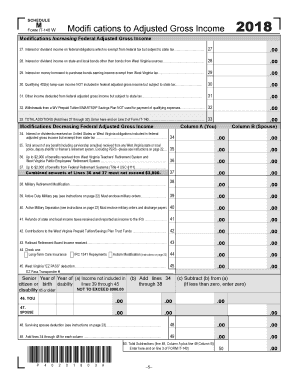
Get Wv Schedule M It-140 2018
How it works
-

Open form follow the instructions
-

Easily sign the form with your finger
-

Send filled & signed form or save
How to fill out the WV Schedule M IT-140 online
Filling out the WV Schedule M IT-140 online can seem daunting, but this guide aims to simplify the process. By breaking down each section and field, you will have a clearer understanding of how to complete the form accurately.
Follow the steps to complete your WV Schedule M IT-140 online.
- Press the ‘Get Form’ button to access the form and open it in the online editor.
- Begin with Line 27, where you will report any interest or dividend income on federal obligations that are exempt from federal tax but subject to state tax. Enter the appropriate amount.
- Continue to Line 28 to report interest or dividend income on state and local bonds not from West Virginia sources.
- Move to Line 29 to input any interest on money borrowed to purchase bonds earning income exempt from West Virginia tax.
- For Line 30, report any qualifying 402(e) lump-sum income that is not included in federal adjusted gross income but is subject to state tax.
- On Line 31, enter any other income deductions from federal adjusted gross income that are subject to state tax.
- Line 32 is for withdrawals from a WV Prepaid Tuition/SMART529 Savings Plan that were not used for qualifying expenses.
- Sum the amounts from Lines 27 through 32 and enter the result on Line 33, indicating the total additions.
- Next, in Column A (You), move to Line 34 to report interest or dividends received that are included in federal adjusted gross income but exempt from state tax.
- Proceed to Line 35 for any benefit received from a West Virginia state or local retirement system.
- Complete Lines 36 and 37, reporting any benefits from the West Virginia Teachers’ Retirement System and Federal Retirement Systems, respectively.
- Continue with Lines 38 to 45, entering any applicable modifications for military retirement, active duty military pay, refunds, contributions, and other deductions.
- Finally, sum the amounts in Columns A and B on Line 49, then enter this total on Line 50 as the total subtractions.
- Review all entries for accuracy before saving your changes or downloading, printing, or sharing the completed form.
Complete your WV Schedule M IT-140 online today for a smooth filing experience.
Get form
Experience a faster way to fill out and sign forms on the web. Access the most extensive library of templates available.
In West Virginia, the inheritance tax is generally imposed on the transfer of property following someone's death. The tax rate varies based on the relationship of the heir to the deceased, with closer relatives facing lower rates. Understanding this tax is crucial for effective estate planning and utilizing the correct forms ensures compliance.
Get This Form Now!
Use professional pre-built templates to fill in and sign documents online faster. Get access to thousands of forms.