We use cookies to improve security, personalize the user experience, enhance our marketing activities (including cooperating with our marketing partners) and for other business use.
Click "here" to read our Cookie Policy. By clicking "Accept" you agree to the use of cookies. Read less
Read more
Accept
Loading
Form preview
  • US Legal Forms
  • Form Library
  • Tax Forms
  • West Virginia Tax Forms
  • Wv Eotc-pit 2012

Get Wv Eotc-pit 2012-2025

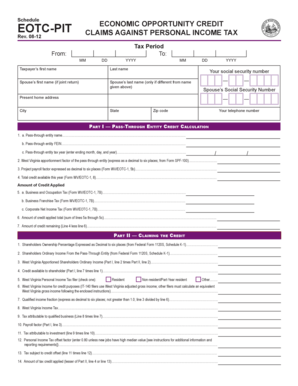
Schedule EOTCPIT Rev. 0812 ECONOMIC OPPORTUNITY CREDIT CLAIMS AGAINST PERSONAL INCOME TAX Tax Period To: From: MM DD YYYY MM Taxpayers first name Last name Spouses first name (if joint return) Spouses.

How it works

  1. Open form

    Open form follow the instructions

  2. Easily sign form

    Easily sign the form with your finger

  3. Share form

    Send filled & signed form or save

How to fill out the WV EOTC-PIT online

The WV EOTC-PIT form allows users to claim the Economic Opportunity Credit against personal income tax in West Virginia. This guide provides step-by-step instructions to help you successfully complete the form online, ensuring all necessary information is accurately provided.

Follow the steps to complete the WV EOTC-PIT form online easily.

  1. Press the ‘Get Form’ button to access the form and open it in the editor.
  2. Enter the tax period dates by filling in the ‘From’ and ‘To’ sections with the month, day, and year.
  3. Provide your personal information by entering your first name, last name, and if applicable, your spouse’s details.
  4. Input your and your spouse’s Social Security numbers accurately.
  5. Fill in your current home address, along with the city, state, and zip code.
  6. Include your telephone number for contact purposes.
  7. In Part I, for each pass-through entity, enter the name, FEIN, and tax year, making sure the tax year is complete.
  8. Calculate and enter the West Virginia apportionment factor of the pass-through entity as a decimal.
  9. Enter the project payroll factor as a decimal, as specified by the form.
  10. Record the total credit available for the year according to the previous form.
  11. Complete the credit applied by filling in the amounts for Business and Occupation Tax, Business Franchise Tax, and Corporate Net Income Tax.
  12. Calculate the total amount of credit applied by summing the previous fields.
  13. Determine the amount of credit remaining by subtracting the total credit applied from the total credit available.
  14. In Part II, input the shareholders' ownership percentage, and their ordinary income from the pass-through entity.
  15. Calculate the West Virginia apportioned shareholders' ordinary income based on the previous lines.
  16. Calculate the credit available to a shareholder using the amount of credit remaining.
  17. Indicate whether you are a resident, non-resident, or part-year resident.
  18. Calculate your West Virginia income for credit purposes as needed.
  19. Determine the qualified income fraction as instructed.
  20. Calculate the tax attributable to qualified business and the tax attributable to investment.
  21. Determine the personal income tax offset factor; typically, this is 0.80 unless conditions dictate otherwise.
  22. Find the tax subject to credit offset by calculating the applicable tax attributes.
  23. Finally, transfer the appropriate amount of tax credit applied to the Personal Income Tax return or any various final steps to save, download, print, or share the completed form.

Complete your WV EOTC-PIT form online today for a smoother filing experience.

Get form

Experience a faster way to fill out and sign forms on the web. Access the most extensive library of templates available.
Get form

Related content

EOTC-PIT
Business Franchise Tax (Form WV/EOTC-1, 7B) ... Schedule EOTC-PIT ❖ Economic Opportunity...
Learn more
West Virginia Personal Income Tax Forms and...
Apr 15, 2021 — The 2020 West Virginia personal income tax is due April 15, 2021. This...
Learn more

Related links form

Temporary Visitor Driver's License (TVDL) Quick Guide Illinois Mobile Driver Services Facility Medical Cannabis Verification Form 1 Instructions For Application Office Of Attorney General Kris W ...

Questions & Answers

Get answers to your most pressing questions about US Legal Forms API.

Contact support

To file a non-resident tax return, you should gather all income documents earned in West Virginia. Using the WV EOTC-PIT, complete the appropriate forms, which outline your earnings from that state. You can easily access these forms through platforms like uslegalforms, which provides templates and guidance specifically for non-residents. Filing accurately is crucial to avoid penalties and fulfill your tax responsibilities.

Whether you need to file a WV tax return depends on your income level and source. If you earn income in West Virginia as a non-resident, you must file a return under the WV EOTC-PIT. It’s important to evaluate your income and understand the state’s requirements to determine your obligations. Consulting resources can help clarify your situation and ensure compliance.

When filing taxes for a state where you do not reside, you will need to complete a nonresident tax return. The WV EOTC-PIT can assist you in determining what income is subject to taxes in West Virginia. Additionally, you can use platforms like uslegalforms to access the necessary documents and guidance tailored for non-residents. This way, you can ensure that you meet all tax obligations correctly.

Yes, you can file a nonresident state tax return using TurboTax. The platform supports the WV EOTC-PIT, making it easy for you to navigate through the necessary forms and calculations. By inputting your information, TurboTax will guide you through the process, ensuring you don’t miss any important deductions or credits. This can save you time and reduce stress while filing your taxes.

For non-residents, only income earned within West Virginia is taxable under the WV EOTC-PIT system. This includes wages from employment, income from a business operated in the state, and rental income from properties located in West Virginia. It’s essential to keep track of these earnings, as they must be reported on your tax return. Knowing what income is taxable can help you avoid unexpected charges.

Filling out the back of a West Virginia title involves providing information such as the buyer's name, address, and the sale date. Additionally, as a seller, you need to sign the title in the appropriate area. Completing this process correctly will help fulfill the requirements of the WV EOTC-PIT, ensuring an efficient transfer of ownership.

If you made less than $5000, you typically may not need to file taxes in West Virginia, but there are exceptions based on specific circumstances like self-employment or other income sources. It's important to consult state guidelines to determine your filing obligations. Understanding these aspects can help you navigate your tax situation more effectively, particularly with respect to the WV EOTC-PIT.

In West Virginia, the minimum income threshold for filing taxes can vary depending on your filing status and age. Generally, if your income exceeds certain limits, you will need to file a tax return. It's wise to check both federal and state requirements to ensure compliance, especially with the WV EOTC-PIT guidelines in mind.

When selling a car in West Virginia, you need to fill out the vehicle title with the buyer's information, including their name and address. Be sure to sign and date the title in the seller's section. This process ensures proper transfer of ownership under the WV EOTC-PIT guidelines, making it smooth for both you and the buyer.

The general economic opportunity tax credit (WV EOTC-PIT) in West Virginia is designed to encourage economic growth by providing tax incentives for businesses and individuals. This credit can reduce the overall tax burden for eligible taxpayers, thus promoting job creation and investment in the state. To determine your eligibility and benefits, consider consulting with USLegalForms for tailored guidance on these tax credits.

Get This Form Now!

Use professional pre-built templates to fill in and sign documents online faster. Get access to thousands of forms.
Get form
If you believe that this page should be taken down, please follow our DMCA take down processhere.

Industry-leading security and compliance

US Legal Forms protects your data by complying with industry-specific security standards.
  • In businnes since 1997
    25+ years providing professional legal documents.
  • Accredited business
    Guarantees that a business meets BBB accreditation standards in the US and Canada.
  • Secured by Braintree
    Validated Level 1 PCI DSS compliant payment gateway that accepts most major credit and debit card brands from across the globe.
Get WV EOTC-PIT
Get form
Form Packages
Adoption
Bankruptcy
Contractors
Divorce
Home Sales
Employment
Identity Theft
Incorporation
Landlord Tenant
Living Trust
Name Change
Personal Planning
Small Business
Wills & Estates
Packages A-Z
Form Categories
Affidavits
Bankruptcy
Bill of Sale
Corporate - LLC
Divorce
Employment
Identity Theft
Internet Technology
Landlord Tenant
Living Wills
Name Change
Power of Attorney
Real Estate
Small Estates
Wills
All Forms
Forms A-Z
Form Library
Customer Service
Terms of Service
Privacy Notice
Legal Hub
Content Takedown Policy
Bug Bounty Program
About Us
Help Portal
Legal Resources
Blog
Affiliates
Contact Us
Delete My Account
Site Map
Industries
Forms in Spanish
Localized Forms
State-specific Forms
Forms Kit
Legal Guides
Real Estate Handbook
All Guides
Prepared for You
Notarize
Incorporation services
Our Customers
For Consumers
For Small Business
For Attorneys
Our Sites
US Legal Forms
USLegal
FormsPass
pdfFiller
signNow
airSlate WorkFlow
DocHub
Instapage
Social Media
Call us now toll free:
+1 833 426 79 33
As seen in:
  • USA Today logo picture
  • CBC News logo picture
  • LA Times logo picture
  • The Washington Post logo picture
  • AP logo picture
  • Forbes logo picture
© Copyright 1997-2025
airSlate Legal Forms, Inc.
3720 Flowood Dr, Flowood, Mississippi 39232
Form Packages
Adoption
Bankruptcy
Contractors
Divorce
Home Sales
Employment
Identity Theft
Incorporation
Landlord Tenant
Living Trust
Name Change
Personal Planning
Small Business
Wills & Estates
Packages A-Z
Form Categories
Affidavits
Bankruptcy
Bill of Sale
Corporate - LLC
Divorce
Employment
Identity Theft
Internet Technology
Landlord Tenant
Living Wills
Name Change
Power of Attorney
Real Estate
Small Estates
Wills
All Forms
Forms A-Z
Form Library
Customer Service
Terms of Service
Privacy Notice
Legal Hub
Content Takedown Policy
Bug Bounty Program
About Us
Help Portal
Legal Resources
Blog
Affiliates
Contact Us
Delete My Account
Site Map
Industries
Forms in Spanish
Localized Forms
State-specific Forms
Forms Kit
Legal Guides
Real Estate Handbook
All Guides
Prepared for You
Notarize
Incorporation services
Our Customers
For Consumers
For Small Business
For Attorneys
Our Sites
US Legal Forms
USLegal
FormsPass
pdfFiller
signNow
airSlate WorkFlow
DocHub
Instapage
Social Media
Call us now toll free:
+1 833 426 79 33
As seen in:
  • USA Today logo picture
  • CBC News logo picture
  • LA Times logo picture
  • The Washington Post logo picture
  • AP logo picture
  • Forbes logo picture
© Copyright 1997-2025
airSlate Legal Forms, Inc.
3720 Flowood Dr, Flowood, Mississippi 39232