Loading
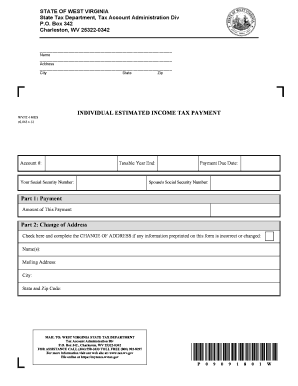
Get Wv Dor Wv/it-140es 2018-2026
How it works
-

Open form follow the instructions
-

Easily sign the form with your finger
-

Send filled & signed form or save
How to fill out the WV DoR WV/IT-140ES online
Filling out the WV DoR WV/IT-140ES form online can be a straightforward process if you follow the right steps. This guide will provide you with detailed instructions on how to accurately complete each section of the form to ensure your estimated income tax payment is properly submitted.
Follow the steps to complete your form with ease.
- Click the ‘Get Form’ button to access the form and open it in your preferred document editor.
- Enter your name in the designated field. Ensure your name is spelled correctly as it appears on your identification.
- Fill out your address, including street number, city, state, and zip code. Double-check that all information is accurate.
- Input your Social Security Number in the provided field, and ensure it is correctly entered.
- Enter your spouse's Social Security Number, if applicable. If you are not married, you can skip this field.
- In Part 1, specify the amount of your payment. This should reflect the estimated amount based on your expected tax obligations.
- If there has been a change of address or if any preprinted information is incorrect, check the box in Part 2 and fill out the CHANGE OF ADDRESS section.
- Review all information for accuracy, ensuring that names, numbers, and amounts are correct before proceeding.
- After completing the form, you can save your changes, download it for your records, print it, or share it with your tax professional.
Complete your WV DoR WV/IT-140ES online today to ensure timely payment and avoid penalties.
Similar to previous questions about property tax, there is no definite age at which you cease paying property taxes in West Virginia. Senior citizens may explore eligibility for reduced tax rates or exemptions. It's wise to contact local authorities for specific guidelines applicable to your circumstances.