E 9)......................................................... 10 0 0 0 0 0 0 .00 0 .00 0 .00 0 .00 0 .00 500 .00 0 .00 0 .00 0 .00 0 .00 tax dept use only PAYMENT PLAN CORR SCTC NRSR HEPTC *p40201701F* Return to the first page Primary last name shown on form IT-140 Social Security number 10. Total Taxes Due (from previous page).............................................................................. 10 0 .00 11. West Virginia Income Tax Withheld (SeeForm instructions) Che.
Loading

Open form follow the instructions

Easily sign the form with your finger

Send filled & signed form or save
How to fill out the WV DoR IT-140 online
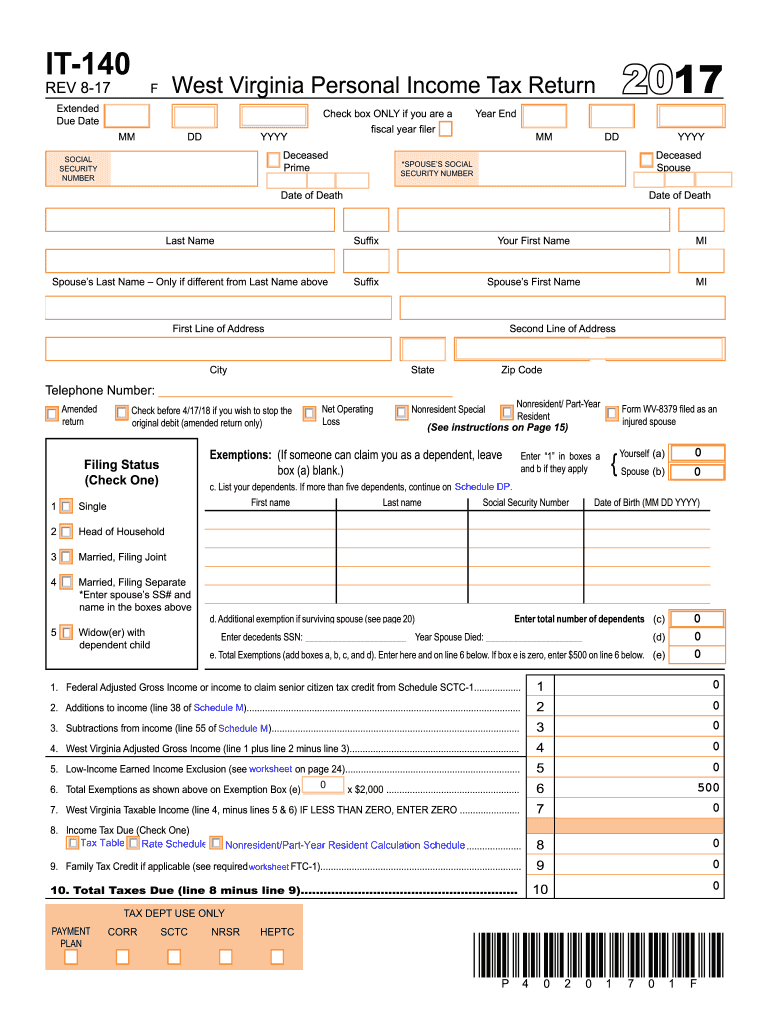
Filing your West Virginia Personal Income Tax Return using the IT-140 form can be a straightforward process with the right guidance. This guide will provide you with step-by-step instructions on how to complete the form accurately while filing it online.
Follow the steps to successfully complete your WV DoR IT-140 form online.
- Click the ‘Get Form’ button to obtain the form and open it in the online editor.
- Fill in your personal information, including your name, address, and social security number. Ensure that all details are accurate and formatted correctly.
- Indicate your filing status by checking the appropriate box (e.g., single, married filing jointly, head of household).
- In the exemptions section, list yourself, your spouse (if applicable), and any dependents you are claiming. Provide their names, social security numbers, and dates of birth.
- Calculate your Federal Adjusted Gross Income and report it on the form. This value is essential as it influences your overall tax calculations.
- Report any additions and subtractions to your income that may apply. This includes specific deductions outlined in the tax instructions.
- Determine your West Virginia taxable income and enter this value on the designated line of the form.
- Choose the method by which you will calculate your tax and fill in the necessary details to compute your tax due.
- Enter any credits you are eligible for, including tax withheld and any other applicable deductions.
- Review all entries for accuracy, ensuring there are no mistakes before moving to the final steps.
- Once all fields are completed, save your changes. You may download, print, or share the completed form as needed.
Complete your WV DoR IT-140 and file your taxes online today!
Experience a faster way to fill out and sign forms on the web. Access the most extensive library of templates available.
Related content
This summary form and the appropriate credit calculation schedule(s) or form(s) must be...
The maximum refundable tax credit is $1,000. You must complete the schedule below to...
Page 140. 140 treatment facility that the patient is an alcoholic or intoxicated person...
Get answers to your most pressing questions about US Legal Forms API.
Did West Virginia eliminate personal property taxes?
West Virginia has not completely eliminated personal property taxes. However, there have been discussions about potential reforms to ease the burden on residents. Utilizing the WV DoR IT-140 allows you to report personal property effectively. It's vital to stay updated on legislative changes that may impact this tax.
Is WV doing away with income tax?
As of now, West Virginia is not eliminating income tax. Some lawmakers have proposed changes, but these have yet to be enacted. Individuals should remain vigilant and keep informed about any legislative actions regarding income tax in the state. Completing the WV DoR IT-140 is essential for adherence to current tax regulations.
At what age do you stop paying property taxes in WV?
Homeowners in West Virginia often qualify for property tax relief after reaching the age of 65. The process involves submitting specific forms to the county assessor. Understanding how the WV DoR IT-140 interacts with property taxes can be beneficial for seniors. It's advisable to check local guidelines for current rules.
What is West Virginia tax form IT-140?
The WV DoR IT-140 is the state's primary income tax form for residents. It is used to report personal income and calculate taxes owed to West Virginia. Filling out this form accurately is vital for ensuring compliance with state tax laws. Many rely on resources like uslegalforms to simplify the process.
At what age do you stop paying property taxes in West Virginia?
In West Virginia, property taxes can be reduced or exempted for homeowners aged 65 and older. The specifics of the exemptions may vary, and applicants must complete the appropriate forms to receive them. Utilizing the WV DoR IT-140 can help you navigate potential benefits effectively. Always consult local regulations to ensure compliance.
Is West Virginia going to stop taxing social security?
Currently, West Virginia taxes social security benefits. However, discussions about potential changes are ongoing. It's essential to stay informed about state policies, as updates may occur. The WV DoR IT-140 tax form remains a critical document for understanding your tax obligations.
What is a West Virginia IT 140 form?
The West Virginia IT 140 form is the standard income tax return used by individuals in the state to report income, deductions, and tax credits. This form is essential for calculating your state taxes and ensuring compliance with tax obligations. Proper use of the WV DoR IT-140 ensures that you claim all eligible deductions efficiently. Each year, review your financial documents to prepare for filing this form accurately.
How do I get a WV tax ID number?
To obtain a WV tax ID number, you can apply through the West Virginia State Tax Division. This process is straightforward and can typically be completed online. Make sure to have your application details ready, as it involves verifying your business structure and tax obligations. The WV DoR IT-140 can also guide you during the application and tax filing process.
What is an IT40 form?
The IT40 form is an individual income tax return form in West Virginia, similar to the federal 1040 form. This form is utilized to document income, calculate tax liability, and claim refunds. Filling out the WV DoR IT-140 accurately will simplify your filing process and ensure compliance. Remember to check all relevant schedules that may accompany the IT40 for complete reporting.
Is WV getting rid of personal property tax?
There has been ongoing discussion regarding the elimination of personal property tax in West Virginia. While some proposals have gained traction, no final decision has been made yet. Staying updated through the WV DoR and related resources ensures you are informed about any potential changes. Always consult your tax advisor for specific implications on your financial situation.
Use professional pre-built templates to fill in and sign documents online faster. Get access to thousands of forms.
If you believe that this page should be taken down, please follow our DMCA take down process here.
This form is available in several versions. Select the version you need from the drop-down list below.