Loading
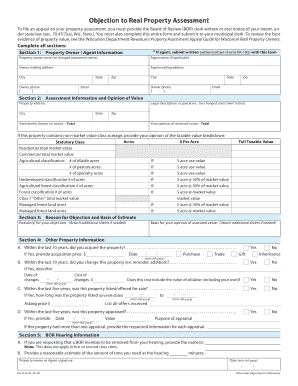
Get Wi Pa-115a 2018
How it works
-

Open form follow the instructions
-

Easily sign the form with your finger
-

Send filled & signed form or save
How to fill out the WI PA-115A online
Filling out the WI PA-115A form online can be a straightforward process with the right guidance. This comprehensive guide will walk you through each section of the form to ensure you complete it accurately and efficiently.
Follow the steps to successfully fill out the WI PA-115A online.
- Select the 'Get Form' button to acquire the form and open it in your preferred editing tool.
- In section 1, enter your property owner or agent information. If you are an agent, remember to include written authorization (Form PA-105) alongside this submission. Specify the property owner’s name, address, phone number, and email, as well as the agent’s information if applicable.
- Proceed to section 2, where you need to provide assessment information and your own opinion of value. Fill in the legal description or parcel number from the changed assessment notice, the property address, and both the official assessment shown on your notice and your opinion of the assessed value.
- Next, if applicable, detail non-market value class acreage in section 2. This includes the taxable value breakdown for residential, commercial, agricultural classifications, and others. Make sure to calculate and list the total market and taxable values based on the instructions.
- Move to section 3 to state your reasons for objection and the basis for your opinion of assessed value. You may attach additional sheets if needed to ensure clarity and accuracy in your reasons.
- In section 4, provide other relevant property information, including any acquisitions, changes made to the property, listing or sale history, and appraisal details from the last few years.
- In section 5, if applicable, indicate any requests regarding the Board of Review (BOR) hearing information, such as removing a member or estimating the hearing time you require.
- Finally, review all entered information for accuracy, then apply your signature and the date at the bottom of the form. After finalizing your entries, you can save changes, download, print, or share the completed form.
Start your online form completion now for a smooth and efficient filing experience.
Get form
Experience a faster way to fill out and sign forms on the web. Access the most extensive library of templates available.
Related links form
To properly fill out a quitclaim deed in Wisconsin, you need to write the names of the seller and buyer accurately. Next, describe the property in detail, including the legal description. After signing the deed in front of a notary, ensure it is recorded with the local county register of deeds. Utilizing platforms like uslegalforms aids in ensuring your deed adheres to the WI PA-115A format.
Get This Form Now!
Use professional pre-built templates to fill in and sign documents online faster. Get access to thousands of forms.