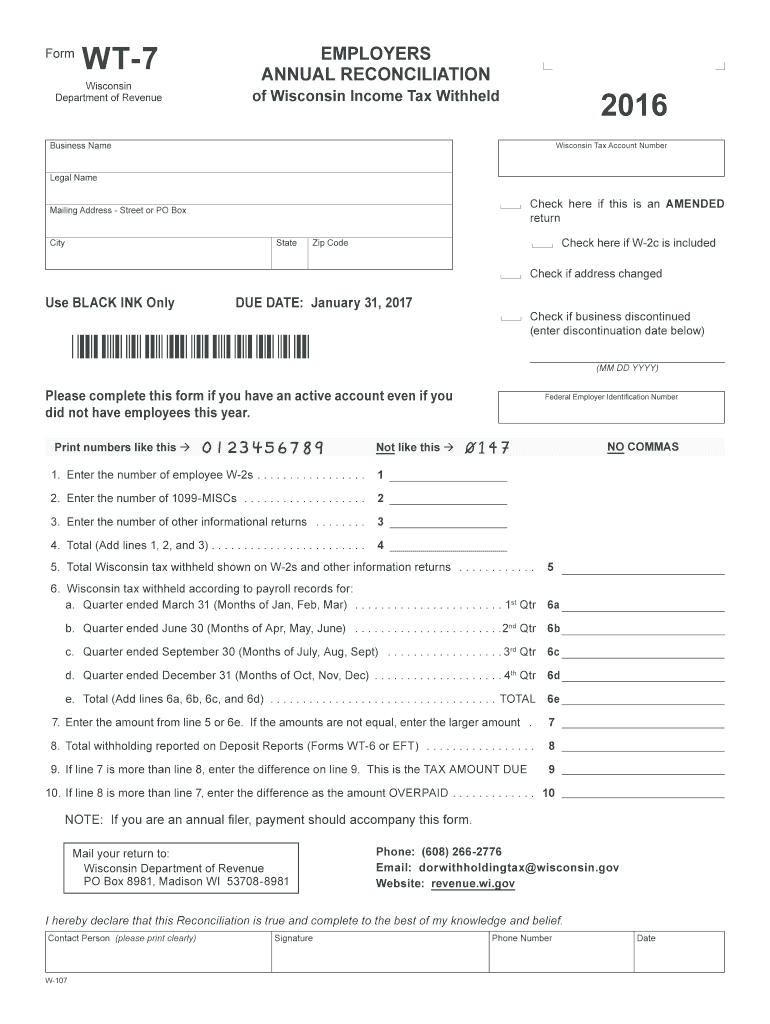
Consin Tax Account Number Legal Name Check here if this is an AMENDED return Mailing Address - Street or PO Box City State Check here if W 2c is included Zip Code Check if address changed Use BLACK INK Only DUE DATE: January 31, 2017 Normally due January 31 following the calendar year. DUE WITHIN 30 DAYS of account cease date, if withholding account is closed prior to December 31. Please complete this form if you have an active account even if you did not have employees this year. Pr.
Loading

Open form follow the instructions

Easily sign the form with your finger

Send filled & signed form or save
How to fill out the WI DoR WT-7 online
The WI DoR WT-7 is an essential form for employers in Wisconsin to report income tax withheld from employees. This guide provides clear, step-by-step instructions to assist users in completing the form accurately and efficiently online.
Follow the steps to fill out the WI DoR WT-7 online with ease.
- Click the ‘Get Form’ button to obtain the WI DoR WT-7 form and access it for completion.
- Enter your 15-digit Wisconsin Tax Account Number in the designated field.
- Provide your Legal Name and Business Name as they appear on your official documents.
- Fill in your Mailing Address, including Street or PO Box, City, State, and Zip Code.
- Indicate whether this is an amended return by checking the appropriate box.
- If applicable, check the box to indicate that you are including a W-2c.
- If your address has changed, check the corresponding box to notify the authorities.
- Record your Federal Employer Identification Number in the specified field.
- Enter the number of employee W-2s, 1099-MISCs, and other informational returns in the given lines. Sum these numbers on the appropriate lines.
- Complete the lines detailing the total Wisconsin tax withheld indicated on W-2s and reports according to payroll records for each quarter.
- Calculate and enter the necessary amounts on the subsequent lines as directed, ensuring accuracy in reflecting total withholding and tax amounts due.
- Finally, review your entries for accuracy, print the completed form, and ensure you sign it before mailing.
Complete and submit your WI DoR WT-7 online today to fulfill your employer tax reporting obligations.
Experience a faster way to fill out and sign forms on the web. Access the most extensive library of templates available.
Related content
It is a secure process developed by the Department of Revenue (DOR) for employers and/or...
Form WT-7 (Fill-In Form), Employers Annual Reconciliation of Wisconsin Income Tax Withheld...
Conecte essa TV LED Smart Philips à Internet e descubra um novo mundo de televisão...
Get answers to your most pressing questions about US Legal Forms API.
How do I find my Wisconsin tax number?
If you need to find your Wisconsin tax number, review previous tax documents or correspondence from the Wisconsin Department of Revenue. This number may also be included on your business registration forms. If you still have difficulty, contacting the Wisconsin DoR through their customer service can help you retrieve your number efficiently.
How do I find my state withholding number?
To find your state withholding number, check your payroll documents or previous tax filings where this number may have been recorded. If you cannot locate it, you can contact the Wisconsin Department of Revenue directly for assistance. Providing your business details will help them retrieve your WI DoR WT-7 number more quickly.
How do I get Wisconsin tax forms?
You can easily obtain Wisconsin tax forms from the Wisconsin Department of Revenue's website. The site offers downloadable versions of all necessary forms, including the WI DoR WT-7 for withholding tax registration. Alternatively, you can visit local offices or libraries that may have physical copies. Make sure you have the correct forms for your tax needs.
What is Wisconsin form WT-7 for?
Wisconsin Form WT-7 is used to apply for a withholding tax number. This form is essential for businesses that need to withhold state taxes from employee salaries. By filling out the WT-7, you provide your business information and the necessary details that allow the Wisconsin Department of Revenue to issue your withholding tax number promptly.
How do I set up tax withholding?
Setting up tax withholding involves determining the appropriate amount to withhold based on employee earnings and filing status. You can use the information from the WI DoR's guidelines to calculate these amounts accurately. It's also necessary to register for a withholding tax number, achievable by completing Form WT-7. Consulting a tax professional may help ensure compliance.
What is a withholding tax number?
A withholding tax number is a unique identifier assigned to businesses that are required to withhold taxes from employee wages. This number allows the state to track tax obligations efficiently and helps ensure compliance with tax laws. If you are starting a business in Wisconsin, obtaining a withholding tax number through Form WT-7 is essential for proper tax management.
How do I get a Wisconsin state tax ID number?
You can get a Wisconsin state tax ID number by completing the appropriate forms on the Wisconsin Department of Revenue's website. Typically, this involves filling out the necessary information on the Form WT-7, which also serves as the withholding application. Be thorough and double-check your entries before submitting. Once approved, your tax ID will be issued promptly.
How do I get a Wisconsin withholding tax number?
To obtain a Wisconsin withholding tax number, you need to complete the Form WT-7, which is the application specifically for this purpose. You can submit this form online through the Wisconsin Department of Revenue's website. Ensure that you provide all required information accurately to avoid delays. Once processed, you will receive your withholding tax number from the WI DoR.
How do you answer 'Are you exempt from withholding?'?
When answering whether you are exempt from withholding, review your tax history and current year estimates. If you meet the criteria, such as expecting no tax liability, you can confidently mark yes and file the WI DoR WT-7 to formalize this status. It’s important to be honest and thorough in your response to avoid complications later on.
Does Wisconsin have a state tax withholding form?
Yes, Wisconsin has a state tax withholding form known as the WT-7. This form allows employees to claim exemptions from withholding based on their income situation. By understanding this form, you can effectively manage your state tax liabilities and avoid any surprises during tax season.
Use professional pre-built templates to fill in and sign documents online faster. Get access to thousands of forms.
If you believe that this page should be taken down, please follow our DMCA take down process here.
This form is available in several versions. Select the version you need from the drop-down list below.