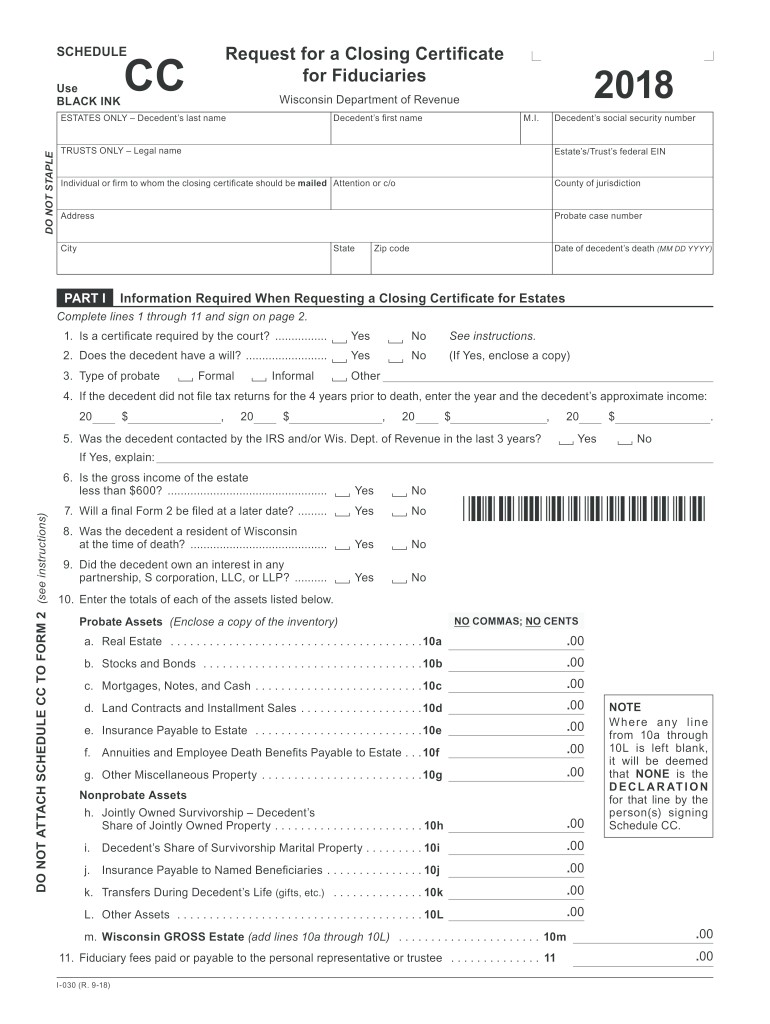
Decedent s social security number TRUSTS ONLY Legal name Estate s/Trust s federal EIN Individual or firm to whom the closing certificate should be mailed Attention or c/o County of jurisdiction Address Probate case number City State PART I Zip code Date of decedent s death (MM DD YYYY) Information Required When Requesting a Closing Certificate for Estates Complete lines 1 through 11 and sign on page 2. 1. Is a certificate required by the court? .
Loading

Open form follow the instructions

Easily sign the form with your finger

Send filled & signed form or save
How to fill out the WI DoR Schedule CC online
Filing the Wisconsin Department of Revenue Schedule CC form online can streamline the process of requesting a closing certificate for estates and trusts. This guide will provide clear, step-by-step instructions to help you successfully navigate each section of the form.
Follow the steps to fill out the Schedule CC form online.
- Click ‘Get Form’ button to access the Schedule CC form and open it in your chosen editor.
- Begin by entering the decedent's last name, first name, middle initial, and social security number at the top of the form.
- For estates, indicate whether a certificate is required by the court. Choose 'Yes' or 'No' based on your situation.
- Next, indicate if the decedent had a will. If the answer is 'Yes,' ensure to attach a copy of the will.
- Select the type of probate: formal, informal, or other, as applicable.
- If the decedent did not file tax returns for the four years prior to death, provide the year and approximate income for each year.
- Indicate if the decedent was contacted by the IRS or Wisconsin Department of Revenue in the last three years, and provide an explanation if 'Yes.'
- Select 'Yes' or 'No' to indicate if the gross income of the estate is less than $600.
- Indicate if a final Form 2 will be filed at a later date by choosing 'Yes' or 'No.'
- Mark whether the decedent was a resident of Wisconsin at the time of death.
- Indicate if the decedent owned an interest in any partnership, S corporation, LLC, or LLP.
- Fill out the totals of each type of probate and nonprobate assets as specified in the form, ensuring to follow the 'NO COMMAS; NO CENTS' rule.
- Complete the fiduciary fees paid or payable section.
- In Part II, if applicable to trusts, provide the required information, including whether a certificate is needed by the court and details about the trust.
- Sign the form to certify the accuracy of the information provided in accordance with legal requirements.
- Finally, save your changes, download the completed form, and prepare for mailing it to the Wisconsin Department of Revenue or to share it as necessary.
Start completing the WI DoR Schedule CC online today to ensure accurate and timely submission.
Experience a faster way to fill out and sign forms on the web. Access the most extensive library of templates available.
Related content
If no, DO NOT submit Schedule CC. The department only issues a Closing Certificate if a...
Apr 14, 2023 — Processing Schedule (All Laws) ... cc”) the municipal contact on the...
Botões. Botão de ligar/desligar. Quando não estiver a utilizar o iPhone, é possível...
Get answers to your most pressing questions about US Legal Forms API.
How late can I file my taxes in Wisconsin?
In Wisconsin, you can file your taxes late, but you should aim to do so within three years of the original due date. Filing late may result in penalties, but addressing your return promptly remains important. If you are unable to file in time, consider seeking assistance from Uslegalforms, which offers tools to help you navigate late filings.
Is direct file available in Wisconsin?
Yes, Wisconsin offers direct filing options for residents. You can file your income tax return electronically using the Wisconsin e-file system, making the process quick and efficient. Additionally, using the WI DoR Schedule CC within the e-File system can simplify your tax reporting needs.
Can I file my taxes after April 18?
Yes, you can file your taxes after April 18, but you may face penalties and interest on any taxes owed. It is essential to file your return as soon as possible to minimize these additional costs. Utilizing the WI DoR Schedule CC may help streamline your filing process even if you miss the traditional deadline.
How late is too late to file a tax return?
While you can file your Wisconsin tax return late, it is best to do so as soon as possible. The state imposes penalties and interest on overdue returns, which escalate the longer you wait. Filing within three years of the due date can help you claim any potential refunds or credits, but after that, you may lose those benefits.
Is there a cut off time to file taxes?
Yes, Wisconsin has specific deadlines for filing taxes. Typically, the deadline aligns with the federal tax return deadline, which is usually April 15. However, when this date falls on a weekend or holiday, you can file by the next business day. It’s important to stay informed about these dates to avoid late penalties.
How do I request a closing certificate for Fiduciaries in Wisconsin?
To request a closing certificate for Fiduciaries in Wisconsin, you will need to complete the WI DoR Schedule CC form. This form allows fiduciaries to report income and tax liabilities, making it essential for ensuring compliance. You can submit the form online or by mailing it directly to the Wisconsin Department of Revenue. Uslegalforms provides resources to guide you through the process, ensuring you meet all requirements.
How do I check my Wisconsin homestead refund status?
To check your Wisconsin homestead refund status, visit the Wisconsin Department of Revenue's official website and use their online tracking tool. Have your details ready, such as your name and Social Security number, to retrieve the information quickly. Maintaining awareness of your status, especially after submitting the WI DoR Schedule CC, can help you plan your finances better.
What is a Schedule AD in Wisconsin tax form?
Schedule AD in Wisconsin is used to report the allocation of property taxes and can have implications for your overall tax situation. Understanding how this form interacts with your other submissions, like the WI DoR Schedule CC, can optimize your tax benefits. It’s wise to refer to the official guidelines to follow the required process efficiently.
How long does a Wisconsin refund take?
A Wisconsin tax refund typically arrives within four to six weeks after submission. If you submit the WI DoR Schedule CC with accurate information, you may help ensure a smooth processing experience. Utilizing online resources can also keep you updated as you await your refund.
How long does it take to get a Wisconsin Homestead credit refund?
Receiving a Wisconsin Homestead credit refund usually takes about 4 to 6 weeks, similar to other state tax refunds. To expedite the process, it’s vital to complete the WI DoR Schedule CC accurately when claiming your homestead credit. Regularly checking the status of your refund can also keep you informed of any updates.
Use professional pre-built templates to fill in and sign documents online faster. Get access to thousands of forms.
If you believe that this page should be taken down, please follow our DMCA take down process here.
This form is available in several versions. Select the version you need from the drop-down list below.