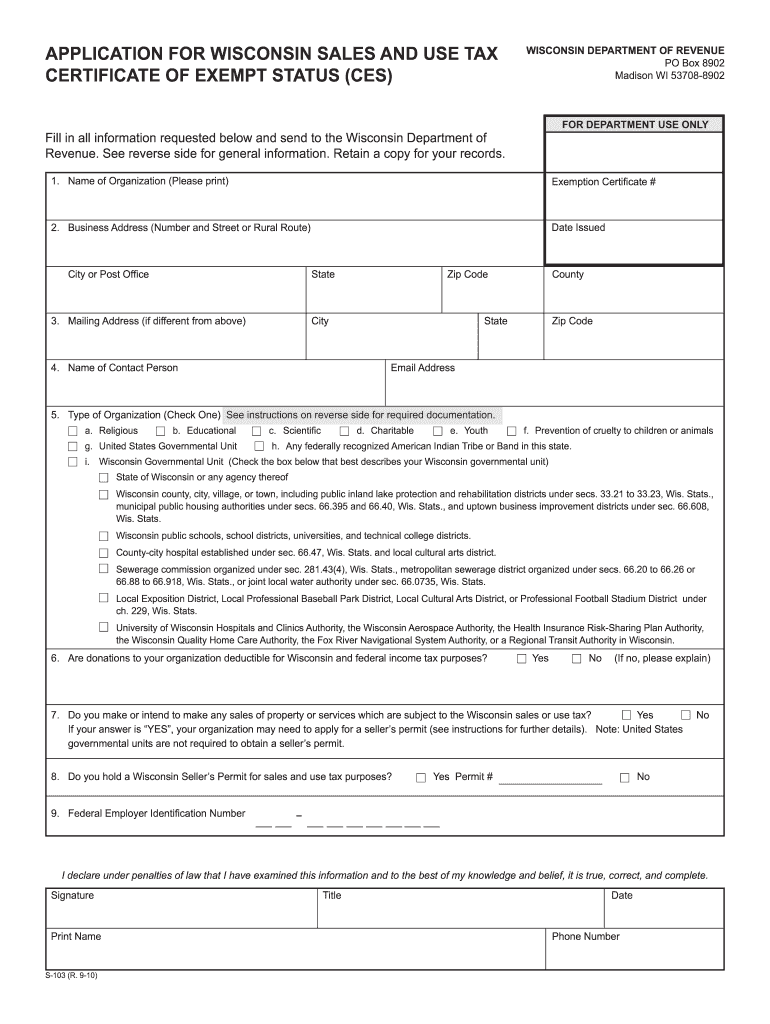
Is true, correct, and complete. Signature Title Print Name S-103 (R. 9-10) Date Phone Number PURPOSE OF THIS FORM Sales to certain nonprofit organizations, Tribes, and governmental units described in 1, 2, and 3 below are exempt from Wisconsin sales or use tax. So that retailers can identify these nonprofit organizations, Tribes or governmental units that qualify for this exemption, the department issues the nonprofit organization, Tribe or governmental unit a Certificate of Exem.
Loading

Open form follow the instructions

Easily sign the form with your finger

Send filled & signed form or save
How to fill out the WI DoR S-103 online
The Wisconsin Department of Revenue S-103 form, also known as the Application for Wisconsin Sales and Use Tax Certificate of Exempt Status, is essential for certain organizations to obtain a Certificate of Exempt Status. This guide will provide clear and detailed instructions for completing the form online, ensuring that you have the necessary information to secure your exemption efficiently.
Follow the steps to complete the WI DoR S-103 online
- Press the ‘Get Form’ button to access the form. This will allow you to open the document in your preferred online editor.
- Begin by entering the name of your organization in the designated field. Make sure to print clearly to avoid any misunderstandings.
- Fill in the business address, including the street number, city or post office, state, and zip code. Ensure accuracy, as this is where official correspondence will be sent.
- If your mailing address differs from your business address, provide the mailing address in this section.
- Enter the name of a contact person for your organization. This individual will be responsible for any inquiries or follow-ups.
- Select the type of organization by checking one of the provided boxes, ensuring you choose the category that best describes your entity.
- Indicate whether donations to your organization are deductible for Wisconsin and federal income tax purposes. If the answer is no, include a brief explanation.
- Answer whether you make or intend to make any sales of property or services subject to Wisconsin sales or use tax. If yes, be mindful that you may need to apply for a seller's permit.
- Confirm if you hold a Wisconsin Seller's Permit for sales and use tax purposes, providing the permit number if applicable.
- Include your Federal Employer Identification Number for identification purposes. This is crucial for processing your application.
- Finally, read the declaration statement carefully, sign the form, and print your name, title, and date. Include your phone number for further communication.
- Once all fields are completed, review your information for accuracy. You can then save your changes, download the form, print it, or share it as necessary.
Complete your WI DoR S-103 application online today to efficiently secure your exempt status.
Experience a faster way to fill out and sign forms on the web. Access the most extensive library of templates available.
Related content
Feb 24, 2021 — This form is for certain nonprofits, governmental units, and tribes to...
... dor.state.wi.us/forms/sales/s-103.pdf. • When a Wisconsin or Tribal sales tax exempt...
Esta é uma Philips Android TV™. A Android TV oferece milhares de filmes, shows e jogos...
Get answers to your most pressing questions about US Legal Forms API.
How do I get a Wisconsin state tax ID number?
You can get a Wisconsin state tax ID number by applying directly through the Wisconsin Department of Revenue. The WI DoR S-103 will guide you through the necessary forms and requirements. You can submit your application online or via mail. For a seamless experience, consider using uslegalforms to navigate the application process effectively.
What are the requirements to get a tax ID number?
To obtain a tax ID number in Wisconsin, you must provide essential information about your business, including its structure and ownership. The WI DoR S-103 outlines these requirements in detail. You will also need to fill out the appropriate forms to initiate the process. Using uslegalforms can simplify this task and ensure compliance.
How to qualify for farm tax exemption in Wisconsin?
Qualifying for a farm tax exemption in Wisconsin involves meeting specific criteria set by the WI DoR S-103. Generally, you must operate a farm and meet the income thresholds. Gathering necessary documents, such as proof of agricultural production, is crucial. The uslegalforms platform can guide you through the application process.
Is an EIN the same as a tax ID?
An Employer Identification Number (EIN) is a specific type of tax ID issued by the IRS. The WI DoR S-103 allows you to understand the differences better. While both numbers identify a business for tax purposes, they serve different functions and are issued by different authorities. Always double-check which number you need for your specific tax obligations.
How do I apply for CES in Wisconsin?
Applying for the Common Edits Summary (CES) in Wisconsin is straightforward. You can complete your application online through the WI DoR S-103 portal or by mail. Make sure to gather all required documents to streamline the process. Using the uslegalforms platform can help ensure you fill out your application accurately.
What is the dor tax rate in Wisconsin?
The WI DoR S-103 provides insights into Wisconsin's Department of Revenue (DoR) tax rates. The income tax rates vary based on your earnings. Make sure to check the official Wisconsin DoR website for the most accurate and updated rates. Understanding these rates is essential for effective tax planning.
What is Form ST 103?
Form ST 103, also known as the Wisconsin Sales and Use Tax Exemption Certificate, is used to claim sales tax exemptions for qualifying purchases. By properly filling out this form, you assert your status as exempt from sales tax, which can benefit businesses and organizations alike. For comprehensive guidelines on using Form ST 103, you may refer to the resources available at the WI DoR website.
What happens if you don't file taxes in Wisconsin?
If you don't file your taxes in Wisconsin, you may face penalties including fines and interest on any taxes owed. Additionally, the state has the authority to take legal action to collect unpaid taxes. To avoid these complications, it is advisable to understand your obligations and use resources like the WI DoR S-103 for guidance on maintaining compliance.
What does filing requirements mean?
Filing requirements pertain to the stipulations that specify when individuals must submit their tax returns to the state. This includes income levels, deadlines, and documentation needed. For clarity on these requirements, you can consult the WI DoR S-103, which outlines everything succinctly, helping you stay compliant with state laws.
What is the filing requirement?
The filing requirement is a specific set of criteria that dictates who must file a tax return in Wisconsin. Generally, if your income meets or exceeds the thresholds set by the state, you're required to file. The WI DoR S-103 includes details that clarify these requirements, ensuring you understand your obligations.
Use professional pre-built templates to fill in and sign documents online faster. Get access to thousands of forms.
If you believe that this page should be taken down, please follow our DMCA take down process here.