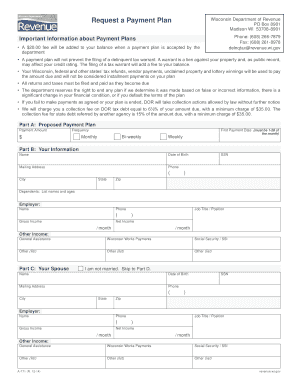
A $20.00 fee will be added to your balance when a payment plan is accepted by the department A payment plan will not prevent the filing of a delinquent tax warrant. A warrant is a lien against your property and, as public record, may affect your credit rating. The filing of a tax warrant will add a fee to your balance. Your Wisconsin, federal and other states tax refunds, vendor payments, unclaimed property and lottery winnings will be used to pay the amount due and will not.
Open form follow the instructions
Easily sign the form with your finger
Send filled & signed form or save
How to fill out the WI A-771 online
The WI A-771 form is essential for individuals seeking to establish a payment plan with the Wisconsin Department of Revenue. This guide provides clear, step-by-step instructions to help users complete the form accurately and efficiently online.
Follow the steps to successfully complete the WI A-771 form online.
- Click ‘Get Form’ button to obtain the form and open it in the editor.
- In Part A, Proposed Payment Plan, enter your desired payment amount and select the frequency of payments from the options provided: monthly, bi-weekly, or weekly. Specify the date for the first payment, ensuring it falls between the 1st and 28th of the month.
- Move to Part B, Your Information. Fill in your name, date of birth, mailing address, social security number, and phone number. Make sure to include your city, state, and zip code. You should also list the names and ages of any dependents, and provide details about your employer, including name, phone number, job title, gross income, and net income for the month.
- If applicable, complete Part C, Your Spouse, with the same details required in Part B, including spouse's name, date of birth, mailing address, social security number, and income information.
- In Part D, list all banks and other financial institutions, specifying the name, type of account (checking, savings, etc.), and balance.
- Proceed to Part E, where you list all motor vehicles and similar assets. Specify the year, make, model, fair market value, lien holder, and balance owed for each vehicle.
- In Part F, Real Estate, provide information on all properties you own, including the location, fair market value, mortgage holder, and balance due.
- Fill out Part G, Expenses, detailing your monthly payments for various expenses such as mortgage/rent, vehicle payments, utilities, food, insurance, and any loans or credit cards. Note any payments that are behind along with amounts.
- Review all provided information to ensure accuracy, then proceed to Part H. Sign and date the form, and if applicable, have your spouse do the same.
- Once the form is completed, save your changes, and you can now proceed to download, print, or share the form as needed for submission.
Complete your WI A-771 form online to take the next step in establishing your payment plan.
Experience a faster way to fill out and sign forms on the web. Access the most extensive library of templates available.
Related content
A $20 fee will be added to your balance when a payment plan is accepted by the department...
Dec 31, 2019 — To obtain the Payment Plan Request (Form A-771), go to...
Esta lista reúne os mortos e desaparecidos políticos no regime militar de 1964. Os...
Get answers to your most pressing questions about US Legal Forms API.
Are my charitable contributions tax-deductible?
Your charitable contributions can be tax-deductible, depending on the organization and your state laws. In Wisconsin, donations to qualified charities allow you to reduce your taxable income. It is essential to obtain proper documentation for your donations. Familiarize yourself with the guidelines under WI A-771 for a clear understanding of your eligibility.
Are charitable donations deductible in Wisconsin?
Yes, charitable donations made in Wisconsin can be deductible if they meet necessary criteria. This deduction provides an opportunity for taxpayers to give back to their communities while benefiting financially. Each charitable organization must have IRS approval to qualify. Ensure you comply with all regulations related to WI A-771 for deductibility.
Are charitable contributions deductible in Wisconsin?
Yes, charitable contributions are deductible in Wisconsin if made to qualified organizations. These deductions can help lower your tax liability, aligning with WI A-771 regulations. It's crucial to keep records of your donations for verification purposes. Make sure to check the specific eligibility requirements to maximize your deductions.
How to make a payment plan for taxes owed?
Creating a payment plan for taxes owed involves contacting your local tax authority. In Wisconsin, the Department of Revenue offers options to set up structured payment arrangements. This approach allows you to manage tax obligations without overwhelming stress. Always consider using resources like uslegalforms for guidance on managing payment plans effectively, especially regarding WI A-771.
Which states allow charitable deductions?
Many states across the U.S. allow charitable deductions including Wisconsin. Charitable contributions made to qualified organizations can reduce your taxable income. However, each state has different rules and thresholds for these deductions. To ensure compliance, it’s always good to reference state-specific guidelines, especially concerning WI A-771.
How does voluntary disclosure work?
Voluntary disclosure generally involves proactively reporting previously underreported income or unpaid taxes to the Wisconsin Department of Revenue. By doing so, you can avoid severe penalties and establish your intent to comply with tax laws. The WI A-771 program simplifies this process, allowing you to address your tax obligations efficiently and avoid long-term consequences.
Why am I getting a letter from the Wisconsin Department of Revenue?
Receiving a letter from the Wisconsin Department of Revenue may indicate that they require additional information regarding your tax filings or there are issues that need addressing. This communication can sometimes relate to discrepancies or concerns tied to the WI A-771 program. It is crucial to review the letter carefully and respond promptly to mitigate any potential penalties.
What is a Wisconsin withholding exemption certificate?
A Wisconsin withholding exemption certificate allows employers to withhold less tax from your paycheck, reflective of your tax situation. This certificate can help you retain more of your earnings throughout the year. If you’re unsure about your eligibility, consider exploring resources on the WI A-771 program for guidance on proper tax documentation.
What percentage do you have to repay ERC voluntary disclosure program?
Under the ERC voluntary disclosure program, the repayment percentage typically varies based on specific factors related to your case. Generally, participants in the WI A-771 program can expect to navigate repayment terms that aim to minimize financial strain while ensuring compliance with tax laws. It's best to consult the Wisconsin Department of Revenue for precise calculations tailored to your situation.
What is the Wisconsin Voluntary Disclosure Program?
The Wisconsin Voluntary Disclosure Program allows taxpayers to disclose previously unreported income or unpaid taxes. This program helps individuals and businesses resolve potential tax liabilities without incurring severe penalties. By participating in WI A-771, you can enjoy a streamlined process that emphasizes compliance and transparency.
Use professional pre-built templates to fill in and sign documents online faster. Get access to thousands of forms.
If you believe that this page should be taken down, please follow our DMCA take down process here.
This form is available in several versions. Select the version you need from the drop-down list below.