Get Wi A-771 2018-2026
How it works
-

Open form follow the instructions
-

Easily sign the form with your finger
-

Send filled & signed form or save
How to fill out the WI A-771 online
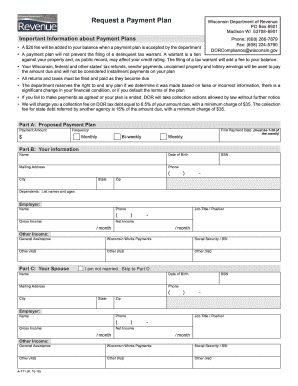
Completing the WI A-771 form is an important step for people seeking a payment plan with the Wisconsin Department of Revenue. This guide provides you with clear, step-by-step instructions to complete the form accurately, ensuring you provide all necessary information for consideration.
Follow the steps to fill out the WI A-771 online.
- Click the ‘Get Form’ button to obtain the WI A-771 form and open it in your preferred editor.
- In Part A, propose your payment plan by specifying the payment amount, frequency (monthly, bi-weekly, or weekly), and the first payment date (which should be between the 1st and 28th of the month).
- Fill out Part B with your information, including your name, date of birth, mailing address, phone number, and Social Security Number (SSN). Additionally, list your dependents' names and ages, and provide details about your employer, gross and net income, job title, and any other income sources.
- If applicable, complete Part C regarding your spouse’s information. If you are not married, indicate that and skip to Part D. If married, include your spouse's name, mailing address, date of birth, SSN, phone number, and employment information as previously detailed.
- In Part D, list all banks and financial institutions, specifying their names, types (checking, savings, etc.), and current balances.
- In Part E, provide information about any motor vehicles, boats, motorcycles, snowmobiles, or ATVs you own. For each vehicle, list the year, make, model, fair market value, lien holder, and balance owed.
- In Part F, document any real estate properties you own, including their location, fair market value, mortgage holder, and balance due.
- When filling out Part G, list your monthly expenses, including payments for mortgage or rent, vehicle payments, utilities, insurance, and any additional expenses, noting any that are behind.
- Review the information you provided for accuracy before signing in Part H. Confirm your understanding of the payment plan terms and include your signature and date. If applicable, have your spouse sign as well.
- Once completed, save your changes, and you can download, print, or share the form as needed.
Start completing your WI A-771 form online today to request your payment plan.
The filing requirement for Wisconsin indicates the conditions under which individuals must submit a tax return. This includes various thresholds based on income type and residency status. Understanding these requirements is essential for compliance, and resources like WI A-771 are valuable in navigating the specifics. For personalized tax assistance, check out uslegalforms, which provides relevant resources.