Loading
Get Wa Drs 1099-r 2009-2026
How it works
-

Open form follow the instructions
-

Easily sign the form with your finger
-

Send filled & signed form or save
How to fill out the WA DRS 1099-R online
Filling out the WA DRS 1099-R form accurately is essential for reporting your retirement distributions. This guide provides a clear and supportive step-by-step approach to help you complete this form online, ensuring you understand each section and field.
Follow the steps to successfully complete the WA DRS 1099-R form.
- Press the ‘Get Form’ button to obtain the WA DRS 1099-R and display it in your editor.
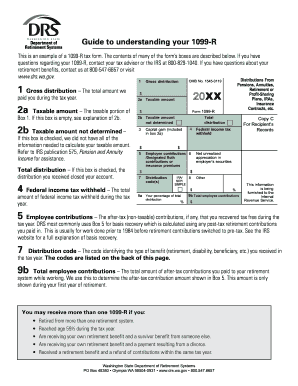
- In Box 1, enter the gross distribution, which is the total amount paid to you by the Department of Retirement Systems (DRS) during the calendar year.
- In Box 2a, indicate the taxable amount from the gross distribution shown in Box 1. If this box is empty, proceed to Box 2b for further guidance.
- In Box 2b, check this box if the taxable amount could not be determined. For assistance, refer to IRS publication 575, which addresses pension and annuity income.
- If you closed your account, mark Box 3 to indicate that the total distribution was received.
- In Box 4, report the total federal income tax withheld during the year.
- If applicable, note your after-tax contributions in Box 5. This reflects nontaxable contributions recovered tax-free during the year.
- In Box 7, enter the distribution code that pertains to your benefit type, referring to the definitions provided on the back of the form for clarity.
- Include any other pertinent amounts in subsequent boxes (8 through 14), such as state tax withheld or local distributions, following the same careful input of information.
- Review all details for accuracy, then proceed to save your changes. You can also choose to download, print, or share the completed WA DRS 1099-R form as needed.
Complete your WA DRS 1099-R form online today for a smooth filing experience.
To report WA DRS 1099-R income in TurboTax, navigate to the 'Income' section and select 'Pensions and Annuities.' You will then enter the information from your 1099-R directly into the prompted fields. This guided process helps ensure that your entries are accurate and complete.